

Questions this page answers
- Venue records and the venue directory (14 questions)
- Tech specs and tech packs (12 questions)
- Holds and avails (13 questions)
- Booking calendar (11 questions)
- Inquiries, proposals and contracts (8 questions)
- Advancing the show with the venue (10 questions)
- Load-in, access and parking (8 questions)
- Venue day-of operations (6 questions)
- Settlement and venue money (5 questions)
- Multi-venue, tours and festivals (5 questions)
- Sharing, permissions and integrations (6 questions)
- Compliance, safety and pricing (6 questions)
Deal-breakers at a glance
These 13 questions decide most evaluations. Soundcheck answers Yes to 3, Partly to 8 and No to 2.Worked example: an AV company at a hotel ballroom
An AV company is booked for a corporate awards gala in a hotel’s Grand Ballroom, with a cocktail reception in the Foyer first. They have never worked the hotel. Here’s how the deal-breakers play out.Find the venue once
Store the tech pack and the paperwork
Advance with the hotel
Note what's different tonight
Keep codes tight
Venue records and the venue directory
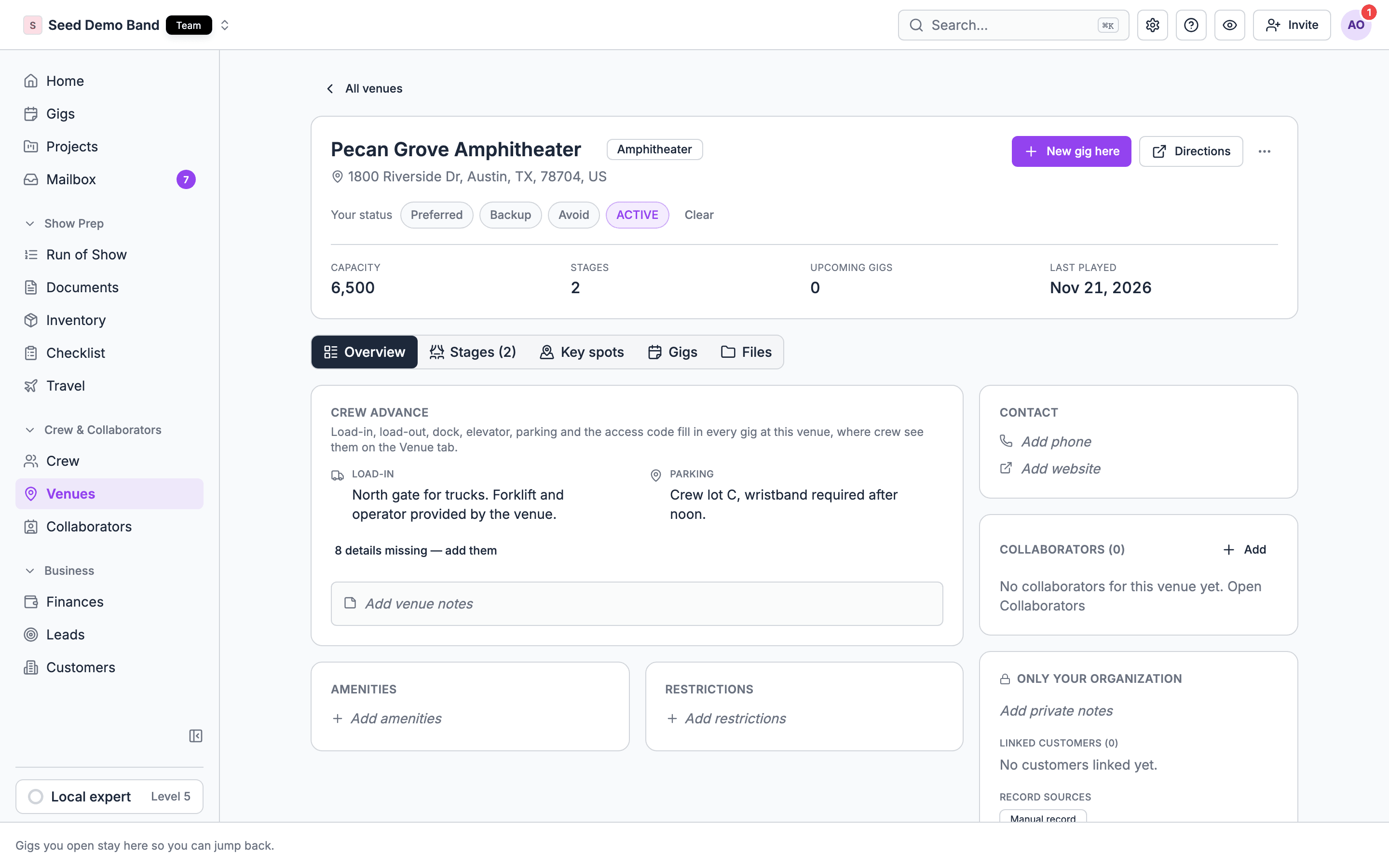
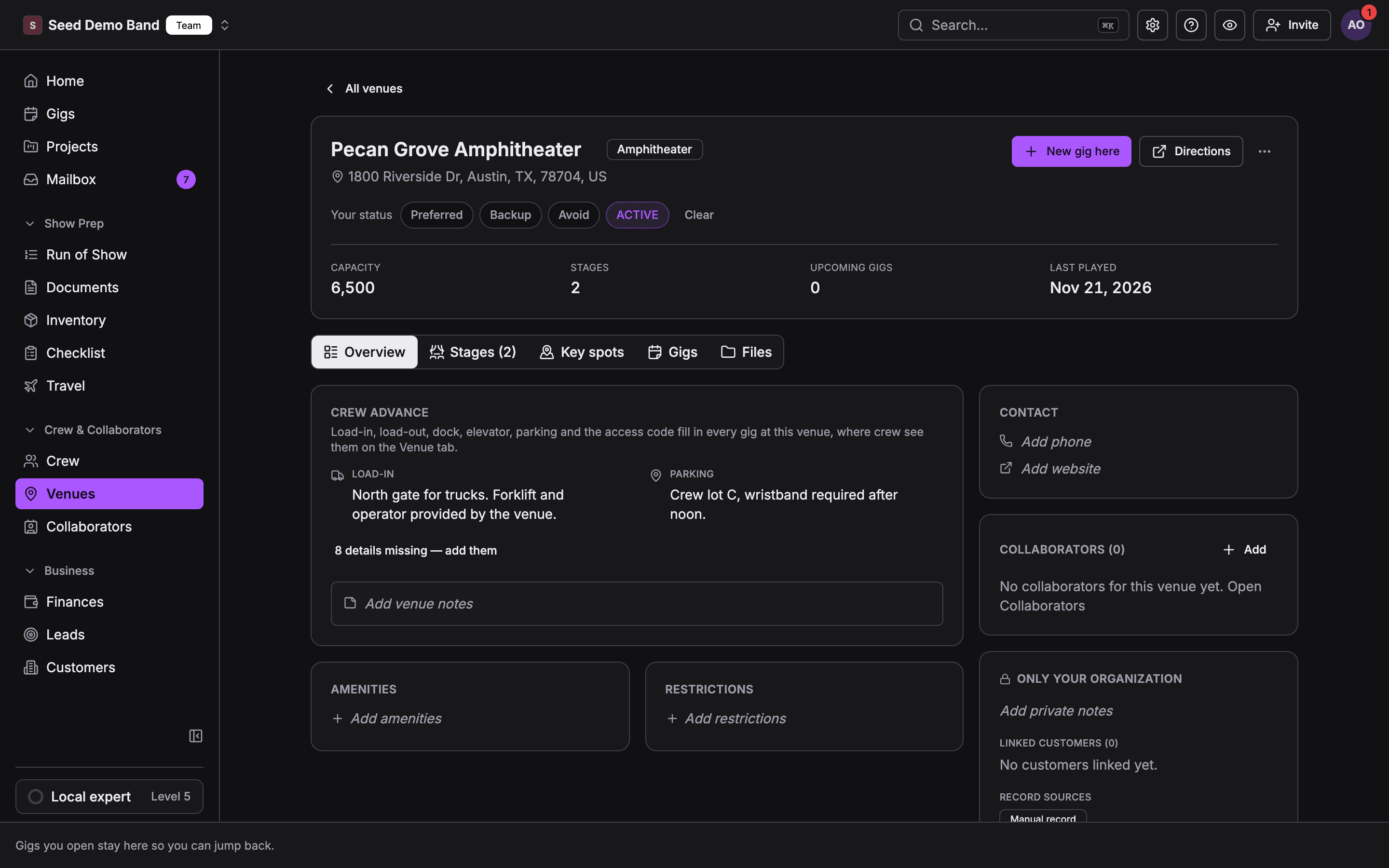
1. Can I keep one record per venue with the address, loading address, contacts, capacity and notes, and reuse it on every gig there?
1. Can I keep one record per venue with the address, loading address, contacts, capacity and notes, and reuse it on every gig there?
2. Can a venue have several rooms, stages or spaces, each with its own capacity and specs?
2. Can a venue have several rooms, stages or spaces, each with its own capacity and specs?
3. Is the loading or stage-door address separate from the public address the guests use?
3. Is the loading or stage-door address separate from the public address the guests use?
4. Can I store the venue's own contacts by role, such as production manager, house tech, security, box office, catering and the in-house AV vendor?
4. Can I store the venue's own contacts by role, such as production manager, house tech, security, box office, catering and the in-house AV vendor?
5. Does the venue record show every past and upcoming gig we've done there?
5. Does the venue record show every past and upcoming gig we've done there?
6. Can I add private notes about a venue, such as “the freight lift is slow”, that the client can't see?
6. Can I add private notes about a venue, such as “the freight lift is slow”, that the client can't see?
7. Can I attach photos of the dock, stage, power distro and green room?
7. Can I attach photos of the dock, stage, power distro and green room?
9. If two of my staff create the same venue twice, can I merge the duplicates?
9. If two of my staff create the same venue twice, can I merge the duplicates?
10. Does the venue record keep the time zone, so call times show correctly when we work in another state?
10. Does the venue record keep the time zone, so call times show correctly when we work in another state?
11. Can I store Wi-Fi details, door codes and alarm codes, and limit who sees them?
11. Can I store Wi-Fi details, door codes and alarm codes, and limit who sees them?
12. Can I mark a venue's preferred-vendor rules, for example “in-house AV only” or “outside caterers pay a fee”?
12. Can I mark a venue's preferred-vendor rules, for example “in-house AV only” or “outside caterers pay a fee”?
14. Can I import my existing venue list from a spreadsheet?
14. Can I import my existing venue list from a spreadsheet?
Tech specs and tech packs
15. Can I upload the venue's tech pack PDF and keep the current version on the venue record?
15. Can I upload the venue's tech pack PDF and keep the current version on the venue record?
16. Can I enter the specs as structured fields, such as stage size, grid height, trim height, rigging points and load limits, and not only as a PDF?
16. Can I enter the specs as structured fields, such as stage size, grid height, trim height, rigging points and load limits, and not only as a PDF?
17. Can I record the in-house audio, lighting and video inventory: console models, PA, monitors, projectors and screens?
17. Can I record the in-house audio, lighting and video inventory: console models, PA, monitors, projectors and screens?
18. Can I record the power: service size, phase, amperage, connector types (camlock, L21-30) and where the tie-in is?
18. Can I record the power: service size, phase, amperage, connector types (camlock, L21-30) and where the tie-in is?
19. Can I record the distance from the dock to the stage, and any stairs, lifts, ramps or tight corners on the path?
19. Can I record the distance from the dock to the stage, and any stairs, lifts, ramps or tight corners on the path?
20. Can I note the house rules on haze, pyro, open flame, confetti and decibel limits?
20. Can I note the house rules on haze, pyro, open flame, confetti and decibel limits?
21. Does the tool show when the tech pack was last updated and who updated it?
21. Does the tool show when the tech pack was last updated and who updated it?
22. Can I compare my show's rider against the venue's specs, so gaps show up before we commit?
22. Can I compare my show's rider against the venue's specs, so gaps show up before we commit?
23. Can I note what the venue charges for in-house gear, labour and power?
23. Can I note what the venue charges for in-house gear, labour and power?
24. Can I store stage plots, room diagrams and CAD files for the venue?
24. Can I store stage plots, room diagrams and CAD files for the venue?
25. Can the venue update its own tech pack, so I'm not keeping it current for them?
25. Can the venue update its own tech pack, so I'm not keeping it current for them?
26. Can the visiting crew see the tech pack on their phones on the day?
26. Can the visiting crew see the tech pack on their phones on the day?
Holds and avails
27. Can I place holds on a date with a rank, such as first hold, second hold and third hold?
27. Can I place holds on a date with a rank, such as first hold, second hold and third hold?
28. When the first hold drops, does the second hold move up automatically, and does the holder get told?
28. When the first hold drops, does the second hold move up automatically, and does the holder get told?
29. Can I set a challenge on a hold and a deadline for the first holder to confirm or release?
29. Can I set a challenge on a hold and a deadline for the first holder to confirm or release?
30. Can a hold expire on its own after a set date?
30. Can a hold expire on its own after a set date?
31. Can I hold several dates for one tour routing and release the ones that don't work?
31. Can I hold several dates for one tour routing and release the ones that don't work?
32. Can I hold a room or a stage, and not the whole venue?
32. Can I hold a room or a stage, and not the whole venue?
33. Can I send a promoter or agent a list of our open dates (avails) for a date range?
33. Can I send a promoter or agent a list of our open dates (avails) for a date range?
35. Can an outside promoter or agent request a hold without seeing the rest of my calendar?
35. Can an outside promoter or agent request a hold without seeing the rest of my calendar?
36. Can I see who placed each hold and when?
36. Can I see who placed each hold and when?
37. Is there a difference between a tentative hold, a contract-out date and a confirmed date?
37. Is there a difference between a tentative hold, a contract-out date and a confirmed date?
38. Can I hold a date for a private event or rental, not only for a show?
38. Can I hold a date for a private event or rental, not only for a show?
39. Can I see holds by artist or client across all my venues at once?
39. Can I see holds by artist or client across all my venues at once?
Booking calendar
40. Can I see every venue, room and stage on one calendar, and filter it?
40. Can I see every venue, room and stage on one calendar, and filter it?
41. Does the tool warn me before I book two events in the same room at the same time?
41. Does the tool warn me before I book two events in the same room at the same time?
42. Can I block time for setup and teardown, not only for the event itself?
42. Can I block time for setup and teardown, not only for the event itself?
43. Can I mark dark days, maintenance days and buyouts?
43. Can I mark dark days, maintenance days and buyouts?
44. Can I sync the calendar to Google Calendar or Outlook, and is the sync one-way or two-way?
44. Can I sync the calendar to Google Calendar or Outlook, and is the sync one-way or two-way?
46. Can I see events in day, week, month and list views, and print them?
46. Can I see events in day, week, month and list views, and print them?
47. Can I color events by status, type or room?
47. Can I color events by status, type or room?
48. Does the calendar handle overnight events that end after midnight without splitting them into two days?
48. Does the calendar handle overnight events that end after midnight without splitting them into two days?
49. Can I see the staffing and crew count on each date from the calendar?
49. Can I see the staffing and crew count on each date from the calendar?
50. Can I book recurring events, such as a weekly residency?
50. Can I book recurring events, such as a weekly residency?
Inquiries, proposals and contracts
51. Can a client send an inquiry from my website straight into the calendar as a lead?
51. Can a client send an inquiry from my website straight into the calendar as a lead?
52. Can I send a proposal with room hire, food and beverage minimums and fees, and have the client sign it online?
52. Can I send a proposal with room hire, food and beverage minimums and fees, and have the client sign it online?
53. Can I take a deposit when the contract is signed, and does that confirm the hold?
53. Can I take a deposit when the contract is signed, and does that confirm the hold?
54. Can I set different rates for weekdays, weekends, peak season and holidays?
54. Can I set different rates for weekdays, weekends, peak season and holidays?
55. Can I track the food and beverage minimum and how close the client is to it?
55. Can I track the food and beverage minimum and how close the client is to it?
56. Can I produce a banquet event order (BEO) from the booking, and does it update when the booking changes?
56. Can I produce a banquet event order (BEO) from the booking, and does it update when the booking changes?
57. Can I record the cancellation terms and see what's owed if a client cancels?
57. Can I record the cancellation terms and see what's owed if a client cancels?
58. Does the tool handle the rental of the venue to an outside promoter (a four-wall deal)?
58. Does the tool handle the rental of the venue to an outside promoter (a four-wall deal)?
Advancing the show with the venue
59. Can I send the venue an advance form and get their answers back into the gig, not into an email thread?
59. Can I send the venue an advance form and get their answers back into the gig, not into an email thread?
60. Is there a standard advance checklist I can reuse: load-in time, parking, power, catering, hospitality, Wi-Fi, security, merch, settlement?
60. Is there a standard advance checklist I can reuse: load-in time, parking, power, catering, hospitality, Wi-Fi, security, merch, settlement?
61. Can I track which advance items are confirmed and which are still open?
61. Can I track which advance items are confirmed and which are still open?
62. Can the venue's production manager see and edit the advance without a paid seat?
62. Can the venue's production manager see and edit the advance without a paid seat?
63. Can I attach our rider, stage plot and input list to the advance?
63. Can I attach our rider, stage plot and input list to the advance?
64. Is there a deadline for the advance, and does the tool send reminders?
64. Is there a deadline for the advance, and does the tool send reminders?
65. Can I see the advance history, who answered what, and when?
65. Can I see the advance history, who answered what, and when?
66. When the venue answers, does the information land in the right places, such as the day sheet and the schedule?
66. When the venue answers, does the information land in the right places, such as the day sheet and the schedule?
67. Can I advance several shows on a tour in one place and see which are complete?
67. Can I advance several shows on a tour in one place and see which are complete?
68. Can I copy the advance from our last show at this venue?
68. Can I copy the advance from our last show at this venue?
Load-in, access and parking
69. Can I record the load-in window, the earliest access time and the curfew for load-out?
69. Can I record the load-in window, the earliest access time and the curfew for load-out?
70. Can I record the dock details: dock height, number of bays, truck size limits and whether there's a forklift?
70. Can I record the dock details: dock height, number of bays, truck size limits and whether there's a forklift?
71. Can I record where trucks, buses and crew cars park, and any permits needed?
71. Can I record where trucks, buses and crew cars park, and any permits needed?
72. Can I note union rules at the venue, such as minimum calls, house crew requirements and who may touch what?
72. Can I note union rules at the venue, such as minimum calls, house crew requirements and who may touch what?
73. Can I note security check-in, badge or ID rules for crew?
73. Can I note security check-in, badge or ID rules for crew?
74. Does the crew's day sheet show the load-in address, door and contact automatically?
74. Does the crew's day sheet show the load-in address, door and contact automatically?
76. Can I note elevator sizes and weight limits for gear?
76. Can I note elevator sizes and weight limits for gear?
Venue day-of operations
77. Can the venue staff see the full day's schedule for every room on one screen?
77. Can the venue staff see the full day's schedule for every room on one screen?
78. Can I run doors, set times and curfew from the same schedule the visiting company sees?
78. Can I run doors, set times and curfew from the same schedule the visiting company sees?
79. Can I log incidents, damage and noise complaints against the event?
79. Can I log incidents, damage and noise complaints against the event?
80. Can house crew clock in and out against the event?
80. Can house crew clock in and out against the event?
81. Can the venue send last-minute changes to the visiting company and see that they read them?
81. Can the venue send last-minute changes to the visiting company and see that they read them?
82. Can I record capacity counts during the event?
82. Can I record capacity counts during the event?
Settlement and venue money
83. Can I settle the show with the visiting act or promoter at the end of the night?
83. Can I settle the show with the visiting act or promoter at the end of the night?
84. Can I record the venue's charges back to the promoter: house labour, stagehands, security, rent and credit-card fees?
84. Can I record the venue's charges back to the promoter: house labour, stagehands, security, rent and credit-card fees?
85. Can I record a deal type, such as a flat fee, a door split or a guarantee versus percentage?
85. Can I record a deal type, such as a flat fee, a door split or a guarantee versus percentage?
86. Can I export settlements to accounting?
86. Can I export settlements to accounting?
87. Can both sides see and sign the settlement?
87. Can both sides see and sign the settlement?
Multi-venue, tours and festivals
88. Can a festival treat each stage as a venue with its own schedule and specs?
88. Can a festival treat each stage as a venue with its own schedule and specs?
89. Can a tour see every venue on the routing with its tech pack and advance status?
89. Can a tour see every venue on the routing with its tech pack and advance status?
90. Can an agency see which venues its acts have played and how the shows went?
90. Can an agency see which venues its acts have played and how the shows went?
91. Can I rate or review a venue for my team's future reference?
91. Can I rate or review a venue for my team's future reference?
Sharing, permissions and integrations
93. Can I control which of my staff see money, contracts and private venue notes?
93. Can I control which of my staff see money, contracts and private venue notes?
94. Can a visiting company and the venue work on the same gig without either seeing the other's private data?
94. Can a visiting company and the venue work on the same gig without either seeing the other's private data?
95. Does the tool connect to ticketing (Ticketmaster, Eventbrite, DICE, AXS) to pull counts?
95. Does the tool connect to ticketing (Ticketmaster, Eventbrite, DICE, AXS) to pull counts?
96. Does it connect to accounting (QuickBooks, Xero)?
96. Does it connect to accounting (QuickBooks, Xero)?
97. Is there an API or an AI assistant connection for venue and calendar data?
97. Is there an API or an AI assistant connection for venue and calendar data?
98. Can I export the calendar and venue list?
98. Can I export the calendar and venue list?
Compliance, safety and pricing
99. Can I store the venue's certificate of insurance requirements and track whether each vendor's COI is in?
99. Can I store the venue's certificate of insurance requirements and track whether each vendor's COI is in?
100. Can I store occupancy limits, fire marshal rules and emergency exits for the room?
100. Can I store occupancy limits, fire marshal rules and emergency exits for the room?
101. Can I record accessibility details for guests and crew (ADA access, step-free routes)?
101. Can I record accessibility details for guests and crew (ADA access, step-free routes)?
102. Can I store the venue's alcohol licence rules and last-call time?
102. Can I store the venue's alcohol licence rules and last-call time?
103. Is pricing per venue, per user or per event, and do outside collaborators cost extra?
103. Is pricing per venue, per user or per event, and do outside collaborators cost extra?
104. Is there a free tier for a single small venue?
104. Is there a free tier for a single small venue?