

When to use it
- When someone joins. An onboarding flow collects contact details, positions, tax forms and signed policies in one pass.
- Before a gig. Send a crew agreement or deal memo for signature, and check that everyone’s certifications are current.
- Ongoing. Keep licenses, insurance and other records on file, with expiry dates that flag when they lapse.
The pieces
Onboarding paperwork
Early access. Custom onboarding flows are rolling out gradually, and they’re part of the Enterprise plan. Contact info@soundchecklive.io to have them turned on.
Build a flow
1
Open Onboarding
Go to Settings → Labels → Departments → Onboarding.
2
Start from a template
Choose Add from a template. Event crew adds contact and emergency info, positions, a W-9 upload and certifications. Musicians & performers adds contact info with gear notes, an emergency contact, instruments and a W-9 upload. Essentials only adds contact info and positions.
3
Add your own steps
Choose Add Another Step for anything else, such as a Document Review step with your safety policy and Require e-signature on.
4
Turn it on
Turn on the flow’s toggle. It reads Enabled — members will see this flow.
Sensitive fields
A Form step can collect Bank account (masked), Routing number (masked), SSN (masked) and TIN (masked). Values are stored encrypted and shown masked. Only the Owner, Finance members and people with the finance access grant can choose Reveal, and every reveal is written to the audit log. Admins without that grant can’t reveal them. See Custom onboarding flows for every option.Tax and employment forms
Soundcheck doesn’t generate or file 1099s, W-2s or certified payroll. See Crew invoices and payouts.
Worker classification (W-2 or 1099)
Soundcheck doesn’t decide or enforce whether someone is an employee or a contractor, and there’s no built-in W-2 or 1099 setting. California’s AB5 and similar rules make that decision a legal one. Talk to your employment adviser. What you can do in Soundcheck:1
Record the classification
Add a crew record field named Worker type, of type Choice, with the options W-2 and 1099. Mark it Required, and leave Share with connected orgs off.
2
Collect the right paperwork
Collect a W-9 from contractors. Collect your employment paperwork from employees through your payroll provider.
3
Pay each group its own way
Pay contractors through Soundcheck payouts. For W-2 crew, export approved hours to payroll and record the payment with Mark as paid…. See Time clock.
Crew records: certifications, insurance and more
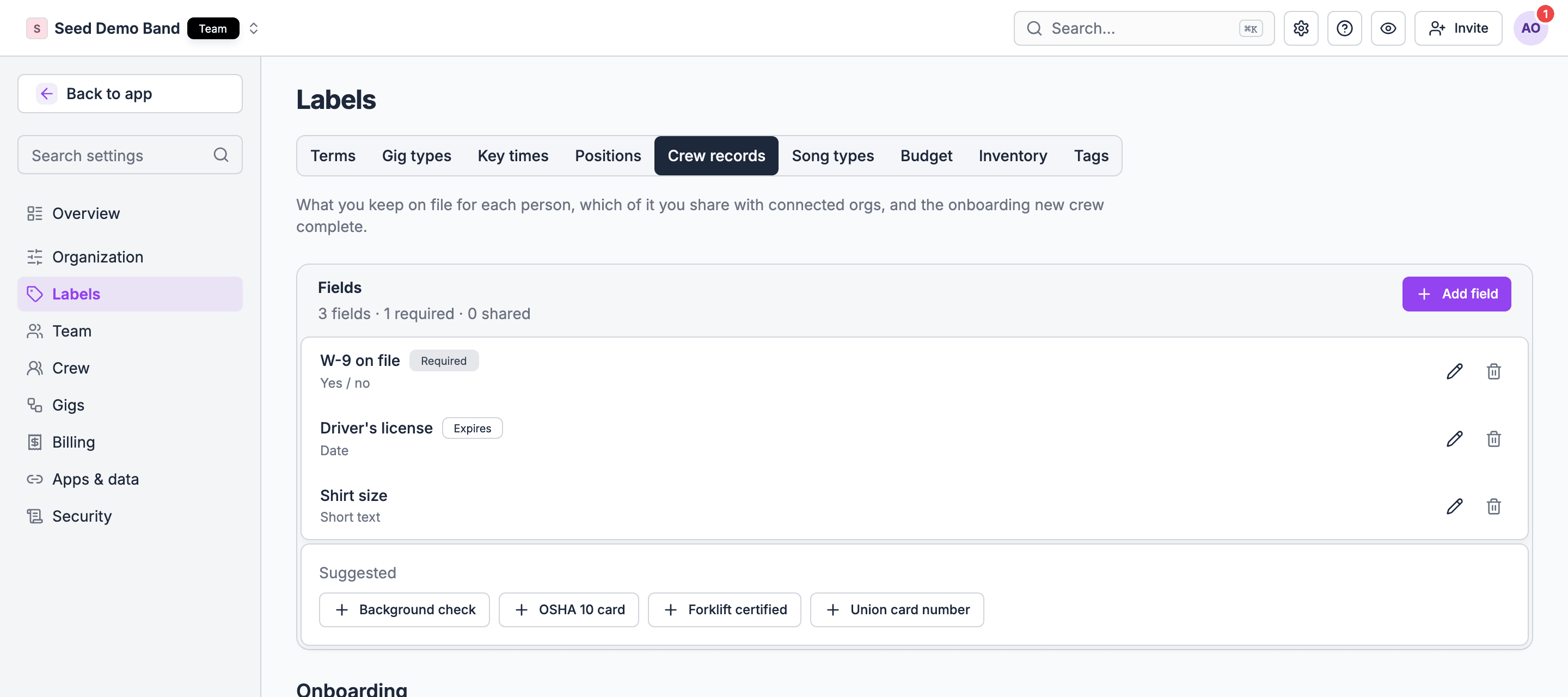
Crew records are what you keep on file for each person, and they’re on for every organization. With no fields yet, the page suggests common ones: W-9 on file, Background check, Driver’s license, OSHA 10 card, Forklift certified, Shirt size and Union card number.Add a field
1
Open Crew records
Go to Settings → Labels → Departments → Crew records and choose Add field.
2
Name it and pick a type
Pick Short text, Long text, Number, Date, Yes / no or Choice. You can’t change the type later.
3
Choose the settings
Required counts it toward a complete record. Expires asks for an expiry date and flags the value once it passes. Share with connected orgs lets organizations you share crew with see it read-only. Leave sharing off for tax forms and anything private.
Certifications
Soundcheck doesn’t have a separate certification type, and it doesn’t block a booking when a certification has expired. Track each one as a crew record field:- Add a field per certification, such as ETCP rigger, Forklift certified or OSHA 10 card, with Expires on.
- Attach the card or certificate to the field.
- Before you book someone for that position, check their record for expired or Expires soon.
Insurance (COI)
To keep a crew member’s or subcontractor’s certificate of insurance on file, add a field such as COI on file, of type Date, with Expires on, and attach the PDF. Soundcheck doesn’t produce certificates of insurance or add a venue as additional insured. Your insurer issues those.Who sees records
- Owners and admins see and edit crew records and their files on the web. There’s no crew record screen in the mobile app.
- Connected organizations see only fields marked Share with connected orgs, read-only. See Crew records and crew sharing.
Agreements, deal memos and waivers
Early access. Agreements and forms are part of the CRM, which is rolling out gradually. Contact info@soundchecklive.io to have it turned on.
1
Pick the crew
On the gig’s People tab, in the Crew group, choose Send agreement on a crew row, or select several.
2
Write or upload the terms
Start from your Crew agreement template, which fills in the gig’s details, or upload a PDF.
3
Send for signature
Each person gets their own copy and a signing link.
Emergency contacts
Each person keeps their own emergency contacts on their profile: a name, a relationship and a phone number, and optionally an email. On the web they’re in the Health & Safety card. In the app, people choose Edit crew details and Add emergency contact. The people who staff them can see these contacts, along with dietary needs.What isn’t supported, and what to do instead
Worked example: a production company onboards a new rigger
Atlas Event Productions hires a new up rigger for an arena show.- The rigger accepts an offer and joins the organization. The Event crew onboarding flow asks for contact and emergency info, positions, a W-9 upload and their certifications.
- A Document Review step with Atlas’s fall-protection policy has Require e-signature on. The rigger signs on their phone.
- The office manager opens the rigger’s Crew record, enters the ETCP expiry date on the ETCP rigger field, and attaches the card. Worker type is set to 1099.
- Before the arena date, the production manager sends a crew agreement with the day rate and dates. The rigger signs it from the Inbox.
- Ten months later, the rigger’s record shows Expires soon on ETCP rigger. The office manager uses Request again on the certification step to collect the renewed card.
Questions this page answers
- Can I mark each person as W-2 or 1099?
- Can crew upload a W-9 or I-9 in the app?
- Can I collect direct deposit details, emergency contacts and ID during onboarding?
- Can I store certifications with expiry dates and get warned before they expire?
- Can I keep a certificate of insurance on file, or produce one for a venue?
- Can crew sign an NDA, waiver or safety policy before their first call?
- Can I prove what rate someone agreed to?
- Can I record a background check?
- Who can open crew documents?
Related
Crew records and sharing
Fields, expiry and sharing with other organizations.
Custom onboarding flows
Every onboarding step and template.
Agreements and e-sign
Templates, signing and signed PDFs.
Crew invoices and payouts
Payroll, 1099s and payment methods.
Permissions and privacy
Who sees records and documents.
Switching tools
Bring records and expiry dates with you.