

Opening the page
- With a link: the link has the code in it and opens the page straight away.
- With a code: go to
/live. The Follow an event page asks for the Event code (Enter the code the organizer shared to see the schedule and live updates.). Type the code and choose Open event.
hrbr7q4k works as well as HRBR-7Q4K. A code that isn’t 8 letters and numbers shows That is not an event code. Codes are 8 letters and numbers, like HRBR-7Q4K. See Codes and privacy.
Nobody signs in.
Top of the page
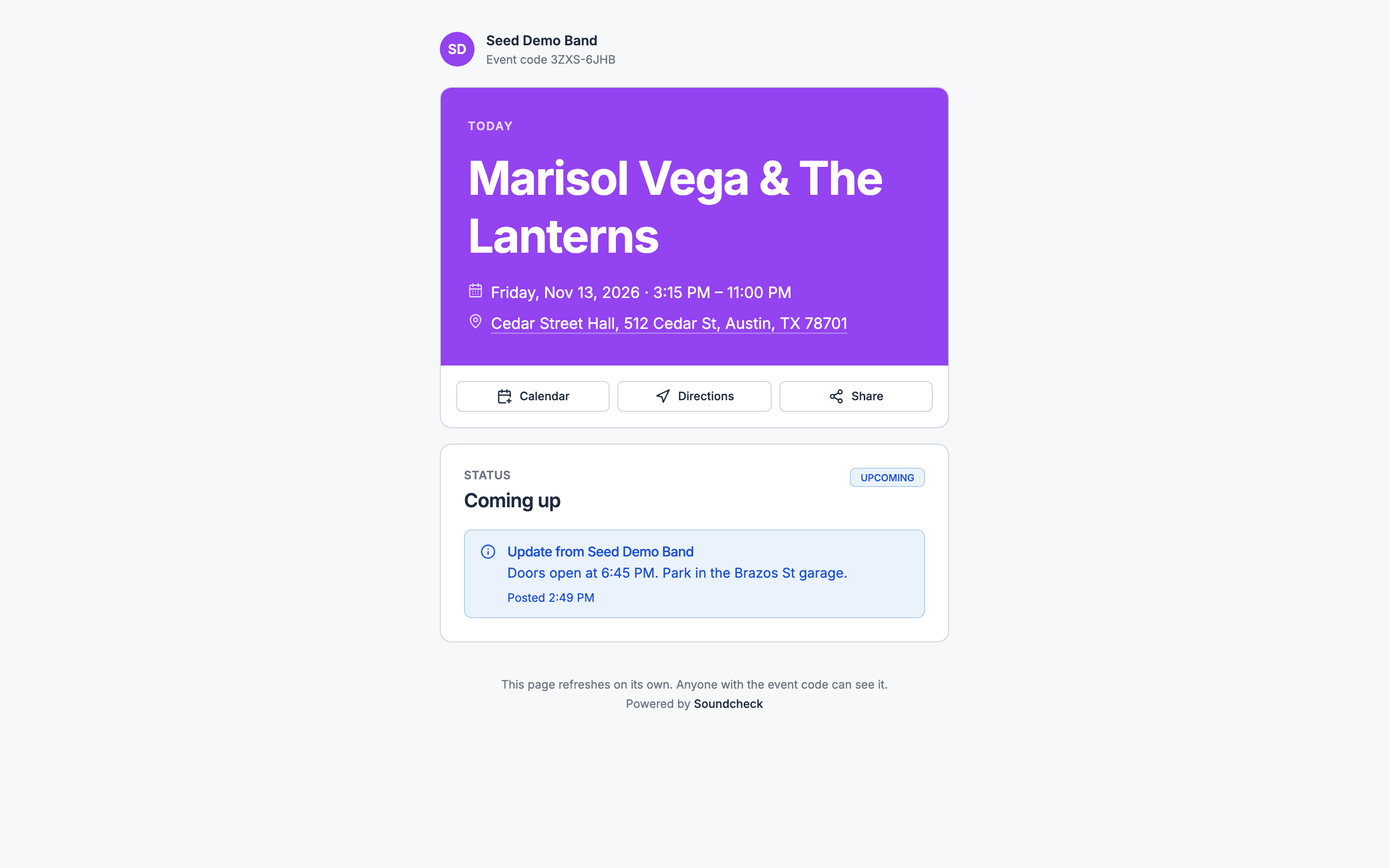
- Your brand. The page shows the brand name from your branding settings (or your organization’s name when none is set), your logo, and your brand colours once you’ve set them. With no logo, it shows your initials. See Branding.
- Event code. Shown above the title.
- Poster. The gig’s cover image, when it has one.
- Countdown. Today, Tomorrow, In 3 days, Happening now, or That was a show once it’s over.
- Title, date and hours.
- Where. The venue, linked to a map. With no venue yet, it reads Location to be confirmed.
Calendar, Directions and Share
Status
The status card reads Right now while the gig is live, and Status otherwise. Its badge is one of:
With no run of show to follow, the gig’s start and end times decide the status, or its dates when it has no times.
While the gig is live, the card shows:
- Now: what’s happening, with its time and location (Happening now: First dance).
- Next: what’s coming up and when it’s expected to start.
- A progress bar of how far along the schedule is.
Your updates
- Running late. When you set Schedule status, a notice reads Running about 15 min behind schedule, or in hours and minutes for longer delays. “Now” and “next” and their times follow the delay.
- Status note. Your note shows as Update from your brand name (or your organization’s name), with the time you posted it.
Schedule
The Schedule card lists the run of show sections and items guests may see, with their titles, times and locations. The current item is marked Now and the one after it Next. A tentative item shows Tentative. When there’s no run of show for guests to see, the card lists the guest-facing key times instead: doors, ceremony, show, set time and curfew. Under the schedule, Times are local to the venue. Times are always in the gig’s time zone (or your organization’s, when the gig has none), whatever the guest’s phone is set to. Day headings appear only when the schedule runs over more than one day. See The schedule on the page for what’s included and what’s left out.Foot of the page
The page ends with This page refreshes on its own. Anyone with the event code can see it. and Powered by Soundcheck. Powered by Soundcheck always shows, even with your branding. The page is in English only, and it asks search engines not to list it.Refreshing
The page refreshes itself every minute, and again when the guest comes back to the tab. If a refresh fails, the page keeps the last update and says Showing the last update; we will keep trying to refresh. If the page is taken down or the code is replaced, the page stops refreshing and offers Enter a different code. After too many wrong codes from one network, it offers Try again instead.Related
Live page
Start here.
The schedule on the page
What the schedule includes.
Guest pages
The same page with a guest’s pass.