

When to use it
- Before you staff. Set rates once on each person’s positions, so every shift fills in the right fee without you looking it up.
- When you build a shift. Choose flat or hourly, a total or a per-day rate, and override it for anyone who negotiated something different.
- After the gig. Check the payables on the gig’s Finances tab, then pay them or export them.
Where rates come from
Rates live in three places. A position’s default day rate is a reference only and never sets anyone’s pay. Crew are paid from their own rate for the position or a fee on the shift, and the most specific one wins.Set a person’s rates
1
Open their profile
Open the person from the Staff page.
2
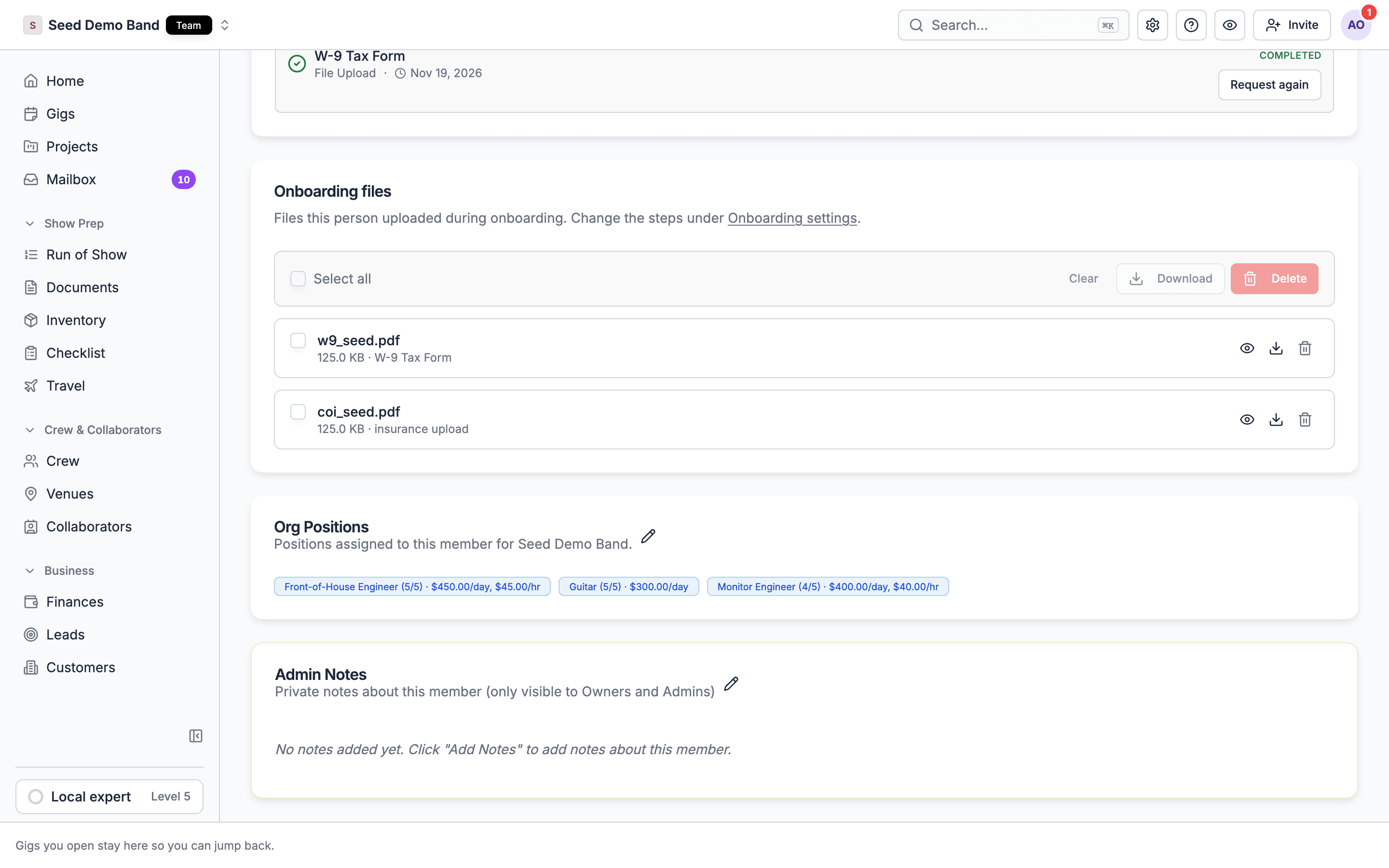
Find Org Positions
The Org Positions card lists each position they hold.
3
Enter the rates
Enter a Day rate, an Hourly rate, or both. An empty day rate shows the placeholder No day rate, and an empty hourly rate shows No hourly rate. A person with no rate for a position gets no fee from the position’s default day rate.
How a person’s fee is chosen
When you add someone to a shift, Soundcheck sets their fee in this order:- A fee you typed for that person.
- The shift’s own pay, when the person takes it as is.
- A day rate you gave for the shift, times the days.
- The person’s rate for that position:
- On an hourly shift, their hourly rate.
- On a flat shift, their day rate times the number of days, at least one.
Flat or hourly
When you build a shift, the pay type is Flat or Hourly.
Leave the pay blank for an unpaid call. Crew then see No pay listed.
Multi-day pay
Soundcheck totals each person’s pay across the days they accept. When a person’s fee came from their own day rate for the position, they’re paid that day rate for each accepted day, up to the fee Soundcheck stamped when you added them. Someone at $650 a day who accepts one day of a three-day shift is paid $650, not $1,950.- A fee you typed, or a shift paid as a Flat total, pays the whole shift once the person accepts any day, however many days they accept. A shift paid Per day with the shift rate adds up only the days they accept.
- Giving a day back, or removing a day, lowers day-rate pay. Adding a day to the shift later doesn’t raise it.
- On an hourly shift, each accepted day’s hours count.
Changing pay after you send
Pay locks when the shift is sent: Rates can only be changed on draft positions. People you add to a live shift who haven’t been sent yet can still have their fee changed by someone with finance access. To change the deal for someone already booked, swap them out with a new fee, or add a ledger line for the difference.Who sees rates
The Day sheet PDF never includes pay, so you can hand it to the whole crew. See Permissions and privacy.
For the whole path from rate to payout, see Crew pay, start to finish.
From pay to payables
When someone accepts a shift with a fee above zero, Soundcheck adds a payable to the gig’s ledger, Crew offer payout - {shift name}, dated on the gig’s date. A flat fee for the whole shift is dated the last shift day the person accepted instead, and while it’s unpaid with no payment started, that date moves if they gain or lose days. From there:- The amount changes on its own while the payable is unpaid, has no payment started and isn’t on a crew invoice. Once it has been paid or invoiced, an increase adds a separate line for the difference instead.
- A decrease on an invoiced payable with no payment started lowers it to the new amount, and the crew invoice turns Needs update.
- A withdrawal or cancellation voids the unpaid payable with no payment started, even when it’s on a crew invoice. That invoice turns Needs update. See Invoices and changes.
- Rescheduling the gig moves unpaid payables with no payment started to the new date. A flat-fee payable stays on the shift’s last accepted day.
- Statuses are Unpaid, Processing, Paid, Partial, Failed, Refunded and Voided.
What isn’t supported, and what to do instead
Soundcheck doesn’t do these today.Worked example: a wedding band with side players
Harbor Lights is a six-piece wedding band. The leader books two regular players, a keys sub, a sound engineer and a lighting tech for a Saturday wedding.- The admin has already set each player’s Day rate on their Org Positions. The keys sub has a higher rate as Music director than as Keys.
- The leader builds one Flat shift per position for the date. Each fee fills in from the person’s rate for that position.
- The sound engineer negotiated an extra $75 to bring her own wireless kit. The leader types her fee on her row before sending.
- When everyone accepts, each fee becomes a payable on the gig’s Finances tab. The band’s net for the night shows in Net income.
- The keys player pays $18 for parking at the venue and submits it as an expense with a photo of the receipt.
Questions this page answers
- Can I set a rate per person per position?
- Can I pay a day rate, a half-day rate, an hourly rate or a flat fee?
- Can I add per diem, kit fees, mileage or travel days?
- Can rates differ by client, venue or city?
- Can crew see their rate before they accept, and can I hide it from other crew?
- Does Soundcheck total what each person is owed on a multi-day gig?
- Can I pay a cancellation fee?
- How do I pay side players a flat fee?
Related
Crew pay, start to finish
One gig from rate to payout.
Overtime and union rules
Overtime on hourly shifts.
Crew invoices and payouts
Turn payables into payments.
Time clock
Approved hours set hourly pay.
Positions
The position catalog and default day rates.
Offers
Build and send shifts.
Payouts
Pay crew from the gig.