

Why quote on the gig
- One place for the price. The quote sits beside the terms, the deal and the invoices that follow it, so anyone checking the money sees the whole story.
- Gear priced from your records. Lines can come straight from your inventory, priced at each item’s daily rate for the length of the gig.
- Progress you can see. Adding a quote ticks the Quote step of the billing progress bar.
Add a quote
1
Open the Billing card
Open the gig, choose Finances, and find Quote at the top of the Billing card. A gig without one reads No quotes on this gig yet.
2
Choose Add quote
The Add quote dialog opens with a summary of the gig: its name, Date, Venue and client. On your own show with no client, the client reads Your own show.
3
Add lines
Choose Add line for a typed line, or Add from inventory for a gear item. Each line has a Description, a Qty and a Unit price, and shows its Total.
4
Save
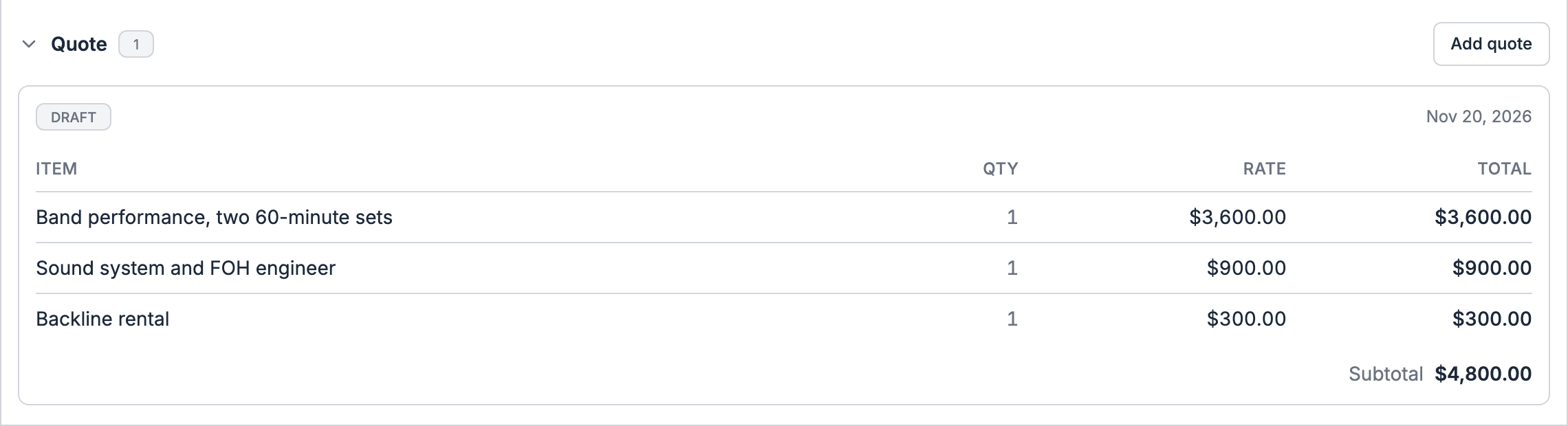
Choose Save quote. The quote shows in the Billing card as a card with a Draft badge, the date it was made, its lines and its Subtotal.
Line rules
Remove a line with its remove button before you save.
After you save
A saved quote stays a Draft. You can’t edit, delete or send it from the gig, and it can’t be marked accepted. To change the price, add a new quote. To get the client’s agreement, send them an uploaded PDF quote or an agreement to sign (see below), and put the agreed price in billing terms. Quotes are one currency each, and the gig quote doesn’t show your cost or margin per line. Check margin on the gig’s ledger once costs are in.Quote from inventory
Add from inventory shows when your plan includes inventory and you have inventory items. It adds a line where you choose an Inventory item.- Price. The unit price fills in from the item’s daily rate times the number of gig days. The line shows the rate as a hint, such as $120/day × 3 days.
- Availability. If you ask for more than is free on the gig’s dates, the line reads Only N free on these dates.
Quotes that come from elsewhere
The gig’s Quote part holds quotes made on the gig. Other quotes reach the same gig through other apps:The Quote approved step
The Quote approved step on the close-out checklist ticks itself when the client signs an uploaded PDF quote with a labelled total, or the gig’s Flex quote reaches Confirmed or later. It then reads From the quote. A quote added on the gig stays a draft, so it never ticks this step. Tick the step by hand when the client agrees some other way.Who can quote
People who manage gigs, Owners, Admins and Gig Coordinators, see Add quote. The Finance role doesn’t add quotes; Finance members set the agreed price in billing terms and bill it with invoices. The quote is hidden while you preview the gig as a member.A quote isn’t an invoice. It doesn’t add anything the client owes to the gig’s books. To bill the client, set the billing terms and invoice the charges they create.
Related
Billing terms and deals
Turn the quote into an agreed price.
Offerings
The catalog of what you sell.
Finances
Start here for the whole tab.