

Why stages matter
- The right details for the right room. Capacity, stage size and house tech belong to a room, not the whole building.
- Site plans reach the right crew. Crew on a gig booked on a stage can open that stage’s plans.
- Overlaps are caught. Soundcheck warns when two gigs are booked on the same stage on the same day.
- The run of show knows where things happen. Section locations pick from the venue’s stages.
The default Main stage
Every venue you save starts with one active stage named Main, so a single-room venue’s details have one place to live. Rename it, or add more stages as the venue needs. An untouched Main stage is dropped automatically once you add another stage.Add and edit stages
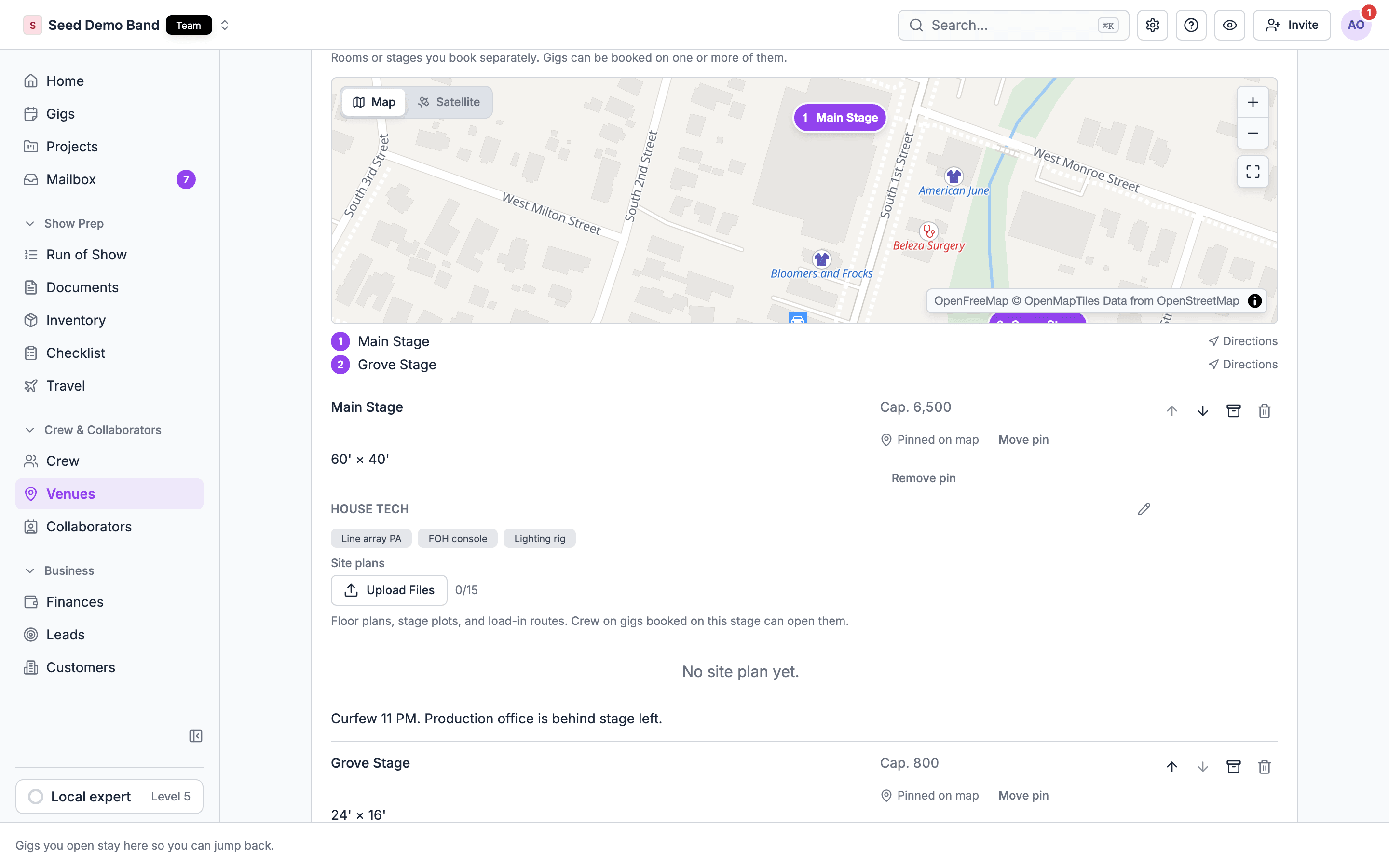
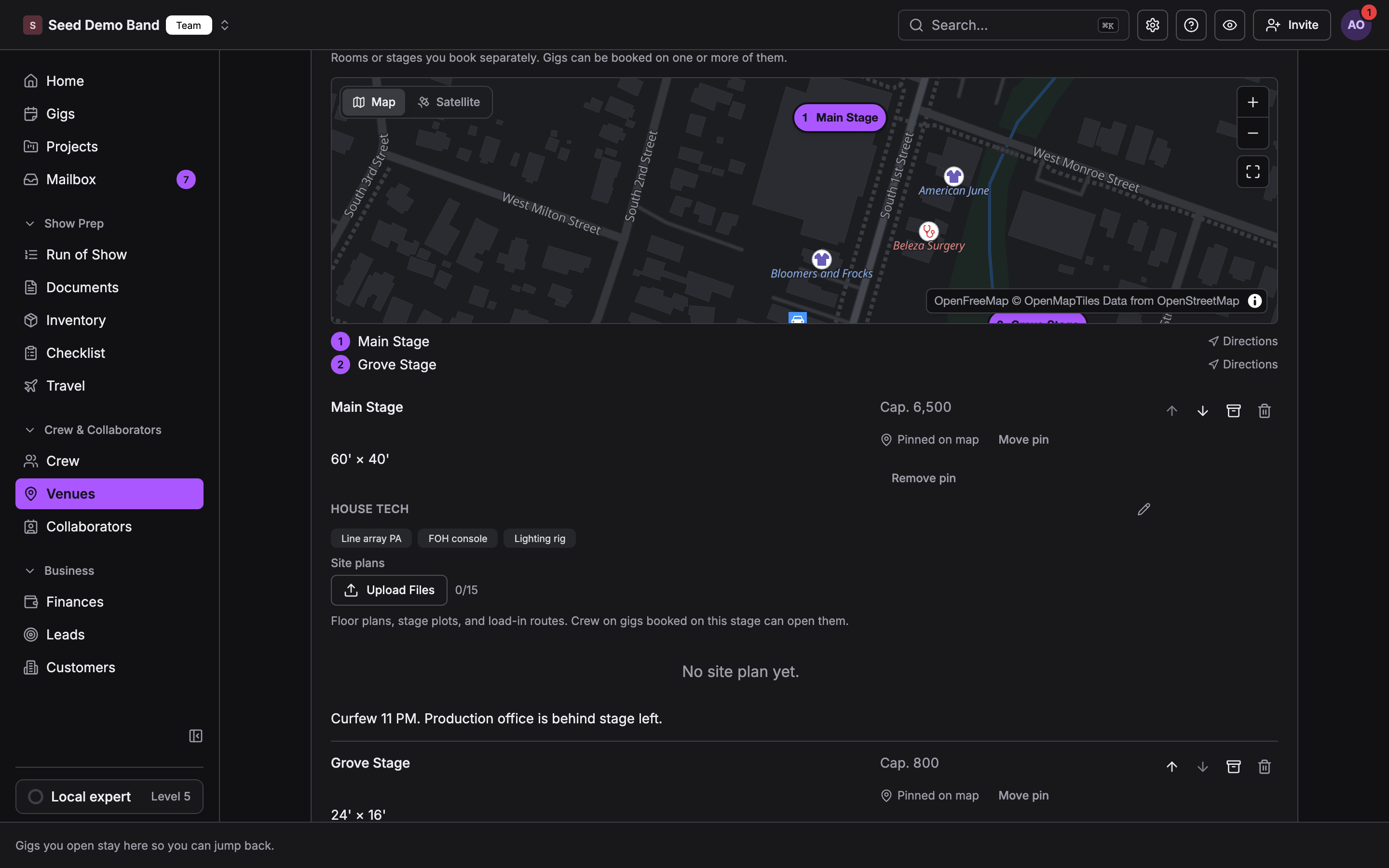
- Open the venue record and choose the Stages tab. Its header reads Stages (N): “Rooms or stages you book separately. Gigs can be booked on one or more of them.”
- Type a name, such as Main Stage, Side Room, Patio…, and choose Add stage.
- Fill in the stage’s fields.
A venue can have up to 50 stages. Editing stages needs Customers, venues and leads, like the rest of the venue record. Use the up and down arrows on a stage to set their order. The order sets the stages’ colors in the run of show.
Pin a stage on the map
On a large site, a map pin tells crew which stage is which.- On the stage, choose Place pin. The button reads Click the map….
- Click the map where the stage is.
- To move it, choose Move pin, or drag the pin. To take it off, choose Remove pin.
Book a gig on stages
A gig is booked on one or more stages of its linked venue.- Open the gig’s Venue tab. The Stages card shows when the venue has stages.
- Open the stage picker and tick the stages the show uses. The picker shows each stage’s capacity. Choose Clear to remove all.
- The booked stages show as chips. Remove one with its x.
Only active stages at the gig’s own venue can be booked. If you link a different venue, book its stages again.
Overlaps
When another gig is booked on the same stage on overlapping days, the Stages card shows a badge such as 1 overlap. Open it to see Also booked on this stage. When you add a stage that’s already booked, Soundcheck asks first: This stage is already booked. “These gigs overlap on the same stage. You can still book it — for a turnover or an early and late show.” Choose Book anyway or Go back. An overlap is a warning, never a block. What counts as an overlap:- Draft gigs count, so a draft booked on a stage works as a pencil for that date.
- Cancelled and archived gigs don’t count.
- A gig without a start time takes up its whole day.
Site plans on the gig
The gig’s Venue tab lists Site plans for its booked stages, each with the stage name. Everyone on the gig sees them. Files marked admin-only stay hidden from crew.Stages in the run of show
A run of show section has a Location. Its picker, Pick a stage or type a place, lists the venue’s stages under Stages, or lets you type a place and choose Use ”…”. Clear location removes it.- The location belongs to the section: “Location applies to the whole section”.
- A row can have its own location. It then reads This item has its own: and the place. Choose Use the section’s to go back.
- Picking a stage the gig isn’t booked on yet books it on the gig.
- A new section with no location takes the gig’s stage: the booked one, else the venue’s only stage, else Main.
Worked example: a two-stage festival day
Riverside Park has Main and Side.- On the venue, add Side next to Main, with its capacity and house tech. Pin both on the map.
- On the festival gig’s Venue tab, book both stages.
- In the run of show, put the headliner’s section on Main and the acoustic sets on Side.
- Crew see both stages pinned on All locations, and the Where column colors each row by stage.
Archive or delete a stage
- Archive hides a stage from new bookings and keeps past gigs intact. Choose the archive icon on the stage. Archived stages are listed under Archived (N); choose Restore to bring one back.
- Delete removes a stage for good. A stage with bookings can’t be deleted. Soundcheck says it “has gigs booked” and offers Archive stage instead.
Related
The gig Venue tab
Where booked stages and site plans show.
Run of Show
Sections, locations and the Where column.