

What you can see, at a glance
The Crew page needs crew staffing, which is on the Team plan and above. Finances and Reports are on Pro and above. See Plans and pricing.
Staffing coverage: the Needs tab
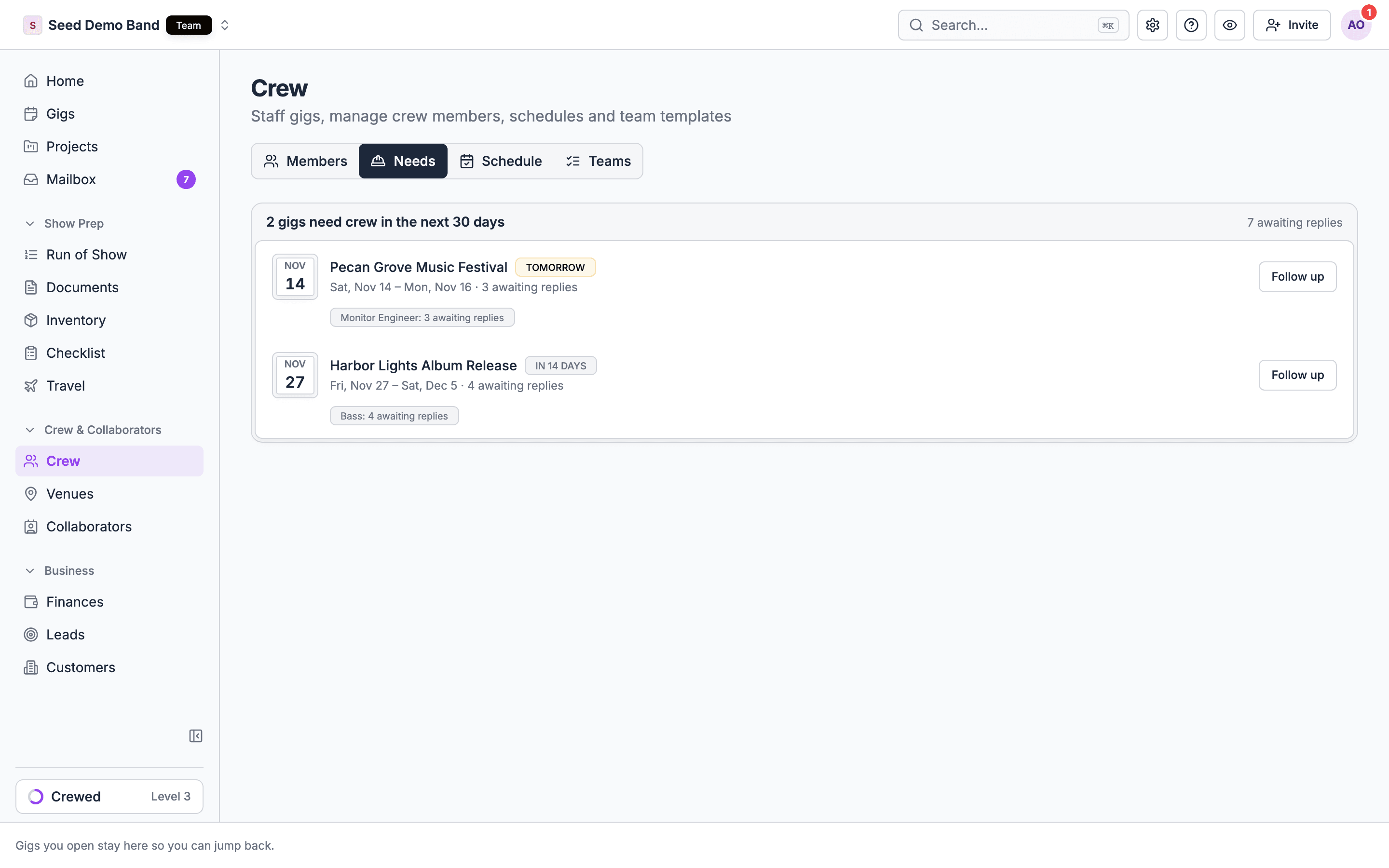
Crew → Needs lists every gig in the next 30 days that still has a seat to fill. It is the first screen to open on a Monday morning. Each row shows:- The gig, its dates, and how soon it starts: Today, Tomorrow or In N days. The badge turns red when the gig is 3 days out or less and still has seats nobody has been asked about, and amber inside 7 days.
- A count line, such as 2 to fill · 3 awaiting replies · 1 in drafts.
- to fill: seats on sent shifts with nobody asked or confirmed.
- awaiting reply: people asked who haven’t answered.
- in drafts: seats on shifts you haven’t sent.
- One badge per position, such as A2: 1 to fill.
- A button: Staff when seats still need asking, or Follow up when you’re only waiting on replies.
Exports
The gig ledger CSV export is early access and rolling out. Contact info@soundchecklive.io to have it turned on. Time clock is early access too.
Hours
Crew hours come from the time clock. Once a manager approves them:- Approved hours replace the scheduled hours on hourly shifts, so pay follows what was worked.
- Overtime and double time are applied per shift day at approval, when your organization has set them. See Overtime and union rules.
- Export approved hours gives you one CSV across gigs for payroll. Filter Crew → Timesheets by Gig, Person, Status or Exception before you export.
Labor cost
Soundcheck doesn’t have a labor cost report today. There is no single screen for labor cost per gig, estimated against actual, or for labor cost by client, venue, department or month. What it does keep:- Every accepted fee is a payable. When someone accepts a shift with a fee, the gig’s ledger gets a line, Crew offer payout - {shift}. Reimbursements, overtime and lines you add as Member payout land there too.
- The gig’s Finances tab totals them. Cost of sales and Net income at the top of the tab include crew pay, and the header shows how many paid crew are settled, such as 3 / 5 paid.
- Reports counts crew in margin. On Finances → Reports, Margin is billed minus crew, vendor and other costs. The table at the bottom lists each gig with what was billed, collected and spent.
- Cash at risk on Reports lists overdue payouts to crew.
Workaround: labor cost per gig and per month
1
Before the gig: read the draft cost
Build the shifts as drafts. With Show pay on, the crew board shows each person’s fee, so you can add up the plan before you send anything. Nobody is told about a draft.
2
After the gig: approve hours
Approve the time clock entries so hourly pay reflects what was worked.
3
Export
Export the gig ledger CSV for each gig, or Export approved hours for a date range.
4
Pivot in a spreadsheet
Filter to crew payout lines, then group by gig, month or payee. For client or venue, add those columns from your gig list.
What there is no report for
Soundcheck doesn’t report on these today. The workaround is listed where one exists.The Reports page
Finances → Reports is about the business: billed, collected, margin, gigs played, cancellations, contracts and booking pace. Crew pay appears in two places: inside Margin, and in Cash at risk as overdue payouts. The Gig billing tab and its weekly email track client deposits and final payments, not crew pay. See Reports.Worked example: an AV company’s month-end
A corporate AV company ran 14 gigs in October, most of them hourly A1, V1 and stagehand shifts.- On the 1st, the operations manager opens Crew → Needs, sees two November gigs marked red with 2 to fill, and chooses Staff on each.
- The crew chief on each October gig had fixed missed punches. The owner filters Crew → Timesheets to October, clears the last Missing clock-out, and approves.
- She chooses Export approved hours and sends the CSV to the payroll service.
- For job costing, she exports each gig’s ledger CSV, pastes them into one sheet and pivots crew payout lines by client. Two conference clients show labor above 50 percent of billed, so she reprices their next quotes.
- Reports shows October’s margin against last October.
Questions this page answers
- Can I see labor cost per gig, estimated against actual? (FAQ)
- Can I see labor cost by client, venue, department or month?
- Can I see overtime and meal penalties paid, and on which gigs?
- Can I export reports to Excel or CSV?
- Can I see who works most, and track no-shows and declines per person?
- Can I see hours per person per week, and payroll totals per pay period?
- Can I schedule a weekly report by email?
- Which gigs still need crew?
Related
Time clock
Where approved hours come from.
Pay and rates
How fees become payables.
Gig ledger
Every line a gig owes or earns, and its CSV export.
Reports
Business health, margin and booking pace.