

The short version
There’s no direct connection to any of these tools. Everything comes in as a file or as pasted text.
The AI import: Paste data
Paste data reads a schedule in almost any shape, from an emailed run sheet to a 200-row production spreadsheet, and turns it into rows you review before anything is added.1
Open it
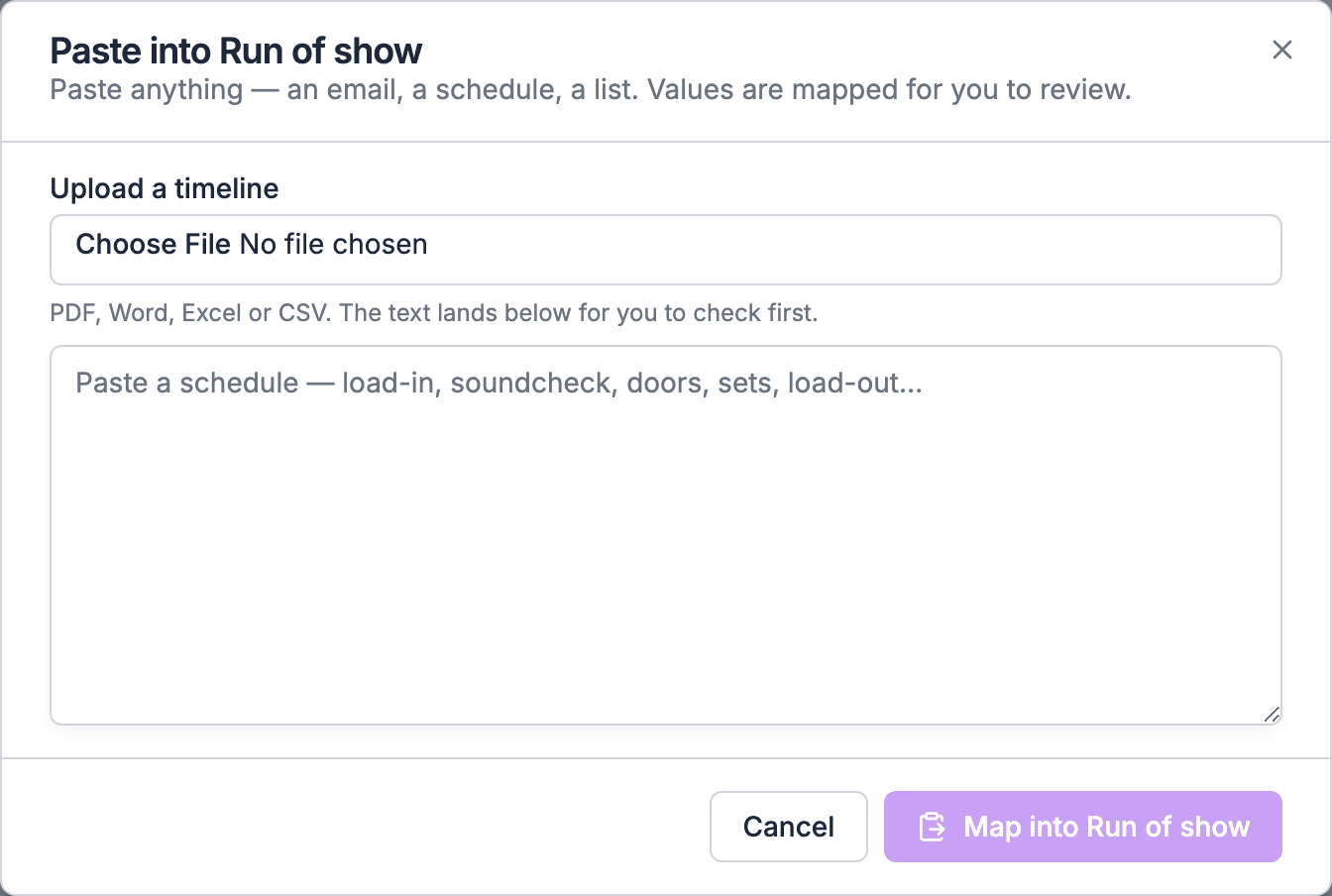
Open the gig’s Run of Show tab, switch to List, and choose Paste data above the grid. The Paste into Run of show dialog opens.
2
Add your rundown
Paste the text into the box, or choose a file under Upload a timeline. A file’s text lands in the box first, so you can delete a cover page or someone else’s schedule before going on.
3
Map it
Choose Map into Run of show. An AI model reads the text and proposes rows.
4
Review the rows
Tick the rows you want and untick the rest. Values the AI isn’t sure about arrive unticked, so look at those first.
5
Fill
Choose the Fill button. The rows are added and autosave, with Undo available.
Files it reads
- Size limit: 8 MB per file. A spreadsheet or Word file also has to stay under 16 MB once it’s opened.
- Very long files are cut off after about 128,000 characters of text. Split a long multi-day rundown and import one day at a time.
What each row carries
Each row the AI proposes has four things: a name, a start time, an optional end time, and notes. Times are read against the gig’s date. Anything else in your source, such as an Audio column, a cue number or a Private Notes column, either lands in the row’s notes or is left out. Check the review before you choose Fill. After that, the rows are ordinary items: move them into sections, link them, add people and mark key times. See Building and editing.Imports only add rows. They never delete or overwrite what’s already in the run of show.
Pasting cells straight into the grid
If your spreadsheet’s columns are already in the grid’s order (start time, then what), you don’t need the AI at all. Add as many empty rows as you need, copy the block in Google Sheets or Excel, select the first Time cell in the grid, and paste. Times like6:42p are read the same as typed values. See Pasting, filling and copying cells.
Key times from a call sheet
For the handful of times everyone works to (crew call, load in, doors, curfew), use Paste key times next to Paste data. Names that match your key time list set those key times. See Pasting key times.Coming from each tool
Shoflo
1
Export
In Shoflo, open the rundown and export it to CSV from its ⋯ menu. Prefer CSV over PDF or Word.
2
Tidy it
Delete empty rows. Shoflo’s default columns are
NUMBER, Items, Start, Duration, Prod Notes, Audio, Video, Lighting, Private Notes.3
Import
In Soundcheck, open the gig, choose Paste data, and upload the CSV under Upload a timeline. Review and Fill.
4
Rebuild what has no field
Put the cue number at the front of each title (LX 14 · Walk-in). Move department text into Notes, one line per department, if the import didn’t. Leave Private Notes out if your crew shouldn’t see them, because everyone on the gig can read a row’s notes.
Rundown Studio
Export the rundown to CSV or Excel. Upload it under Upload a timeline in Paste data. Custom columns come over the same way as Shoflo’s department columns: into notes or not at all. Rundown Studio’s live timers, show-caller mode and output screens have no equivalent in Soundcheck. See Run of Show on show day.Cuez
If you can export a file, upload it. If not, print the rundown to PDF and upload that, or select the rows, copy them, and paste them into Paste data. Scripts, the Automator and MOS connections to graphics and playout have no equivalent in Soundcheck.Stagetimer
Stagetimer is a timer, not a run of show, and Soundcheck doesn’t replace it. Soundcheck has no stage, confidence-monitor or speaker timer. Most teams build the run of show in Soundcheck and keep Stagetimer on the confidence monitor, typing the segment lengths from the run of show into it.Google Sheets
Two routes:- Columns already line up: copy and paste the block into the grid, as above.
- Any other layout: choose File → Download in Sheets, pick Microsoft Excel (.xlsx) or Comma-separated values (.csv), and upload it in Paste data. Put the schedule on the first tab first. You can also select the cells, copy them, and paste the text straight into the Paste data box.
Excel
Upload the.xlsx in Paste data. Move the schedule to the first sheet before you upload. A workbook with one sheet per day needs one import per day: save each day as its own file, or copy each day’s rows into the box.
Word or PDF run sheets
Upload the.docx or .pdf. The text lands in the box, so delete headers, contact blocks and anything that isn’t the schedule before you choose Map into Run of show. A planner’s timeline that a client sends you through the client portal comes in the same way, with Review on the notice. See Timelines from clients.
BandHelper or OnSong (songs and setlists)
Songs live in one library that every setlist and run of show uses.1
Get your songs into a spreadsheet
Export your song list from BandHelper or OnSong to a spreadsheet or CSV, if your plan allows it. Keep one row per song.
2
Import songs
Go to Settings → Apps & data → Import & export, drop the file, and pick the Songs target. Song Title is required. Artist, length (
HH:MM:SS or seconds), key, tempo (1 to 999) and notes come over. An Acts column tags songs to acts.3
Import setlists, if you have them
Import Setlists after Songs. Rows that share a setlist title become one setlist, with its sets in order.
4
Or paste one set at a time
In a gig’s Setlist view, choose Paste data and paste a set list, one song per line. Titles already in your library are matched. New titles are marked New and added to the library.
Templates: bring your standard shows once
Your standard show shapes matter more than any one past show.- One at a time: import the rundown into a gig, clean it up, then choose Save as Template in the Run of Show section’s ⋯ menu. See Templates.
- Many at once: run of show templates can be bulk-imported as a Soundcheck import document under Settings → Apps & data → Import & export. See Run of show templates in the import format reference.
- Starting fresh: the 22 starter templates (wedding, general session, festival stage, awards show and more) may be closer to your show than your old file.
What moves over, and what has no equivalent
What you get that a rundown tool doesn’t have
The run of show lives inside the gig, next to the people, money and paperwork:- People on a row get a checklist task at that time, and see their call in Your times on their phone.
- Key times such as Doors and Curfew come from the rows, and show across the gig.
- Setlists sit in the night as rows, with set lengths added up from the songs.
- Music requests and do-not-play warnings check the sets for you.
- Day sheets, music schedules and advance packets come from the same run of show.
Migration checklist
1
Pick three shows
Pick one typical show, one big show and one multi-day show. Import those first, not your whole archive.
2
Import each into a test gig
Use Paste data with the export or file. Note which columns didn’t come over.
3
Agree your conventions
Decide how your team writes cue numbers in titles, which departments get a line in Notes, and which tracks you use.
4
Turn the best one into a template
Clean it up and choose Save as Template. If every new gig should start from it, choose Make default for new gigs in its ⋯ menu on the templates page.
5
Bring your songs
Import Songs, then Setlists, from a spreadsheet. Spot-check keys and lengths.
6
Set your key times
Check the key time list in Settings → Labels → Gigs → Key times matches the words on your call sheets, so Paste key times matches them.
7
Decide on publishing
Choose whether crew see edits as they save or only after Publish. See Publishing and collaboration.
8
Keep your stage timer
If you use a confidence-monitor or speaker timer, keep it.
9
Run one real show side by side
Run your next show from Soundcheck with the old tool open as a backup. Print a PDF backup too.
10
Bring the rest as you need it
Past shows only need importing when you’ll run them again.
Worked example: an AV company leaving Shoflo
A corporate AV company runs about 40 general sessions a year in Shoflo, with Audio, Video and Lighting columns and cue numbers.- They export last year’s flagship general session from Shoflo to CSV.
- In a test gig, they choose Paste data, upload the CSV, and choose Map into Run of show. 62 rows come back with names and start times. They untick three empty header rows and choose Fill.
- The Audio, Video and Lighting columns came through as notes on some rows and not on others, so they settle on one convention: SQ:, VX: and LX: lines in Notes, and cue numbers at the front of titles (VX 3 · Opener video).
- They group the rows into sections (Walk-in, Opening, Keynote, Awards, Walk-out), put the A1, V1 and LD on their cues with a Department and a Task note, and choose Save as Template.
- They keep Stagetimer for the confidence monitor, because Soundcheck has no speaker timer.
- Every new general session now starts from that template, and crew get their calls and cues on their phones.
Questions this page answers
- Can I import from Shoflo, Rundown Studio or Cuez?
- Which file types and sizes can I upload?
- Do my custom columns and cue numbers come over?
- Can I paste straight from Google Sheets or Excel?
- Can I import my song library from BandHelper or OnSong?
- Does Soundcheck replace my stage timer?
- How long does it take to move over?
Related
Importing a schedule
Paste data, key times, set lists and client timelines.
Adding songs in bulk
Spreadsheets, Spotify and starter packs.
Templates
Save your standard shows once.
Run of Show on show day
What’s different from a show-calling tool.
Coming from another system
Moving crew, venues, clients and events.
Glossary
Rundown terms and their Soundcheck names.