

Why record rides
- Crew know how they get there. Each rider sees the pickup and drop-off, the times, the vehicle and the driver in the mobile app, and can tap to call the driver.
- Directions in a tap. Crew open any pickup or drop-off in a maps app, or call an Uber or Lyft to it.
- Fleet in one list. Your vans and rentals live in one place, and rides point at them.
Add a ride to a gig
1
Open the Transportation card
Open the gig and choose People → Travel. If there’s no Travel group, open the Venue tab (see When travel is on the Venue tab). Find the Transportation card.
2
Choose Add ride
Pick the Type and fill in the details below.
3
Save it
Choose Add ride. The ride appears on the card. Nobody on this ride yet. shows until you add riders.
4
Add riders
Open Add crew to this ride and pick each person. The list only offers people on the gig who aren’t on that ride already.
Ride details
The web form has no field for who pays for the ride or for pickup instructions. Connected AI tools and a workspace import can set both, and crew see the pickup instructions in the app.
Times are entered in the gig’s time zone. There’s no time zone picker on the web. When pickup and drop-off are in different zones, the form says so, for example Pickup is in America/Chicago; drop-off is in America/New_York.
Edit and remove
- Edit a ride. Choose the edit button on the ride, change what you need, and choose Save ride.
- Remove a rider. Choose the remove button on their name. The ride stays.
- Remove a ride. Choose the remove button on the ride and confirm. This removes the ride and everyone booked on it.
Who still needs a ride
Once a gig has at least one ride, the Transportation card names the people on the gig who aren’t on any ride: No ride yet: Zoe, Sam. Only people who can edit travel see it. Like the flight warning, it’s a prompt to check, not an error. Adding, editing or removing a ride doesn’t notify the riders. Tell them yourself.Uber and Lyft links
A Rideshare / taxi ride with a drop-off place shows Get a ride: Uber · Lyft on the gig’s Transportation card once Soundcheck finds the drop-off address on a map. Each link opens that service with the drop-off filled in. In the mobile app, the same ride has a Get a ride button, and every pickup and drop-off offers Ride with Uber and Ride with Lyft. See Travel on mobile.Uber and Lyft need the place on a map. If Soundcheck can’t find the address, you only get maps and copy options. Use a full street address for pickups and drop-offs.
Vehicles
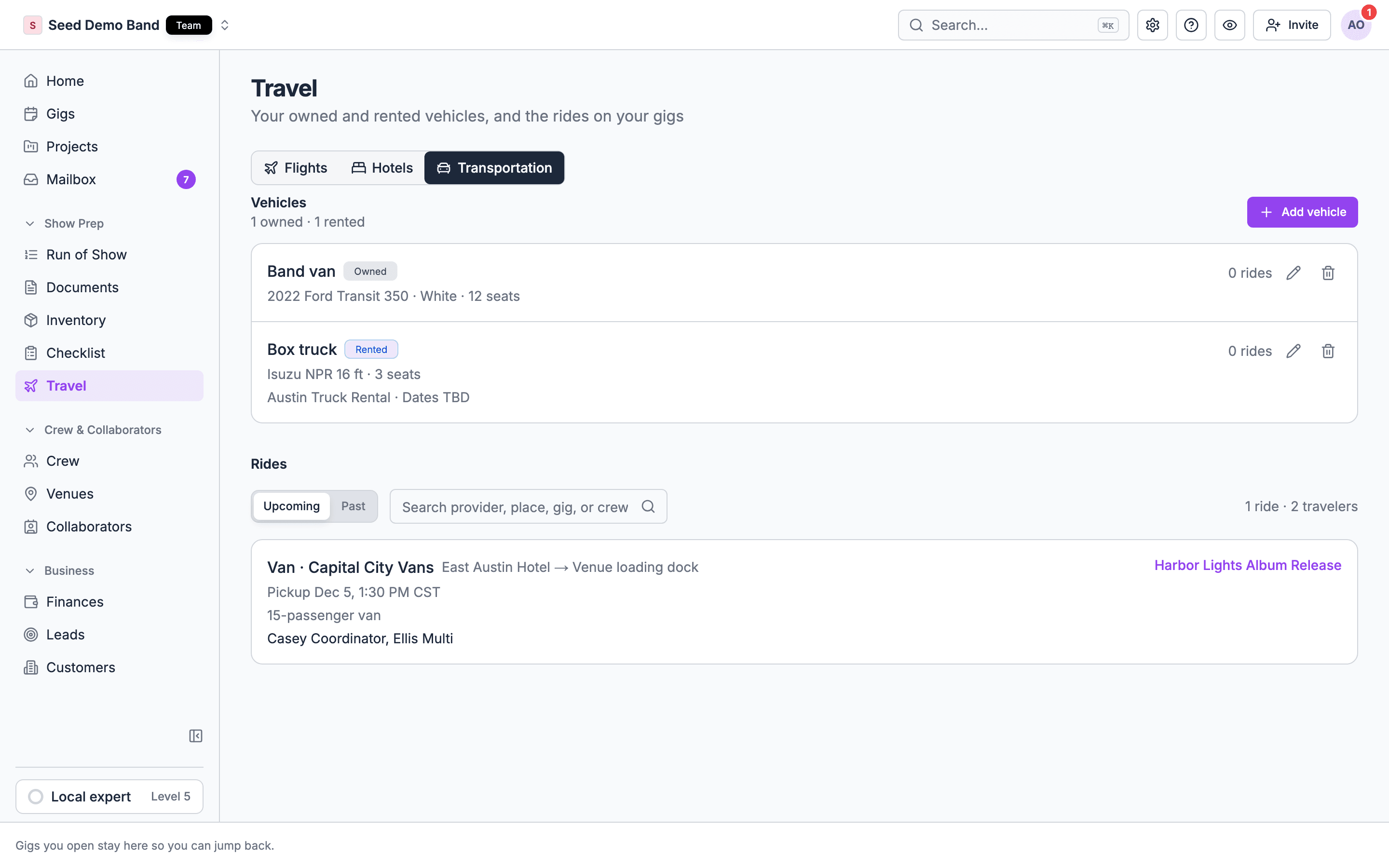
Open Travel in the sidebar and choose the Transportation tab. The Vehicles list holds your organization’s vans, trucks and cars. Choose Add vehicle to add one.
Choose Add vehicle to save it. Each vehicle shows how many rides use it. Edit or delete a vehicle from its row.
Soundcheck doesn’t check a vehicle’s schedule. Nothing stops two rides at the same time from using the same van, so check the rides list before you assign it. Deleting a vehicle removes it from your list. Rides that used it keep its name, but are no longer linked to it.
Every ride on the Travel page
The Transportation tab also lists Rides: every ride on your gigs.- Switch between Upcoming and Past.
- Search by provider, place, gig or crew name.
- Choose Load more rides at the bottom of a long list.
What crew see
Crew see the rides they are on, the rides they added themselves, and rides with nobody on them yet. Each ride shows its type and provider, the pickup and drop-off places and times, pickup instructions when the ride has them, the vehicle and the driver. Crew never see a ride’s cost or payer, and they only see the confirmation on rides they added. See Travel on mobile.Worked example: airport to venue
A band lands at O’Hare at 2 PM and needs to reach the venue for a 5 PM load-in.- On Travel → Transportation, add your rented Sprinter van as a Rented vehicle with its plate and rental dates.
- On the gig, add a Van ride with Provider Hertz, Pickup O’Hare Terminal 3 at 2:30 PM, Drop-off the venue address at 3:30 PM, and pick the Sprinter van.
- Add the driver’s name and phone, then add the band as riders.
- For the merch seller flying in later, add a Rideshare / taxi ride with the venue as drop-off. She gets a Get a ride button in the app.
Related
Travel overview
The building blocks and how Travel fits together.
Travel on mobile
How rides look to crew, with directions and Get a ride.
Venue logistics
Load-in, parking and on-site details at the other end of the ride.
Travel FAQ
Tour buses, runners, driver hours and more.
Travel glossary
Ground, runner, bus call and other transport terms.