

The short version
- Crew staffing is on Team and above. Shift offers, open shifts, availability requests, the crew calendar, per-day answers and hourly pay.
- Crew never pay. The subscription belongs to your organization. Crew use the web and mobile apps free.
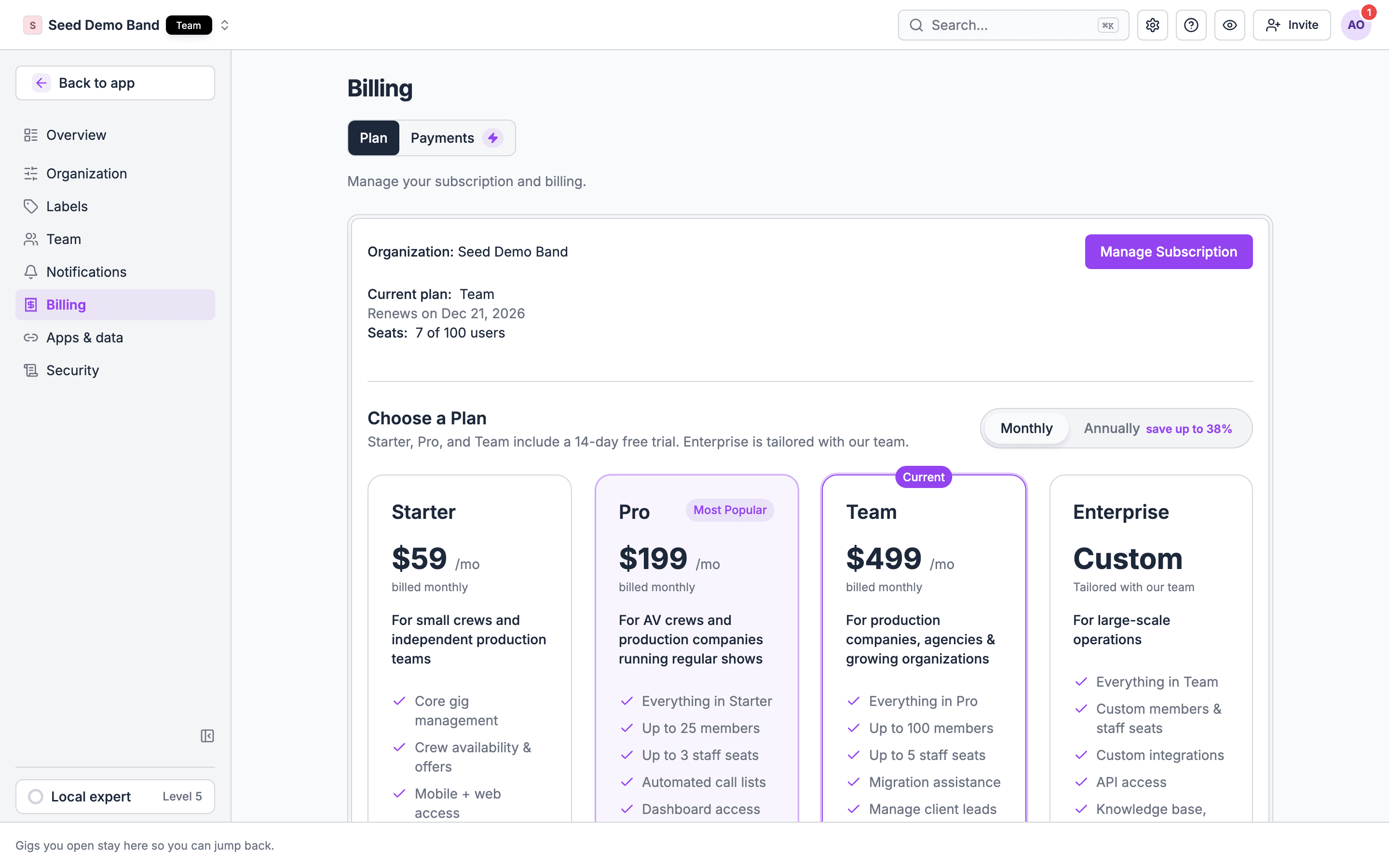
- Crew who join your organization use a member seat, not a staff seat. Team includes 100 member seats.
- Every paid plan starts with a 14-day free trial, no card needed. There is no free plan.
Staffing features by plan
Paying crew through Soundcheck and custom crew onboarding are Enterprise features. Pro and Team organizations that already use them keep them.
Features in early access
Some staffing features are rolling out to organizations a few at a time, whatever their plan: open shifts, the time clock with overtime, the Gig Coordinator role, departments, custom onboarding, gig chats, forms and agreements to crew, imports and exports, and the gig ledger CSV. Contact info@soundchecklive.io to have one turned on.Do crew pay, and do they use seats?
Crew pay nothing. There is no charge to a freelancer for an account, for answering offers, for the mobile app or for getting paid. Seats. Your plan has two kinds:
What uses a member seat:
- Each crew member who has joined your organization.
- Each pending invitation to join it.
- Each person another organization shares with you through crew sharing.
- Someone you add to a shift without an account. They answer from a link and use no seat. If they create an account from that link, they join your organization and take a member seat.
- Crew records, past gigs, and people you imported but haven’t invited.
Limits
- Gigs and offers: no limit. Plans don’t limit how many gigs you create or shifts you send.
- Call lists: 5 on Pro, 25 on Team, unlimited on Enterprise.
- Forms and e-sign for crew paperwork: 10, 10, 25 and unlimited active forms; 5, 25, 100 and unlimited e-sign documents a month.
- Texts: the plans list no separate charge for texts to crew.
Time tracking and payroll export
The time clock is in early access and isn’t tied to a plan tier. Reviewing and approving hours happens on a gig’s Finances tab, so it needs Pro or above, and Export approved hours needs finance access. Soundcheck doesn’t run payroll on any plan: you export approved hours to your payroll service. See Time clock.Collaborators and labor providers
- A collaborator you share part of a gig with signs in and sees only what you shared. They don’t need a plan.
- A company that shares its crew with you uses its own Soundcheck organization to send the share. The people it shares use your member seats.
- A labor provider staffing for several clients runs its own organization and plan, and shares crew with each client’s organization.
What payouts cost
On Enterprise, you can pay crew from a gig:
Recording a payment you made outside Soundcheck (cash, check, Venmo, Zelle) costs nothing on any plan with Finances. See Payments.
Trials
- Starter, Pro and Team start with a 14-day free trial. No credit card is needed.
- To try crew staffing, start a Team trial.
- Editing departments is included on any trial.
- Enterprise is quoted by our team: choose Contact Us on the Billing page.
- An organization without a subscription shows No plan and keeps Starter’s features with 5 member seats and no staff seat.
Billing
- Pay monthly or yearly. Yearly gives you 2 months free.
- Upgrades take effect right away. Downgrades take effect at the next billing cycle, and features above your new plan stop working. Your data stays.
- The Owner manages billing under Settings → Billing → Plan.
- Team includes dedicated onboarding and migration help. Enterprise includes white-glove onboarding.
Which plan fits
Worked example: a wedding band agency
An agency books 6 bands most weekends from a pool of 70 players and 10 sound techs.- It needs shift offers with per-day answers and a sub list for each chair, so it starts a Team trial.
- The 25 players who work every month join the organization and use the app. The other 55 get shifts by link and never use a seat. Team’s 100 member seats leave plenty of room.
- The owner and two bookers are staff, using 3 of Team’s 5 staff seats.
- It records payments made by Zelle on each gig’s Finances tab, at no extra cost.
Questions this page answers
- Do I pay for every freelancer on my roster, or only for admins? (FAQ)
- Is crew scheduling included, or a paid add-on?
- Is the app free for crew?
- Is there a free trial, and what’s included?
- Do text messages cost extra?
- Is there a limit on gigs, offers or crew?
- Are time tracking and payroll export in every plan?
- Is there a price for small companies or bands?
- Can I pay monthly?
- Is onboarding or migration included?
- What happens to my data if I downgrade?
- Do labor providers or partner companies need their own plan?
- Do I pay a fee per payment when I pay crew through Soundcheck?
Related
Subscription plans
Prices, seats and billing.
Feature comparison
Every feature by plan.
Seat limits
How seats are counted.
Switching tools
Bring your roster across.