

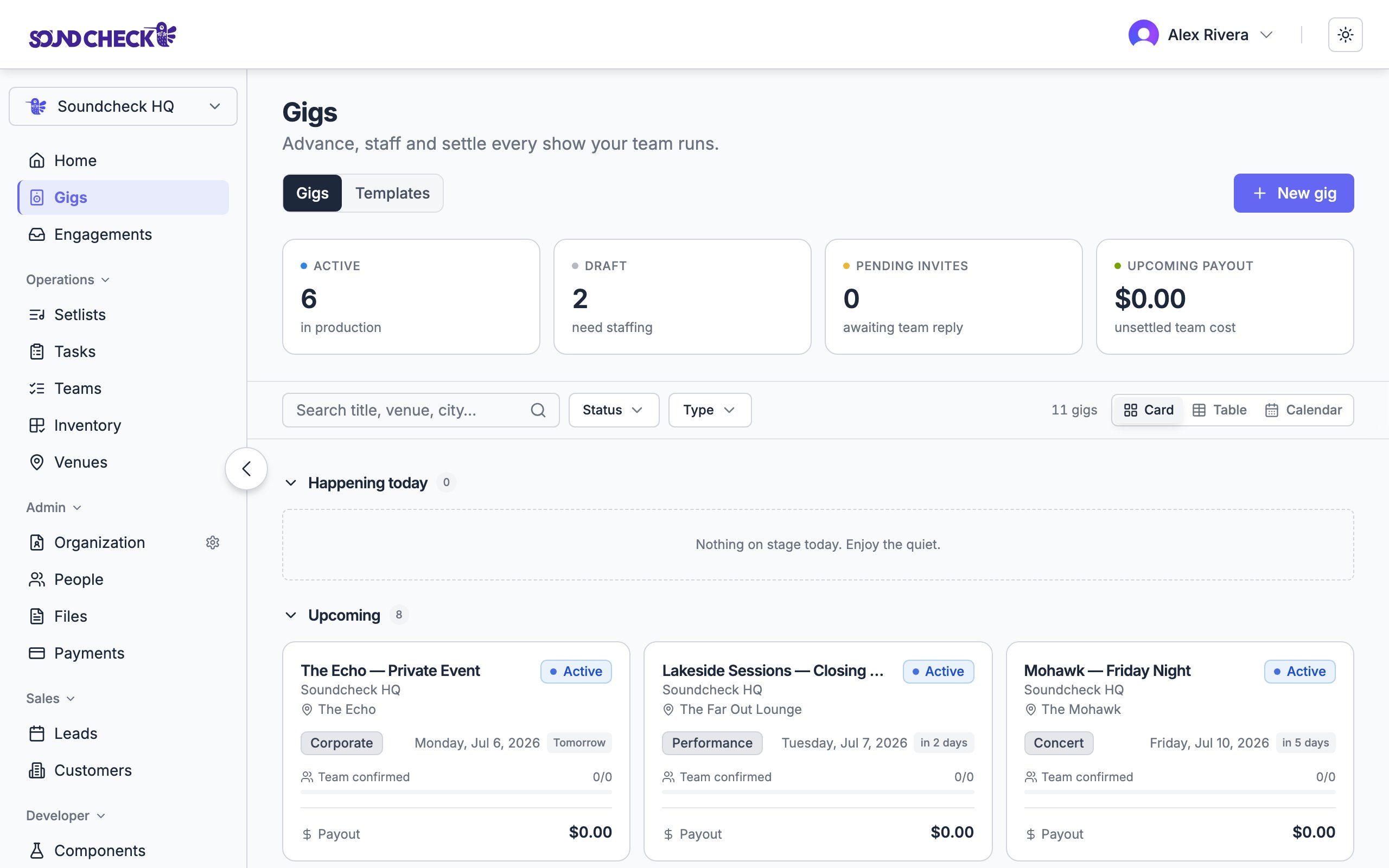
Gigs: stat tiles, a sticky filter bar, and the default table view
The Gigs page
The Gigs page is where every show lives. The default view is Table. Four stat tiles across the top summarize your operation:
Below the tiles, a sticky filter bar keeps search and filters in reach as you scroll:
- Search: match on title, venue, or city (“Search title, venue, city…”)
- Dates filter: Upcoming, Past, or All dates (Upcoming is available and commonly used with Active)
- Status filter: Draft, Active, Completed, Settled, Cancelled
- Type filter: by event type
- A running result count
Three ways to view
A view switcher on the filter bar toggles layout. Table is the default.- Table
- Card
- Calendar
A dense, sortable table (Gig, Type, Date, Venue, Confirmed, Payout, Status) for scanning many gigs at once. This is the default view.
What a gig card shows
Each card carries the essentials: title, organization, and venue; a status pill and type; the date (a range for multi-day gigs); and a relative-day chip (Today, Tomorrow, in 3 days, 2d ago). What’s below depends on your role. Managers see a Team confirmed progress bar (filled positions vs. total) and the gig’s payout total. Crew see their position and their pay.The gig detail
Open any gig to work it. The detail page is organized into tabs:Tabs appear based on your role and your organization’s enabled features. A coordinator staffing a gig sees a different set than an owner closing one out. The older single Resources tab has been split into the dedicated Venue, Clients, and Inventory tabs.
The lifecycle
Every gig moves through a small set of states. Most follow Draft → Active → Completed → Settled. Cancelled and Archived cover gigs that don’t go the distance. Template holds reusable structures.- Draft: still being prepared; sends nothing on its own. Publish it to go live.
- Active: live for staffing, notifications, and operations.
- Completed: an Owner, Admin, or Gig Coordinator explicitly completes the gig after its effective end (the later of its event date and end date). Passing the date alone does not save this status. See How a gig completes.
- Settled: every payout has cleared and the gig is closed on the books.
- Cancelled: the gig was called off (from Draft or Active); never gated by close-out.
- Archived: a legacy filing state for delivered gigs.
Event lifecycle reference
The full state list, the transition matrix, and what gates settling.
What you do with a gig
Create a gig
Name and date to start; venue and the rest come later.
Build the team
Staff org positions with invitations or crew offers.
How shifts work
Statuses, seats, per-day answers, and changing a sent shift.
Run of Show
Lay out the show flow, timeline, and files.
Send payouts
Pay crew by direct deposit or card from Finances.
Group into tours
Fold related gigs into a folder with rolled-up finances.
Close it out
Work the checklist, settle, and capture reviews.
Web vs. mobile
Both surfaces show the same gig data. Build-and-configure work lives best on the web; in-the-moment work lives on mobile.
See Mobile app overview for platform differences. Chat beta is Private Preview, available only to the existing beta tester group. Signing up, paying, upgrading, contacting support, or viewing a public demo does not grant access.
Who can manage gigs
Gig coordinators run the operational side (creating, staffing, and scheduling) without payout or P&L access, which stays with owners and admins.
Related guides
Templates and duplication
Reuse repeatable gig structures.
Draft and publish
Prepare gigs before they go live.
Related reading
The gig economy remix
How Soundcheck is redefining live music operations.
Soundcheck thesis
Why coordinating gigs through Soundcheck builds verified reputation.