

- Crew shifts for people you book and pay: your touring crew, your freelancers, hired local hands you book yourself.
- House labor for crew someone else books: a head count and call times per department, with no names, no offers and no pay.
When to use this page
- You’re a production or touring company working in venues that supply their own crew.
- You’re a venue recording the house crew for an incoming show, or staffing ushers, security and bar alongside stagehands.
- You hire local hands through a labor provider or a union local.
Who’s who on a mixed call
A person isn’t fixed as “touring” or “local”. They’re simply on the shifts you put them on, so someone can tour with you one month and work your local call the next.
House labor: the labor call
The labor call is the house and local labor for a gig: one row per department, each with call times and hands for Load-in, Show and Load-out. On the web, labor call departments arrive with a team template: on the gig’s People → Crew, choose More staffing actions, then Use a team, and pick a template that includes labor lines. They appear on the board in a House labor section, or under the matching position. Hover a row and choose edit to change its calls and hands, or Remove it. What Soundcheck does with each department:- It becomes a house labor shift for each phase: load-in on the first day, show on every day, load-out on the last day. A load-out earlier than the show call lands on the next morning.
- House labor shifts are always drafts. They’re never sent, never have people on them, and never create pay. They record head counts and call times.
- Changing the gig’s dates moves them with it.
- Crew see the Labor call card read-only in the mobile app, and managers see a House labor row on the roster.
save_gig_labor_call tool), and crew see the union local and steward on the Labor call card. The web app has no form for these fields today.
See House labor from the labor call.
Crew you don’t pay
Sometimes you want a named person on the call sheet without paying them through Soundcheck: a venue’s house electrician, a provider’s crew chief, a client’s stage manager.- Add them to a shift with no fee. A payable is only created when someone accepts a shift with a fee above zero.
- If they don’t use Soundcheck, use Add someone without an account. They get an email link to confirm, and you can leave Fee (optional) blank.
- For people who only need to be reachable, not booked, add them as collaborators on the gig instead.
Share crew between organizations
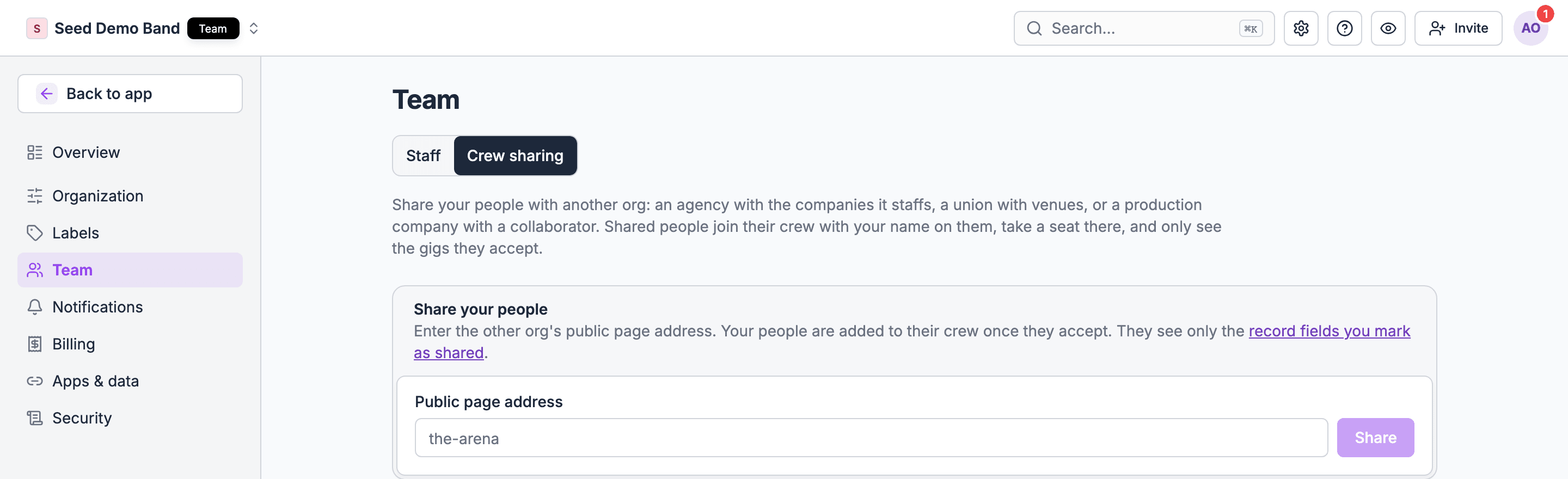
When the other company also uses Soundcheck, they can lend you their people directly.- A labor provider, agency, union or production company goes to Settings → Team → Crew sharing, enters your organization’s Public page address, and chooses Share. It starts once you accept.
- Shared people join your crew with their organization’s name on them and take a member seat in your organization. You staff them like any other crew.
- They see only the gigs they accept with you, and you see only the crew record fields their organization marks as shared.
- Ending a share removes them, except from gigs they’re already booked on.
Working with the venue
When you’re the touring production and the venue uses Soundcheck too, share the gig with the venue’s production manager as a collaborator. Pick what they see: run of show sections, tasks, files, contacts and the venue. They can add the gig to their own organization so their team follows it. Collaborators never see your crew or any money. The venue then staffs its own house crew on its own copy of the show. Each organization staffs and pays its own people.Venues: one tool for every department
A venue can staff ushers, security, bar staff, box office and stagehands in the same place. Positions can be any job you book, so create Usher, Security, Bartender and Stagehand alongside A1 and L1, and staff each event with shifts. Use departments (early access) to group front-of-house and technical staff.Unions
Soundcheck doesn’t connect to a union hall today. It doesn’t send labor orders to a dispatcher, receive the names they send back, hold union rate tables, or calculate union labor estimates. Here’s how operators model union calls with what’s available:
Union wages, overtime, meal penalties and minimum calls vary by local and contract. For how to handle overtime on hours your own crew clock, see Overtime and union rules.
What Soundcheck doesn’t do here
- Labor requests to a venue or provider. You can’t send a head-count request that the venue or provider fills with names inside Soundcheck. Share the gig as a collaborator and agree the call outside it, or have them share their crew with you.
- Crew type. There’s no built-in touring, local or house label on a person. Use a crew record field, a department, or the shift name (Stagehand · Local).
- Yellow card checks. Soundcheck doesn’t compare your local call against a yellow card or rider. Check the house labor rows against the document yourself.
- A crew chief’s own list only. A crew chief given staffing access on a gig sees the whole board, not just their department. Crew on the gig see who else is on it, without anyone’s pay.
Worked example: an arena date on tour
Fictional example. Northbound Productions has a 12-person touring crew playing an arena with an IATSE house.- Their Arena day team template includes labor lines: Carpenters, Electrics, Audio, Riggers and Loaders, with hands for load-in, show and load-out. They apply it with Use a team, and a House labor section appears on the board. They adjust Riggers to 8 up and 4 down for this building.
- The touring crew are already on crew shifts covering the date with their tour rates.
- They add the arena’s production manager as a collaborator and share the run of show’s Load in and Show sections and the venue’s load-in notes.
- The local’s order confirmation goes on the Documents tab. The steward’s name and call go on the labor call through their AI assistant.
- On the day, crew open the gig on their phones and see their own call, the Labor call card, and the run of show.
- After the show, the arena’s labor bill goes into the gig’s ledger as a line item, so the date’s real cost is in one place.
Questions this page answers
- Can I staff a gig with my touring crew, the venue’s house crew and hired local crew together?
- Can I send a labor request to a venue or labor provider?
- As a venue, can I see the labor call for an incoming show and staff it from my house crew?
- Can I track local crew I don’t pay directly?
- Can I check the local call against the yellow card or rider?
- Can I see the labor bill a venue or provider will charge me?
- Can a local crew chief see only their own crew?
- Can I record which crew are union members and their local?
- Can I note a union minimum crew size?
- Can someone be touring crew for one show and local for another?
- Can a venue schedule ushers, security and bar staff in the same tool?
- How do I request crew from a union hall?
Related
Tours and multi-day staffing
Staffing a run of dates.
Overtime and union rules
Overtime on clocked hours, and modelling union terms.
Gig sharing
Share a gig with a venue or partner.