

When to use it
Add a line
1
Open the gig's Inventory tab
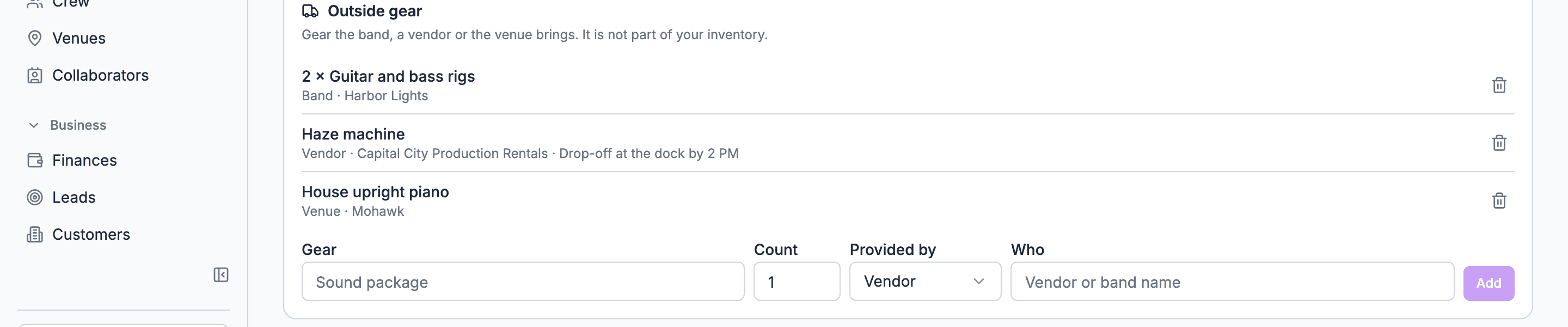
Scroll to Outside gear.
2
Name the gear
Type it under Gear, such as Sound package.
3
Set the count
Type a Count. A count of 1 doesn’t show on the line.
4
Say who brings it
Choose Provided by: Band, Vendor or Venue. It starts on Vendor.
5
Name them
Type Who, such as the vendor or band name.
6
Add it
Choose Add.
Limits
Copies and templates
Outside gear copies with the gig. Duplicating a gig, making a gig from a template, and swapping a gig’s template all carry its outside gear lines. Your own inventory doesn’t copy in the web app; see Which gigs hold gear.What outside gear doesn’t do
Outside gear is a list, on purpose. It keeps the gig’s paperwork complete without pretending you control the gear.- It isn’t in your inventory, so it has no stock, availability, Out or In.
- It has no cost. Put rental costs in the gig’s finances.
- It can’t be assigned to a person.
- Venue is a label. It isn’t linked to the venue record or its stages.
- It isn’t a sub-rental record. There’s no supplier record, purchase order, pickup or return date. Put pickup and return in the run of show.
Who can add and see it
- Add and remove: owners, admins and gig coordinators, on gigs that aren’t archived. On the sample gig, only on a plan with inventory.
- See on the web: people who can see the gig’s Inventory tab. When there are no lines, read-only viewers don’t see the section.
- See in the mobile app: managers see an Outside gear group on the gig’s inventory screen. Crew see it in the gig’s Show info, grouped by Band, Vendor and Venue. See Gear on mobile.
Related
Venue stages
House tech the venue always has.
The gig Inventory tab
Your own gear on the same tab.