

Questions this page answers
- Creating and publishing the page (12 questions)
- Privacy and who can see it (10 questions)
- Live schedule (11 questions)
- Status updates and announcements (9 questions)
- Song requests (13 questions)
- Tips and payments (6 questions)
- QR codes and signage (7 questions)
- Guest engagement (10 questions)
- On-screen and venue display (5 questions)
- Reliability and performance (6 questions)
- Data, compliance and pricing (11 questions)
Deal-breakers at a glance
These 14 questions decide most evaluations. Soundcheck meets the need on 8 (including two where the answer is that no limit or fee exists), partly meets it on 3, and doesn’t on 3.Worked example: a wedding band on a Saturday night
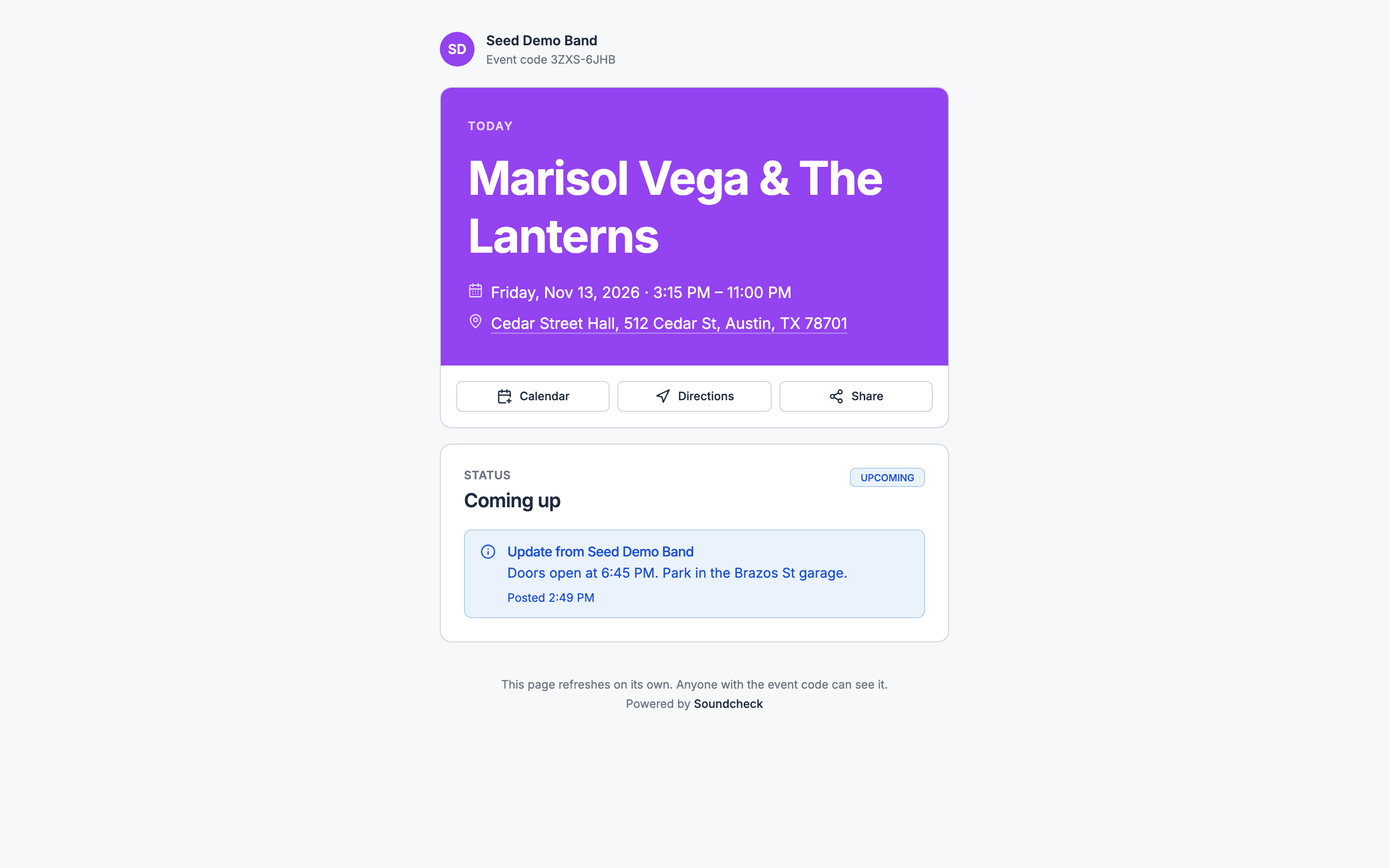
A wedding band’s manager runs a 150-guest reception: ceremony at 4:00 PM, cocktails, dinner, first dance at 7:15 PM and dancing until 11:00 PM. The band loads in at 1:00 PM and soundchecks at 2:30 PM. Here’s how the deal-breakers play out.Publish it from the gig
Share the code
Run late without editing every row
Tell the room something
Handle requests
Creating and publishing the page
1. Can I make a guest-facing page for a gig in a few minutes, from what's already in the gig?
1. Can I make a guest-facing page for a gig in a few minutes, from what's already in the gig?
3. Can I preview the page as a guest sees it before I publish?
3. Can I preview the page as a guest sees it before I publish?
4. Can I publish, unpublish and republish the page whenever I want?
4. Can I publish, unpublish and republish the page whenever I want?
5. Can I set a custom link, such as a short name for the event?
5. Can I set a custom link, such as a short name for the event?
HRBR-7Q4K, and you can’t choose it. Codes skip look-alike characters, so they’re easy to read out. See Codes and privacy.6. Can I put my company's or the client's logo, colours and cover photo on it?
6. Can I put my company's or the client's logo, colours and cover photo on it?
7. Can I use my own domain?
7. Can I use my own domain?
/live/ followed by the code. Link to it from your own site instead. See What guests see.8. Can I make a page for each day of a multi-day event, or one page for the whole event?
8. Can I make a page for each day of a multi-day event, or one page for the whole event?
9. Can I make the page from a template I've saved?
9. Can I make the page from a template I've saved?
10. Can the client edit their own page, such as a couple editing their wedding page?
10. Can the client edit their own page, such as a couple editing their wedding page?
11. Does the page work in other languages?
11. Does the page work in other languages?
12. Can I add custom sections, such as FAQs, parking, accommodation or a gift registry link?
12. Can I add custom sections, such as FAQs, parking, accommodation or a gift registry link?
Privacy and who can see it
13. Can I make the page private with a password?
13. Can I make the page private with a password?
14. Can I keep the page out of Google search results?
14. Can I keep the page out of Google search results?
15. Can I show different content to different audiences, such as guests, VIPs, vendors and crew?
15. Can I show different content to different audiences, such as guests, VIPs, vendors and crew?
16. Is there a separate view for crew with internal times that guests never see?
16. Is there a separate view for crew with internal times that guests never see?
17. Can I expire the link after the event?
17. Can I expire the link after the event?
18. Can I see how many people opened the page?
18. Can I see how many people opened the page?
19. Can I revoke a link that leaked and issue a new one?
19. Can I revoke a link that leaked and issue a new one?
20. Does the page hide private details, such as the client's phone number, the crew list and costs, by default?
20. Does the page hide private details, such as the client's phone number, the crew list and costs, by default?
21. Can guests view it without making an account or downloading an app?
21. Can guests view it without making an account or downloading an app?
/live with the code. Nobody signs in. See What guests see.Buyers ask this first.22. If the venue address is secret until the day, can I reveal it at a set time?
22. If the venue address is secret until the day, can I reveal it at a set time?
Live schedule
23. Does the page show the schedule from the run of show and update automatically when I change it?
23. Does the page show the schedule from the run of show and update automatically when I change it?
24. Can I choose which run-of-show items appear publicly and rename them for guests?
24. Can I choose which run-of-show items appear publicly and rename them for guests?
25. Does it show what's happening now and what's next?
25. Does it show what's happening now and what's next?
26. Does it show times in the event's local time zone, whatever the guest's phone is set to?
26. Does it show times in the event's local time zone, whatever the guest's phone is set to?
27. If we run late, can the page show updated times without me editing every item?
27. If we run late, can the page show updated times without me editing every item?
28. Can I show set times for each act or stage at a festival or club night?
28. Can I show set times for each act or stage at a festival or club night?
29. Can guests build a personal schedule or favourite the sessions they want?
29. Can guests build a personal schedule or favourite the sessions they want?
30. Can guests add an item to their calendar?
30. Can guests add an item to their calendar?
31. Can I show a countdown to the next moment, such as the first dance, doors or the headliner?
31. Can I show a countdown to the next moment, such as the first dance, doors or the headliner?
32. Can I display the schedule on a screen at the venue, full-screen?
32. Can I display the schedule on a screen at the venue, full-screen?
33. Can I show several stages or rooms side by side?
33. Can I show several stages or rooms side by side?
Status updates and announcements
34. Can I post a live announcement, such as "Dinner is served" or "Shuttle leaves in 10 minutes", to the page?
34. Can I post a live announcement, such as "Dinner is served" or "Shuttle leaves in 10 minutes", to the page?
35. Can guests get a push notification or text when I post an update?
35. Can guests get a push notification or text when I post an update?
36. Can guests choose to receive or mute updates?
36. Can guests choose to receive or mute updates?
37. Can I schedule announcements ahead of time?
37. Can I schedule announcements ahead of time?
38. Can I post an urgent alert, such as weather, evacuation or a venue change, that shows at the top?
38. Can I post an urgent alert, such as weather, evacuation or a venue change, that shows at the top?
39. Can I pin an announcement?
39. Can I pin an announcement?
40. Can I see who has seen an announcement?
40. Can I see who has seen an announcement?
41. Can a stage manager post updates from a phone during the show?
41. Can a stage manager post updates from a phone during the show?
42. Can I avoid flooding guests with too many notifications?
42. Can I avoid flooding guests with too many notifications?
Song requests
43. Can guests request songs from the page?
43. Can guests request songs from the page?
44. Can requests be limited to the band's repertoire or the DJ's library?
44. Can requests be limited to the band's repertoire or the DJ's library?
45. Can I turn requests on and off during the night?
45. Can I turn requests on and off during the night?
46. Can I add a do-not-play list so those songs can't be requested?
46. Can I add a do-not-play list so those songs can't be requested?
47. Can guests upvote others' requests, so I see what the room wants?
47. Can guests upvote others' requests, so I see what the room wants?
48. Can I see requests on my phone or tablet on stage in real time?
48. Can I see requests on my phone or tablet on stage in real time?
49. Can I mark a request as played, queued or declined?
49. Can I mark a request as played, queued or declined?
50. Can the couple or client pre-request songs before the event, and can I see those separately?
50. Can the couple or client pre-request songs before the event, and can I see those separately?
51. Can guests leave a dedication or message with a request?
51. Can guests leave a dedication or message with a request?
52. Can I stop spam or repeated requests from one guest?
52. Can I stop spam or repeated requests from one guest?
53. Can I export the requests afterwards?
53. Can I export the requests afterwards?
54. Do requests feed into the setlist or the run of show?
54. Do requests feed into the setlist or the run of show?
55. Can I send played requests to Spotify or a playlist?
55. Can I send played requests to Spotify or a playlist?
Tips and payments
56. Can guests tip the band or DJ from the page?
56. Can guests tip the band or DJ from the page?
57. Can a tip be attached to a song request?
57. Can a tip be attached to a song request?
58. Where does the tip money go, and what fee does the platform take?
58. Where does the tip money go, and what fee does the platform take?
59. Can I connect my own Venmo, Cash App, PayPal or Stripe?
59. Can I connect my own Venmo, Cash App, PayPal or Stripe?
60. Can I see tips per event and export them for tax?
60. Can I see tips per event and export them for tax?
61. Can I turn tipping off for a corporate or private event where it isn't appropriate?
61. Can I turn tipping off for a corporate or private event where it isn't appropriate?
QR codes and signage
62. Can I generate a QR code for the page?
62. Can I generate a QR code for the page?
63. Can I download the QR in print quality (PNG, SVG, PDF)?
63. Can I download the QR in print quality (PNG, SVG, PDF)?
64. Can I have one permanent QR code that always points to my current event?
64. Can I have one permanent QR code that always points to my current event?
65. Can I print a table card or poster with the QR and instructions?
65. Can I print a table card or poster with the QR and instructions?
66. Can I make different QR codes for different areas, such as tables, bar and stage, and see which gets scanned?
66. Can I make different QR codes for different areas, such as tables, bar and stage, and see which gets scanned?
67. Will the QR still work if I change the page's link?
67. Will the QR still work if I change the page's link?
68. Can I put the QR code on an invitation for pre-event requests?
68. Can I put the QR code on an invitation for pre-event requests?
Guest engagement
70. Can guests RSVP or confirm attendance from the page?
70. Can guests RSVP or confirm attendance from the page?
71. Can guests see a seating chart or find their table?
71. Can guests see a seating chart or find their table?
72. Can guests answer a poll or Q&A during a session?
72. Can guests answer a poll or Q&A during a session?
73. Can guests leave a guestbook message?
73. Can guests leave a guestbook message?
74. Can guests see a map of the venue with key areas marked?
74. Can guests see a map of the venue with key areas marked?
76. Can guests see speaker or performer bios?
76. Can guests see speaker or performer bios?
77. Can guests rate the event afterwards?
77. Can guests rate the event afterwards?
78. Can I show sponsor logos on the page?
78. Can I show sponsor logos on the page?
On-screen and venue display
79. Can I put the live schedule or now-playing on a TV or projector at the venue?
79. Can I put the live schedule or now-playing on a TV or projector at the venue?
80. Can I show song requests or a photo wall on a screen?
80. Can I show song requests or a photo wall on a screen?
81. Can I add the page as a browser source in OBS or a streaming tool?
81. Can I add the page as a browser source in OBS or a streaming tool?
82. Does the display recover on its own if the venue Wi-Fi drops?
82. Does the display recover on its own if the venue Wi-Fi drops?
83. Can I show the timer or a "starting soon" screen?
83. Can I show the timer or a "starting soon" screen?
Reliability and performance
84. Will the page hold up when 2,000 people scan the QR at once?
84. Will the page hold up when 2,000 people scan the QR at once?
85. Does the page load fast on a weak phone signal?
85. Does the page load fast on a weak phone signal?
86. Does it work on old phones and every browser?
86. Does it work on old phones and every browser?
87. Is the page accessible to screen readers and colour-blind guests?
87. Is the page accessible to screen readers and colour-blind guests?
88. What happens to the page if your service goes down during my event?
88. What happens to the page if your service goes down during my event?
89. Does the page show the last known schedule if the guest's signal drops?
89. Does the page show the last known schedule if the guest's signal drops?
Data, compliance and pricing
90. What guest data does the page collect, and who owns it?
90. What guest data does the page collect, and who owns it?
92. Can I collect guest emails for follow-up, with consent?
92. Can I collect guest emails for follow-up, with consent?
93. Are minors' data or photos handled differently?
93. Are minors' data or photos handled differently?
94. Can I delete all guest data after the event?
94. Can I delete all guest data after the event?
95. Is the live page included in my plan or an add-on?
95. Is the live page included in my plan or an add-on?
96. Is there a limit on guest views or connections?
96. Is there a limit on guest views or connections?
97. Can I white-label the page so it doesn't show your brand?
97. Can I white-label the page so it doesn't show your brand?
98. Can an agency run pages for many clients from one account?
98. Can an agency run pages for many clients from one account?
99. Can the page be linked from the client's own website or app?
99. Can the page be linked from the client's own website or app?
100. Is there an API or AI assistant connection to update the page?
100. Is there an API or AI assistant connection to update the page?
get_live_page: whether it’s published, its link, delay, note and sections. They can’t publish or update it; post updates in the Soundcheck web or app. See MCP capability catalog.