

Questions this page answers
- Quotes and estimates (15 questions)
- Taxes on quotes and invoices (8 questions)
- Invoicing (12 questions)
- Deposits, retainers and payment schedules (10 questions)
- Taking payments (13 questions)
- Refunds, cancellations and disputes (7 questions)
- Changes, overtime and extras (5 questions)
- Expenses, costs and profit per event (10 questions)
- Paying crew and contractors (13 questions)
- Artist deals and offers (8 questions)
- Show settlement (10 questions)
- Agency commission and splits (7 questions)
- Tour accounting (6 questions)
- Accounting sync (11 questions)
- Reporting (5 questions)
- International and withholding (3 questions)
- Permissions, audit and pricing (5 questions)
Deal-breakers at a glance
These 26 questions decide most evaluations. Soundcheck answers Yes to 7, Partly to 12 and No to 7.Worked example: a wedding band’s booking, from deposit to settled
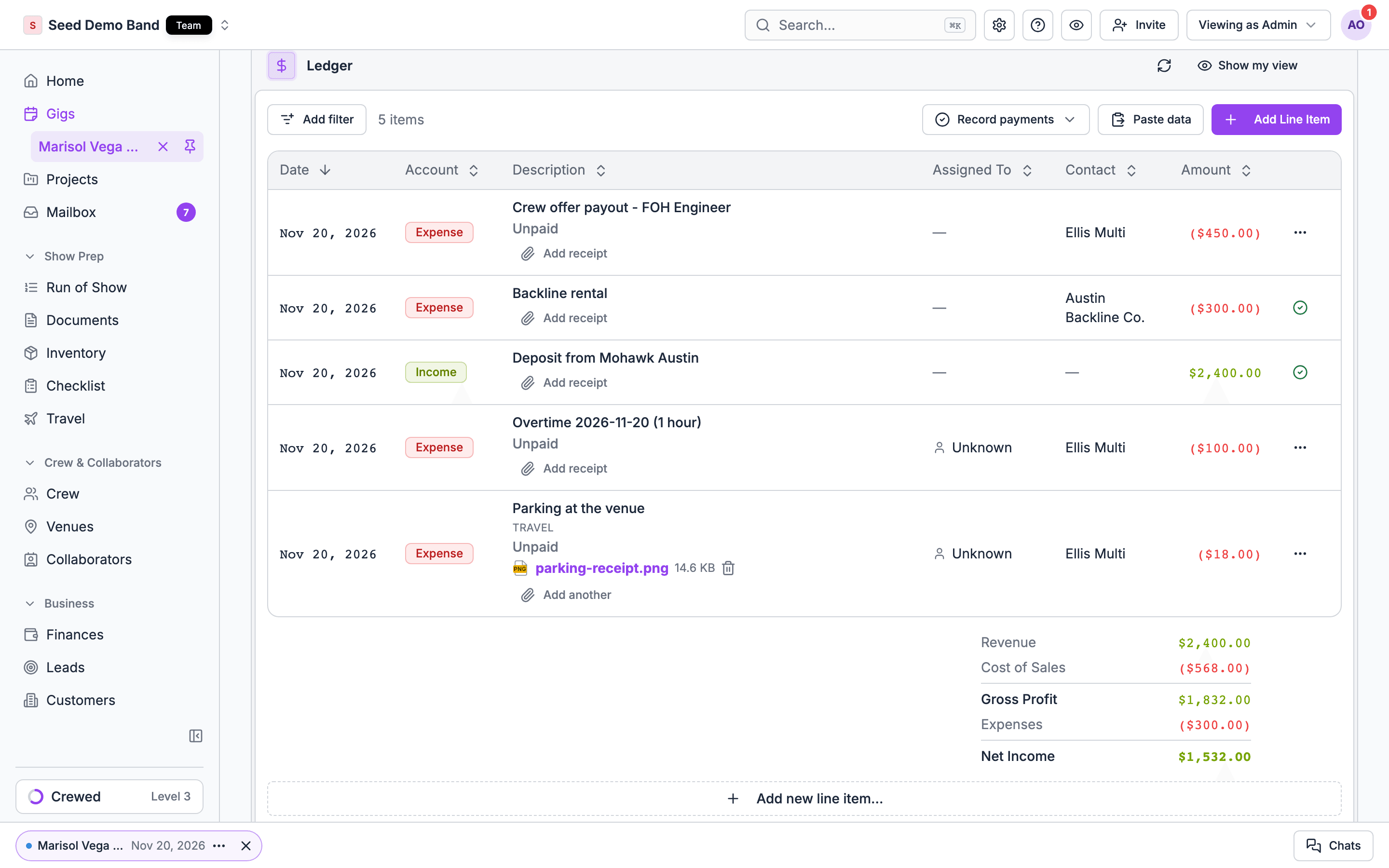
A wedding band agency books a 5-piece band for a Saturday reception at $8,000, with a 50% deposit on signing and the balance due 14 days before. On the night, the couple asks for an extra half hour. Here’s how the deal-breakers play out.Set the price and the schedule
Invoice the deposit
Record the money
Bill the extra half hour
Pay the band
Settle
Quotes and estimates
1. Can I build a quote from my own catalog of services, packages, gear and labor rates, instead of typing every line?
1. Can I build a quote from my own catalog of services, packages, gear and labor rates, instead of typing every line?
2. Can I sell packages (a “Gold” wedding package, a stage package) that expand into their parts on the quote?
2. Can I sell packages (a “Gold” wedding package, a stage package) that expand into their parts on the quote?
3. Can I set different rates for different clients, seasons or job types (rate cards)?
3. Can I set different rates for different clients, seasons or job types (rate cards)?
4. Can I price by the hour, by the day, by the show, by the person or flat?
4. Can I price by the hour, by the day, by the show, by the person or flat?
5. Can I apply a day rate rule for rentals, for example a 3-day job billed as 1.5 days?
5. Can I apply a day rate rule for rentals, for example a 3-day job billed as 1.5 days?
6. Does labor pricing handle overtime, minimum calls and travel time automatically?
6. Does labor pricing handle overtime, minimum calls and travel time automatically?
7. Can I add discounts per line or for the whole quote, as a percentage or an amount?
7. Can I add discounts per line or for the whole quote, as a percentage or an amount?
8. Can I show optional add-ons the client can accept or decline?
8. Can I show optional add-ons the client can accept or decline?
9. Can I see my cost and margin on each line while I build the quote, without the client seeing it?
9. Can I see my cost and margin on each line while I build the quote, without the client seeing it?
11. Can a quote expire, and can I follow up automatically before it does?
11. Can a quote expire, and can I follow up automatically before it does?
12. Can someone approve a quote before it goes out, for example when the discount is above a limit or the margin is below one?
12. Can someone approve a quote before it goes out, for example when the discount is above a limit or the margin is below one?
13. Can I duplicate last year's quote for a repeat client and update the prices?
13. Can I duplicate last year's quote for a repeat client and update the prices?
14. Can the quote show a payment schedule (deposit, then balance) that becomes real invoices when the client accepts?
14. Can the quote show a payment schedule (deposit, then balance) that becomes real invoices when the client accepts?
15. Can the client accept the quote and sign the contract in one step?
15. Can the client accept the quote and sign the contract in one step?
Taxes on quotes and invoices
16. Can I charge sales tax, VAT or GST, and set the rate per location?
16. Can I charge sales tax, VAT or GST, and set the rate per location?
17. Can I mark some lines taxable and others not, for example equipment rental taxable but labor exempt?
17. Can I mark some lines taxable and others not, for example equipment rental taxable but labor exempt?
18. Can I record a client's tax-exempt status and certificate (non-profits, schools, resale)?
18. Can I record a client's tax-exempt status and certificate (non-profits, schools, resale)?
19. Can I show prices with tax included or added on top?
19. Can I show prices with tax included or added on top?
20. Does it handle several tax rates on one invoice (state plus city or county)?
20. Does it handle several tax rates on one invoice (state plus city or county)?
21. Can it work out tax automatically from the venue address, or do I set it by hand?
21. Can it work out tax automatically from the venue address, or do I set it by hand?
22. Does the tax on my invoices match the tax codes in my accounting software when it syncs?
22. Does the tax on my invoices match the tax codes in my accounting software when it syncs?
23. Can I charge a service charge or gratuity (venues and catering) and set whether it's taxable?
23. Can I charge a service charge or gratuity (venues and catering) and set whether it's taxable?
Invoicing
24. Can I create an invoice straight from the accepted quote or the event?
24. Can I create an invoice straight from the accepted quote or the event?
25. Can I split an event into several invoices: deposit, progress payments, final balance, overtime?
25. Can I split an event into several invoices: deposit, progress payments, final balance, overtime?
26. Can I bill one client for many events on one invoice (a monthly statement for a venue or agency client)?
26. Can I bill one client for many events on one invoice (a monthly statement for a venue or agency client)?
27. Can I send an invoice to a different party than the client, such as the client's accounts payable team or a third-party payer?
27. Can I send an invoice to a different party than the client, such as the client's accounts payable team or a third-party payer?
28. Can I add a purchase order (PO) number and the client's cost center?
28. Can I add a purchase order (PO) number and the client's cost center?
29. Can I set payment terms like Net 30, and late fees?
29. Can I set payment terms like Net 30, and late fees?
30. Does the invoice number sequence match my accounting system?
30. Does the invoice number sequence match my accounting system?
31. Can I send automatic payment reminders before and after the due date?
31. Can I send automatic payment reminders before and after the due date?
32. Can invoices carry my logo and payment instructions, and come out as a PDF?
32. Can invoices carry my logo and payment instructions, and come out as a PDF?
33. Can I issue a credit note or partial credit instead of editing a paid invoice?
33. Can I issue a credit note or partial credit instead of editing a paid invoice?
34. Can I re-issue or void an invoice and keep the history?
34. Can I re-issue or void an invoice and keep the history?
35. Can I invoice in a currency other than my own?
35. Can I invoice in a currency other than my own?
Deposits, retainers and payment schedules
36. Can I require a deposit to confirm a booking, and hold the date only once it is paid?
36. Can I require a deposit to confirm a booking, and hold the date only once it is paid?
37. Can the deposit be a percentage or a fixed amount?
37. Can the deposit be a percentage or a fixed amount?
38. Can I set a payment schedule with several installments and dates tied to the event date (for example 50% at booking, 50% 14 days before)?
38. Can I set a payment schedule with several installments and dates tied to the event date (for example 50% at booking, 50% 14 days before)?
39. If the event date moves, do the installment due dates move with it?
39. If the event date moves, do the installment due dates move with it?
40. Can I call the first payment a retainer instead of a deposit, and say on the invoice whether it is refundable?
40. Can I call the first payment a retainer instead of a deposit, and say on the invoice whether it is refundable?
41. Can I take a refundable security or damage deposit for venues and rentals, and return it after the event?
41. Can I take a refundable security or damage deposit for venues and rentals, and return it after the event?
42. Can I set the final balance to be due before the event, and block show-day documents until it is paid?
42. Can I set the final balance to be due before the event, and block show-day documents until it is paid?
43. Can I see every booking whose deposit hasn't been paid?
43. Can I see every booking whose deposit hasn't been paid?
44. Can clients set up autopay for future installments?
44. Can clients set up autopay for future installments?
45. Can I accept a deposit by check or bank transfer and record it by hand?
45. Can I accept a deposit by check or bank transfer and record it by hand?
Taking payments
46. Can clients pay online by card, bank transfer (ACH) or Apple Pay / Google Pay from the invoice link?
46. Can clients pay online by card, bank transfer (ACH) or Apple Pay / Google Pay from the invoice link?
47. What are the processing fees for card and for ACH, and are they the same for every plan?
47. What are the processing fees for card and for ACH, and are they the same for every plan?
48. Can I pass the card fee on to the client as a surcharge, and is that legal in my state?
48. Can I pass the card fee on to the client as a surcharge, and is that legal in my state?
49. Can I offer a discount for paying by bank transfer instead of adding a card surcharge?
49. Can I offer a discount for paying by bank transfer instead of adding a card surcharge?
50. How fast does money reach my bank, and is there an instant payout option?
50. How fast does money reach my bank, and is there an instant payout option?
51. Which payment processor is it (Stripe, PayPal, Square, their own), and can I use my own merchant account?
51. Which payment processor is it (Stripe, PayPal, Square, their own), and can I use my own merchant account?
52. Is there a limit on how much a client can pay by card in one transaction?
52. Is there a limit on how much a client can pay by card in one transaction?
53. Can I take a payment in person at the event (card reader, tap to pay)?
53. Can I take a payment in person at the event (card reader, tap to pay)?
54. Can I record cash, check, wire and Venmo or Zelle payments against an invoice?
54. Can I record cash, check, wire and Venmo or Zelle payments against an invoice?
55. Can I route payments to different bank accounts, for example per brand, per artist or per company?
55. Can I route payments to different bank accounts, for example per brand, per artist or per company?
56. Can clients pay with buy-now-pay-later?
56. Can clients pay with buy-now-pay-later?
57. Does the payment page meet card security rules (PCI) so I never handle card numbers?
57. Does the payment page meet card security rules (PCI) so I never handle card numbers?
58. Can I keep a card on file to charge for overtime or damages after the event, with the client's consent?
58. Can I keep a card on file to charge for overtime or damages after the event, with the client's consent?
Refunds, cancellations and disputes
59. Can I issue a full or partial refund from the tool, and does it update the invoice and my books?
59. Can I issue a full or partial refund from the tool, and does it update the invoice and my books?
60. When a client cancels, can the tool work out what they owe or get back under the contract's cancellation schedule?
60. When a client cancels, can the tool work out what they owe or get back under the contract's cancellation schedule?
61. Can I keep a cancellation fee and refund the rest in one step?
61. Can I keep a cancellation fee and refund the rest in one step?
62. If an event is postponed, can paid amounts carry over to the new date without refunding?
62. If an event is postponed, can paid amounts carry over to the new date without refunding?
63. Can I issue credit for a future booking instead of a refund?
63. Can I issue credit for a future booking instead of a refund?
64. What happens when a client disputes a card payment (chargeback)? Who handles it, and can I submit the signed contract as evidence?
64. What happens when a client disputes a card payment (chargeback)? Who handles it, and can I submit the signed contract as evidence?
65. Is the processing fee returned when I refund?
65. Is the processing fee returned when I refund?
Changes, overtime and extras
66. When the client adds services after booking, can I add them to the next invoice or send a new one?
66. When the client adds services after booking, can I add them to the next invoice or send a new one?
67. Can I bill overtime from the actual times worked on show day?
67. Can I bill overtime from the actual times worked on show day?
68. Can crew log extra hours or expenses on site that I can then bill to the client?
68. Can crew log extra hours or expenses on site that I can then bill to the client?
69. Can I bill damages or lost gear after the event?
69. Can I bill damages or lost gear after the event?
70. Can I see the original quote against the final bill, line by line?
70. Can I see the original quote against the final bill, line by line?
Expenses, costs and profit per event
71. Can I record costs against an event: crew, sub-rentals, travel, hotels, catering, permits, freelancers?
71. Can I record costs against an event: crew, sub-rentals, travel, hotels, catering, permits, freelancers?
72. Can I see budgeted cost against actual cost, and the profit and margin per event?
72. Can I see budgeted cost against actual cost, and the profit and margin per event?
73. Can crew snap a photo of a receipt and submit it from their phone?
73. Can crew snap a photo of a receipt and submit it from their phone?
74. Can I approve or reject expense claims and reimburse them?
74. Can I approve or reject expense claims and reimburse them?
75. Can I mark an expense as billable to the client and add it to the invoice, with or without markup?
75. Can I mark an expense as billable to the client and add it to the invoice, with or without markup?
76. Can I track sub-rentals and sub-contractor bills against the job they were for?
76. Can I track sub-rentals and sub-contractor bills against the job they were for?
77. Can I issue purchase orders to suppliers from the event?
77. Can I issue purchase orders to suppliers from the event?
78. Can I see profit by client, event type, venue, month or salesperson?
78. Can I see profit by client, event type, venue, month or salesperson?
79. Does crew labor cost come in automatically from who worked and their rates?
79. Does crew labor cost come in automatically from who worked and their rates?
80. For planners: can I track the client's overall event budget (all vendors) separately from my own fee?
80. For planners: can I track the client's overall event budget (all vendors) separately from my own fee?
Paying crew and contractors
81. Can I see what I owe each crew member and freelancer per event, from their rate and hours?
81. Can I see what I owe each crew member and freelancer per event, from their rate and hours?
82. Can I pay crew from the tool (direct deposit, ACH), or do I export to payroll?
82. Can I pay crew from the tool (direct deposit, ACH), or do I export to payroll?
83. Who pays the fees on crew payouts?
83. Who pays the fees on crew payouts?
84. What is a payout funding method, and is it the same as my subscription card?
84. What is a payout funding method, and is it the same as my subscription card?
85. Can I handle employees (W-2) and contractors (1099) differently?
85. Can I handle employees (W-2) and contractors (1099) differently?
86. Can I collect W-9s before I pay a contractor, and block payment until I have one?
86. Can I collect W-9s before I pay a contractor, and block payment until I have one?
87. Can I produce the year-end totals per contractor for 1099-NEC filing, using the current threshold?
87. Can I produce the year-end totals per contractor for 1099-NEC filing, using the current threshold?
88. Can crew see what they've earned and when they'll be paid?
88. Can crew see what they've earned and when they'll be paid?
89. Can crew send me an invoice from their pay record?
89. Can crew send me an invoice from their pay record?
90. Can I pay a per diem or travel allowance and track it separately from wages?
90. Can I pay a per diem or travel allowance and track it separately from wages?
91. Can I handle union rates, fringes and pension contributions for union crew?
91. Can I handle union rates, fringes and pension contributions for union crew?
92. Can I see unpaid crew across all events, and mark crew as paid?
92. Can I see unpaid crew across all events, and mark crew as paid?
93. Does the tool help me tell whether a worker should be a contractor or an employee?
93. Does the tool help me tell whether a worker should be a contractor or an employee?
Artist deals and offers
94. Can I record the deal type: flat guarantee, guarantee versus a percentage, guarantee plus bonus, door deal, straight percentage?
94. Can I record the deal type: flat guarantee, guarantee versus a percentage, guarantee plus bonus, door deal, straight percentage?
96. Can I set whether the percentage is on gross or net ticket revenue, and what comes off first (taxes, facility fees, ticketing fees)?
96. Can I set whether the percentage is on gross or net ticket revenue, and what comes off first (taxes, facility fees, ticketing fees)?
97. Can I add bonuses tied to ticket sales tiers?
97. Can I add bonuses tied to ticket sales tiers?
98. Can I record buyer's expenses as fixed or capped, and planned against actual?
98. Can I record buyer's expenses as fixed or capped, and planned against actual?
99. Can I generate an offer sheet from the deal, and send it for acceptance?
99. Can I generate an offer sheet from the deal, and send it for acceptance?
100. Can I record co-promotions and how profit is split between promoters?
100. Can I record co-promotions and how profit is split between promoters?
101. Can I track holds and offers for the same date with different deal terms?
101. Can I track holds and offers for the same date with different deal terms?
Show settlement
102. Can I settle a show in the tool: gross ticket sales, taxes and fees, expenses, the guarantee, the percentage and the final amount owed?
102. Can I settle a show in the tool: gross ticket sales, taxes and fees, expenses, the guarantee, the percentage and the final amount owed?
103. Can I enter actual ticket counts and expenses on the night and see the settlement update?
103. Can I enter actual ticket counts and expenses on the night and see the settlement update?
104. Can I compare the promoter's expenses against the caps or amounts in the contract?
104. Can I compare the promoter's expenses against the caps or amounts in the contract?
105. Can I record deductions and advances already paid (deposit, buyouts, merch splits)?
105. Can I record deductions and advances already paid (deposit, buyouts, merch splits)?
106. Can both sides sign off on the settlement, and keep the signed sheet?
106. Can both sides sign off on the settlement, and keep the signed sheet?
107. Can I produce a settlement for the artist that's different from the internal one (for example hiding my margin)?
107. Can I produce a settlement for the artist that's different from the internal one (for example hiding my margin)?
108. Can I add adjustments after the show, such as a late ticket report or a refund?
108. Can I add adjustments after the show, such as a late ticket report or a refund?
109. Can I settle merch (merchandise) sales and the venue's merch cut?
109. Can I settle merch (merchandise) sales and the venue's merch cut?
110. Can I record how the settlement was paid (cash, check, wire) and reconcile it later?
110. Can I record how the settlement was paid (cash, check, wire) and reconcile it later?
111. Can I settle from my phone?
111. Can I settle from my phone?
Agency commission and splits
112. Can I work out my agency commission automatically on every booking?
112. Can I work out my agency commission automatically on every booking?
113. Can commission be on the gross fee or after certain expenses (pre-commission expenses)?
113. Can commission be on the gross fee or after certain expenses (pre-commission expenses)?
114. Can I split commission between agents, or between my agency and a co-agent?
114. Can I split commission between agents, or between my agency and a co-agent?
116. Can I hold client money separately from my own (a trust or client account), as some states require for agencies?
116. Can I hold client money separately from my own (a trust or client account), as some states require for agencies?
117. Can I produce a statement for each artist showing bookings, fees, commission and payments?
117. Can I produce a statement for each artist showing bookings, fees, commission and payments?
Tour accounting
119. Can I keep a tour budget against actuals across every date?
119. Can I keep a tour budget against actuals across every date?
120. Can I track per diems paid to band and crew, and the cash float the tour manager carries?
120. Can I track per diems paid to band and crew, and the cash float the tour manager carries?
121. Can I record buyouts (cash instead of meals) received from promoters?
121. Can I record buyouts (cash instead of meals) received from promoters?
122. Can I see the tour's profit and loss as the tour goes, not only at the end?
122. Can I see the tour's profit and loss as the tour goes, not only at the end?
123. Can I handle per diems in a way that keeps them tax-free (an accountable plan), with the right rate per city?
123. Can I handle per diems in a way that keeps them tax-free (an accountable plan), with the right rate per city?
124. Can I record income in different currencies on an international tour and see it in my home currency?
124. Can I record income in different currencies on an international tour and see it in my home currency?
Accounting sync
125. Does it sync with QuickBooks Online, QuickBooks Desktop or Xero?
125. Does it sync with QuickBooks Online, QuickBooks Desktop or Xero?
126. What syncs: customers, invoices, payments, refunds, credit notes, expenses, bills?
126. What syncs: customers, invoices, payments, refunds, credit notes, expenses, bills?
127. Does it sync when the invoice is created, or only when it is paid?
127. Does it sync when the invoice is created, or only when it is paid?
128. Does it sync one way or both ways? If I mark an invoice paid in QuickBooks, does the tool know?
128. Does it sync one way or both ways? If I mark an invoice paid in QuickBooks, does the tool know?
129. Can I map my services to my accounting income accounts and classes?
129. Can I map my services to my accounting income accounts and classes?
130. How are processing fees recorded, so my bank deposits reconcile?
130. How are processing fees recorded, so my bank deposits reconcile?
131. How are deposits recorded: as income or as a liability until the event happens?
131. How are deposits recorded: as income or as a liability until the event happens?
132. Can I sync past invoices from before I connected?
132. Can I sync past invoices from before I connected?
133. What happens when a sync fails, and how do I fix it?
133. What happens when a sync fails, and how do I fix it?
134. Is there an export for accounting systems it doesn't connect to (Sage, MYOB, e-conomic)?
134. Is there an export for accounting systems it doesn't connect to (Sage, MYOB, e-conomic)?
135. Is the integration included or a paid add-on?
135. Is the integration included or a paid add-on?
Reporting
136. Can I see who owes me money and how overdue they are (accounts receivable aging)?
136. Can I see who owes me money and how overdue they are (accounts receivable aging)?
137. Can I see booked revenue by month for the coming year?
137. Can I see booked revenue by month for the coming year?
138. Can I see payments received this week or month?
138. Can I see payments received this week or month?
139. Can I export financial reports to a spreadsheet?
139. Can I export financial reports to a spreadsheet?
140. Can I see sales tax collected by location for filing?
140. Can I see sales tax collected by location for filing?
International and withholding
141. If I pay a foreign artist for a US show, does the tool help me withhold the 30% required, or record a Central Withholding Agreement?
141. If I pay a foreign artist for a US show, does the tool help me withhold the 30% required, or record a Central Withholding Agreement?
142. Can I record the exchange rate used on a foreign-currency invoice or payment?
142. Can I record the exchange rate used on a foreign-currency invoice or payment?
143. Can I invoice with VAT for clients in other countries, including reverse charge?
143. Can I invoice with VAT for clients in other countries, including reverse charge?
Permissions, audit and pricing
144. Can I control who sees money: fees, margins, crew rates and settlement?
144. Can I control who sees money: fees, margins, crew rates and settlement?
145. Can I limit who can issue refunds, discounts or change a paid invoice?
145. Can I limit who can issue refunds, discounts or change a paid invoice?
146. Is there a log of every change to an invoice, payment or settlement?
146. Is there a log of every change to an invoice, payment or settlement?
147. Are there extra fees per transaction on top of the processor's fees?
147. Are there extra fees per transaction on top of the processor's fees?
148. Is invoicing and payments included in every plan?
148. Is invoicing and payments included in every plan?