Each answer names the usual cause and the fix. If none of these match, contact support.
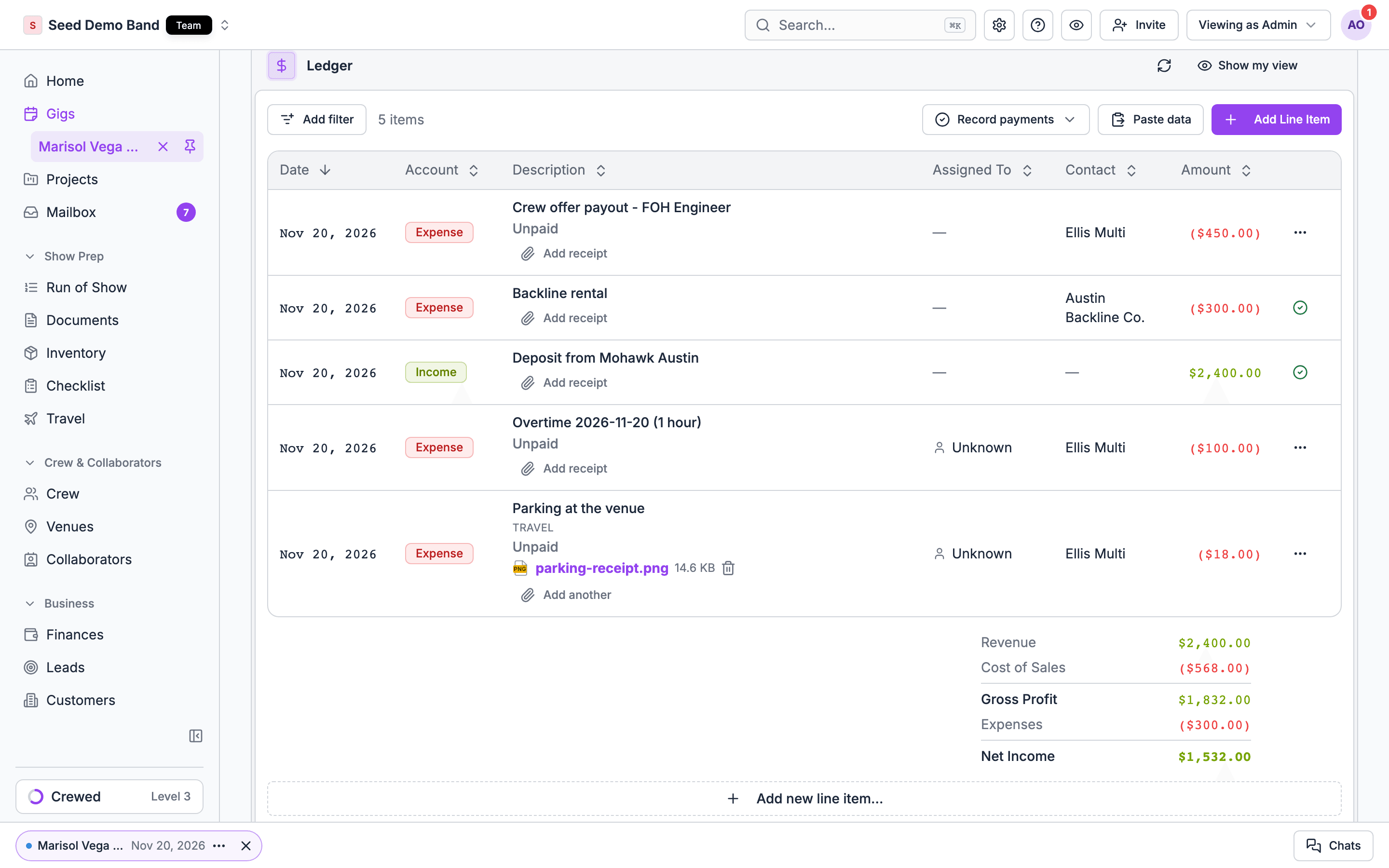
Ledger on a gig with income, expense and payout rows, their status and receipts, above the profit and loss totalsLedger on a gig with income, expense and payout rows, their status and receipts, above the profit and loss totals

The tab

Cause: Finances is part of the Pro plan and above.Fix: an owner upgrades under Settings → Billing → Plan. See Plans.
Cause: you don’t have financial access to this gig, so you see only your own pay and expenses.Fix: ask an Owner or Admin for finance access, or to assign you Finances on this gig. See Gig assignees.
Cause: those parts are for people who manage organization finances: Owners, Admins, Finance members and members with finance access. A gig Finances assignee sees the ledger, not the billing terms.Fix: ask an Owner or Admin for finance access.
Cause: the gig is archived, or the gig’s last day has passed. A gig’s money locks for everyone except Owners and Admins once the gig is over. This applies to every organization and isn’t a setting.Fix: archived gigs stay read-only. On a past gig, ask an Owner or Admin to make the change. See The past-gig lock.

Billing and invoices

Cause: the terms have no price, or the installments add up to more than the contract price.Fix: add a Contract price in Billing terms, or lower the installments in the Deal. See How the terms become charges.
Cause: the installment is due a number of days after signing, and the client hasn’t signed.Fix: none needed. The due date fills in once the client signs, or once you type a Signed date in billing terms.
Cause: it’s on a sent invoice.Fix: void that invoice first, then change it and invoice again. See Void an invoice or write off the balance.
Cause: an invoice bills a different amount than the terms, bills a charge the terms no longer include, or was edited after it was prepared.Fix: the message names the invoice. Void it and invoice the charge again, or change the terms back.
Cause: sent invoices can’t be edited.Fix: void it from the invoice’s actions menu and create a new one.
Cause: the invoice has no client email.Fix: add the client email to send it from Soundcheck, or send it yourself and choose Mark as sent.
The client portal doesn’t take payment. Choose Mark received… on the invoice row in the ledger, enter the method, amount and date, and save. See Record what the client paid.
Cause: client invoices and lines you add to the ledger are in US dollars (USD) only.Fix: enter the amount in USD. Soundcheck doesn’t convert currencies, so work out the USD amount with your bank’s rate and note the original amount in the memo or description.
Cause: sample gigs are for trying Soundcheck out, so their invoices can’t be created, edited or sent.Fix: duplicate the gig to bill a real client.
Cause: Card surcharge % in billing terms starts at 3.Fix: if you don’t surcharge card payments, set Card surcharge % to 0 in the gig’s billing terms. See The fields.
Cause: one overtime entry holds at most 48 hours.Fix: check the contracted and actual end times. A time on the wrong day often causes it. See Overtime limits.
Cause: partial payments stay in Soundcheck until a line is fully paid.Fix: none needed. QuickBooks shows the payment once the line is paid in full.

Payouts

Cause: they haven’t accepted, have nothing unpaid, or haven’t added a bank account for direct deposit. The row reads Member must add a bank account or Member must finish Stripe setup.Fix: ask them to finish payout setup from their profile. Pay everyone who’s ready without waiting.
Cause: your organization has no verified payout funding. The menu reads Add a bank account in Payments first or Add payout funding in Payments first.Fix: the Owner or a Finance member adds and verifies a bank account, or adds a card, under Settings → Billing → Payments. See Payments.
Cause: direct deposit is US dollars only, or no member on the gig is ready for it.Fix: check the gig’s currency, and that each member has a Ready bank account.
Cause: direct deposit takes 2–3 business days to settle.Fix: none needed. The status changes to Paid or Failed when it settles.
Cause: the bank or Stripe refused it.Fix: check the reason on the row, fix it, and choose Retry Payment. Use retry only if the original payment didn’t go through.
Cause: only the Owner and Finance members send payouts through Stripe or direct deposit. Admins and members with finance access record payments made outside Soundcheck.Fix: ask the Owner or a Finance member to send it, or pay outside Soundcheck and choose Mark as paid….
Cause: it belongs to an overtime entry.Fix: void the overtime entry and record it again. See Overtime.

Settling

Cause: at least one payout is unpaid or still processing.Fix: pay it, or record it with Mark as paid…, on the gig’s Finances tab. See Settling a gig.
Cause: your organization enforces the close-out checklist, and steps are still open.Fix: finish them on the Closeout tab, or an Owner or Admin uses Override & settle with a reason. The override skips the checklist, never the payouts.

Crew pay

That’s by design. Hourly pay always shows as a rate, such as $45/hr. The payable is the rate times the scheduled hours, or the approved hours where your organization uses the time clock. See Hourly shifts.
That’s by design. A crew member sees the shift’s rate and their own pay. See Who sees crew pay.
The expense stays saved. Retry the upload without submitting the expense again. Receipts can be JPEG, PNG, HEIC or PDF, up to 10 MB each.
Cause: the app only takes expenses you’ve already paid.Fix: pick the day you paid, today or earlier.
Cause: Soundcheck doesn’t notify managers about submitted expenses, crew invoices or failed payouts.Fix: check the gig’s Finances tab, or Payouts under Business → Finances, after each show.

Finances

Start here for the whole tab.

Payouts

Sending and recording payouts.

Finances FAQ

What buyers and finance teams ask about Finances.