Each answer names the usual cause and the fix. If none of these match, contact support.
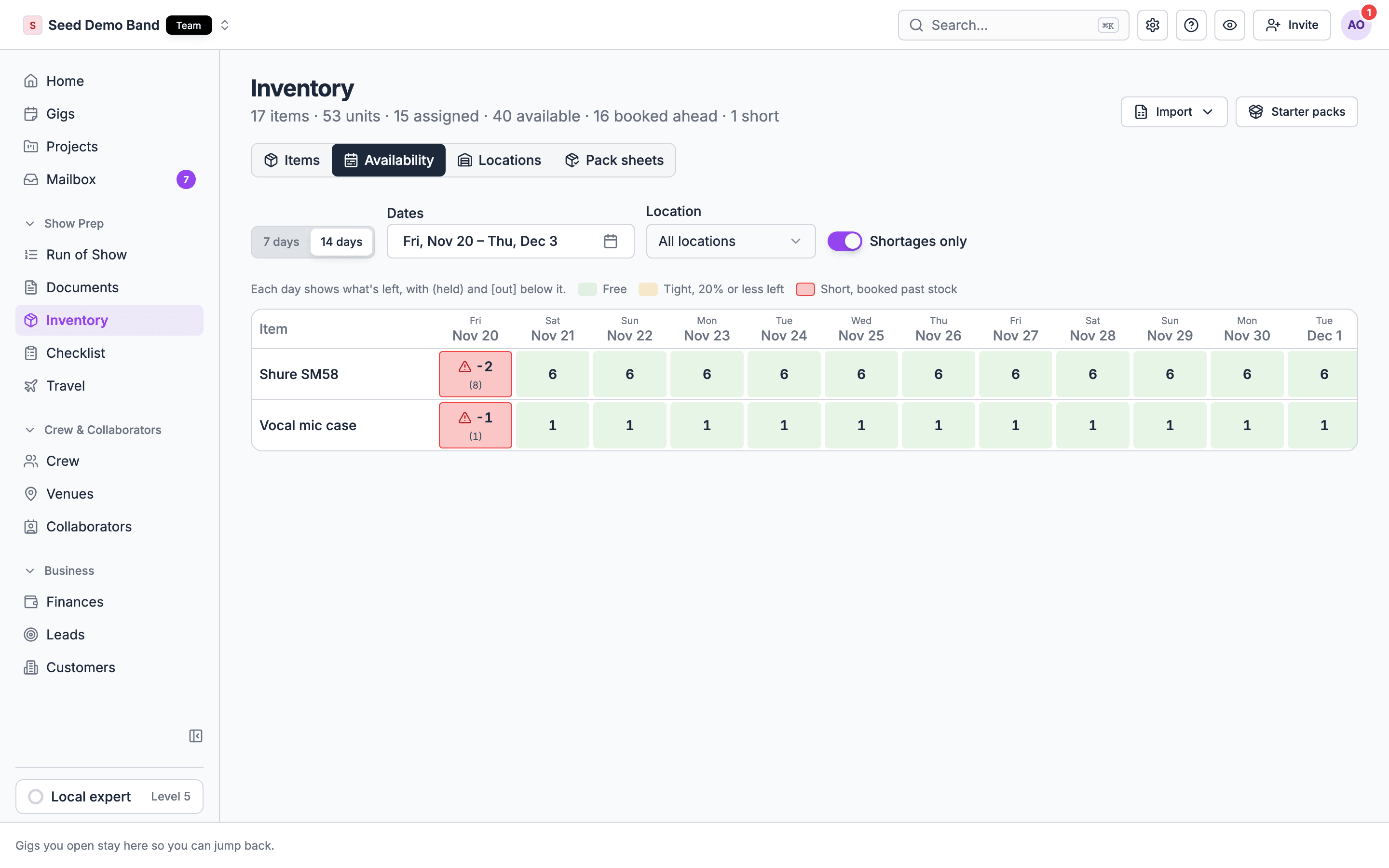
Availability board with items down the side, days across the top and the short days markedAvailability board with items down the side, days across the top and the short days marked
Asking whether Soundcheck can do something, such as scanning, sub-rentals or maintenance schedules? See the Gear FAQ. For what a rental or AV term means in Soundcheck, see the Gear glossary.

Access

Cause: the tab is for owners, admins and gig coordinators, and crew never see it. It also hides while you preview the gig as a member.Fix: ask an owner or admin for gig management access, or leave the member preview.
Cause: your plan doesn’t include inventory. Inventory is a Team plan feature; organizations on Pro keep it for now.Fix: upgrade, or open the sample gig to see a Sample gear preview.
Cause: your role can’t manage gigs.Fix: ask an owner or admin. Owners, admins and gig coordinators can open Inventory.
Cause: only owners and admins can import a spreadsheet.Fix: ask an owner or admin, or add items with Add item or Starter packs.
Cause: the import review is in early access and isn’t on for your organization yet.Fix: email info@soundchecklive.io to ask for it. Meanwhile, use Start from a pack or Add item.

Adding gear

Cause: the gig is a draft. A draft has no inventory at all.Fix: activate the gig, then add what needs to go out. See Which gigs hold gear.
Cause: in the web app, duplicates, template copies and repeated dates start as drafts, and a draft carries no inventory. The gig’s Outside gear lines do copy.Fix: activate the new gig and add the gear. To make this one line, build your standard set as a Bundle kit. See Kits, cases, and accessories.
Cause: drafts, templates, cancelled and archived gigs, and the sample gig, aren’t listed. Active, completed and settled gigs are; past gigs are under Past gigs.Fix: activate the gig first, or add the gear from the gig’s Inventory tab once it’s active.
Cause: you asked for more than is free on this gig’s dates.Fix: lower the quantity, or free some up on the other gig. See Fix a shortage.
Cause: adding an item that’s already planned on the gig, and hasn’t gone out, raises that line.Fix: to keep two lines, give them a different Ships from location or different notes.
Cause: contents book with the kit and can’t be removed on their own.Fix: change or remove the kit’s line.

Availability

Cause: the items list shows what’s free today. The gig checks its own dates. Gear booked only for a future gig still counts as available today.Fix: check the item’s Availability section or the Availability tab for the gig’s dates.
Cause: a past gig still has it ticked Out. Gear stays out until someone ticks In.Fix: open that gig (the Short line names it) or the Coming back pack sheet, and tick In.
Cause: cancelling frees only gear that isn’t packed out. Gear ticked Out counts until it’s ticked In.Fix: tick In when it comes back.
Cause: the availability check failed, so shortages may be missing or out of date.Fix: choose Try again.
Cause: units in maintenance can’t be booked, and a unit can’t be on two overlapping bookings.Fix: pick another unit, or change the unit’s status when it’s fixed.

Packing

Cause: In stays locked until the line is Out.Fix: tick Out first.
Cause: Out stays locked while a line is in.Fix: untick In first, then Out.
Cause: the line is packed out. The editor says “Packed out. Untick it to change the quantity.”Fix: untick Out, change the quantity, then tick it again.
Cause: the gig’s return day has passed and some lines are still Out.Fix: tick In for what came back. Chase the rest.

Outside gear and mobile

Cause: the web form adds and removes lines but doesn’t edit them.Fix: remove the line and add it again.
That’s by design. Outside gear isn’t part of your inventory, so it has no stock, availability, Out or In. See Outside gear.
Cause: the app ticks gear out and in. Adding, editing and removing lines happen on the web.Fix: choose Edit inventory on web. See Gear on mobile.
Both mean the same thing: the gig is out of draft. A draft gig holds no gear.
Cause: you’re offline. Ticks need a connection and aren’t queued.Fix: tick once you’re back on Wi-Fi or mobile data. See Offline and weak signal.
That’s expected. Gear sends no push, email or in-app notifications. Check the gig’s open items, the Short badge on the Gigs list, and Late and Overdue on the Pack sheets tab.
Cause: deleting an item removes its lines on every gig, even gear that’s packed out, and its booking history. It can’t be undone.Fix: add the item again and book it back onto the gig. Next time, mark retired or lost gear out of service instead of deleting it. See Delete items.
Cause: Soundcheck stores the tick, not who made it, and ticks aren’t in the Audit log.Fix: if you need a record, add the name to the line’s Notes.

Gear FAQ

What Gear can and can’t do.

Gear glossary

Rental and AV terms, mapped to Soundcheck.