

Questions this page answers
- Contract templates and building a contract (15 questions)
- Sending and signing (17 questions)
- Legal validity and the audit trail (11 questions)
- Proposals and the quote-to-contract flow (9 questions)
- Riders, tech packs and advance documents (10 questions)
- Forms and intake questionnaires (13 questions)
- Client portal and sharing (8 questions)
- File storage and organization (11 questions)
- Branded PDFs and printing (7 questions)
- Insurance, permits and compliance documents (8 questions)
- Crew, vendor and sub-contractor agreements (6 questions)
- Changes, amendments and cancellations (7 questions)
- Permissions, privacy and security (6 questions)
- Importing, switching and integrations (4 questions)
- Pricing and limits (2 questions)
Deal-breakers at a glance
These 24 questions decide most evaluations. Soundcheck answers Yes to 5, Partly to 17 and No to 2.Worked example: a wedding band books a Saturday reception
A 10-piece wedding band books a reception at a hotel ballroom. The couple wants a contract, a planning questionnaire, a must-play and do-not-play list, and a final music schedule two weeks out. Here’s how the paperwork runs in Soundcheck.Send the contract
{{client_name}}, {{event_date}}, {{venue_name}}, {{contract_price}}, {{deposit_amount}} and {{balance_due}} in place (questions 1 and 2). On the gig’s Documents tab, choose Send under Agreements, start from the template, and send it to the couple’s contact. Leave Sign for your company now off (question 19).Countersign once the deposit is in
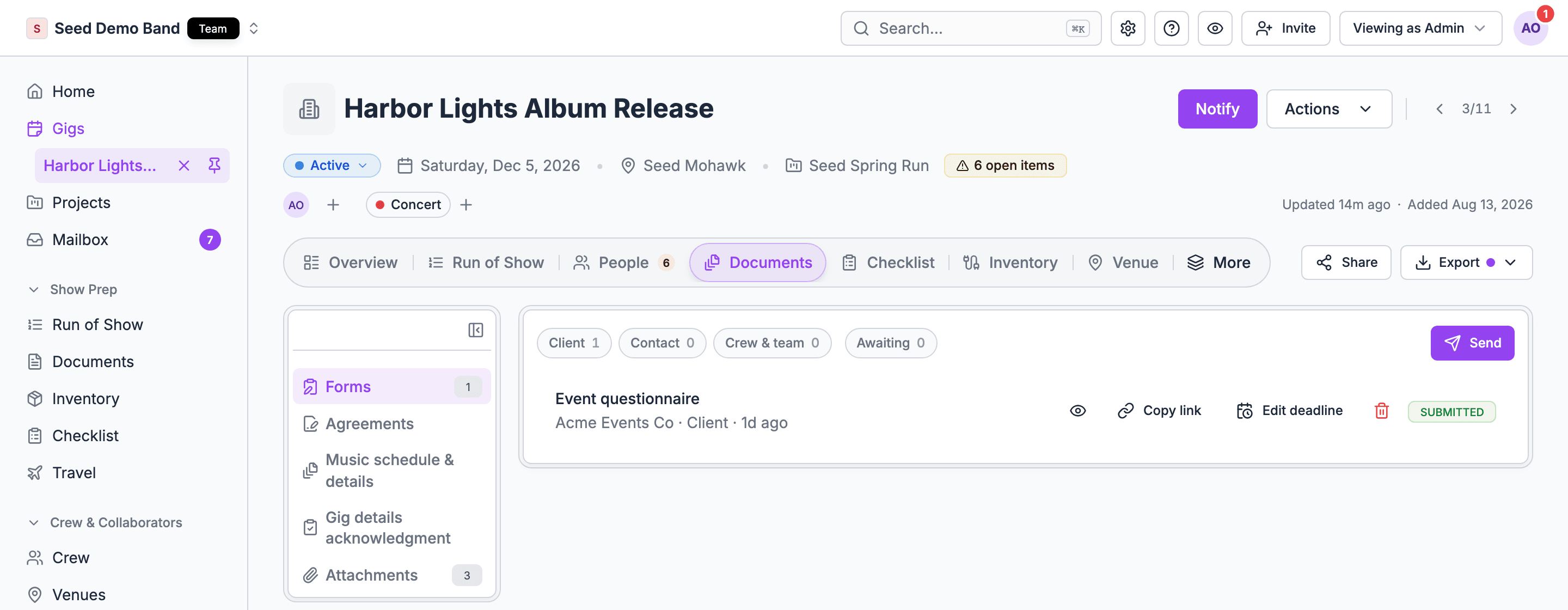
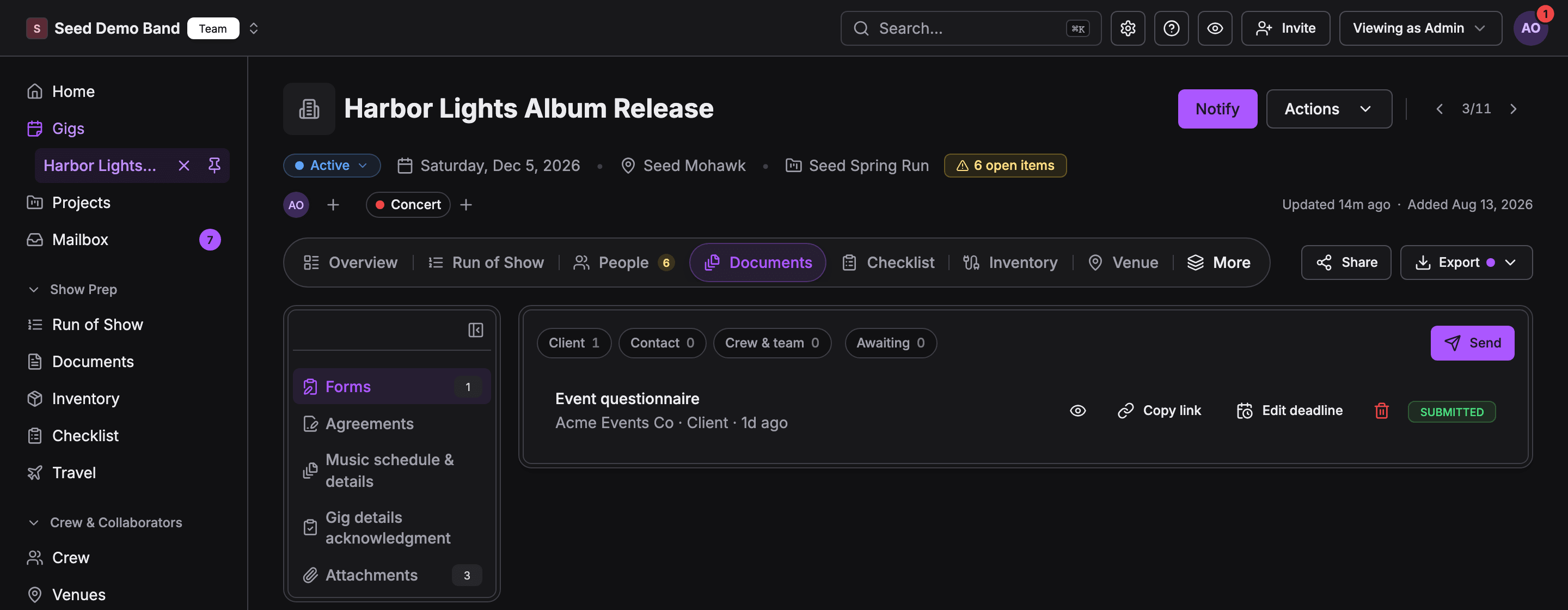
Send the questionnaire
Attach the stage plot and rider
Send the final music schedule
Contract templates and building a contract
1. Can I paste in my existing contract (from Word, Google Docs or a PDF) and turn it into a reusable template, without retyping it?
1. Can I paste in my existing contract (from Word, Google Docs or a PDF) and turn it into a reusable template, without retyping it?
2. Can the template fill in the event details for me: client name, event date, venue, address, start and end times, fee, deposit and balance due dates?
2. Can the template fill in the event details for me: client name, event date, venue, address, start and end times, fee, deposit and balance due dates?
{{client_name}}, {{event_date}}, {{venue_name}}, {{venue_address}}, {{performance_schedule}}, {{contract_price}}, {{deposit_amount}} and {{balance_due}} fill from the gig when you send. If a value is missing on the gig, the dialog names it before anything goes out, so you fix the gig instead of sending a blank. See Agreements and e-sign.Buyers ask this first.3. What merge fields (placeholders) are available, and can I add my own custom fields?
3. What merge fields (placeholders) are available, and can I add my own custom fields?
4. Can I keep several templates, for example a wedding contract, a corporate contract, a venue rental agreement and a crew agreement?
4. Can I keep several templates, for example a wedding contract, a corporate contract, a venue rental agreement and a crew agreement?
5. Can a template include optional clauses I switch on or off per event, such as an outdoor/weather clause, an overtime clause or a sound-limit clause?
5. Can a template include optional clauses I switch on or off per event, such as an outdoor/weather clause, an overtime clause or a sound-limit clause?
6. Can I edit the contract for one client without changing the template?
6. Can I edit the contract for one client without changing the template?
7. Can I put the price breakdown (line items, packages, taxes, payment schedule) inside the contract, pulled from the quote so the numbers always match?
7. Can I put the price breakdown (line items, packages, taxes, payment schedule) inside the contract, pulled from the quote so the numbers always match?
8. Can the contract include a payment schedule that matches the invoices the system will send?
8. Can the contract include a payment schedule that matches the invoices the system will send?
9. Can I add initials boxes next to key clauses, such as the cancellation policy or the no-refund clause?
9. Can I add initials boxes next to key clauses, such as the cancellation policy or the no-refund clause?
{{initials_client}} in the PDF before you upload it. Agreements written in the editor don’t have initials boxes, so upload a PDF when you need them. See Agreements and e-sign.10. Can I add fields the client fills in while signing, such as their legal name, billing address, or the name of the day-of contact?
10. Can I add fields the client fills in while signing, such as their legal name, billing address, or the name of the day-of contact?
12. Does the contract support more than one event date, for example a rehearsal dinner and a wedding, or a multi-day conference?
12. Does the contract support more than one event date, for example a rehearsal dinner and a wedding, or a multi-day conference?
{{event_date}} fills the gig’s date. For a rehearsal dinner and a wedding, write both dates and times into the terms, or send a separate agreement from each gig. See Agreements and e-sign.13. Can I write a contract in another language or with another currency?
13. Can I write a contract in another language or with another currency?
14. Is there a library of starter templates for my kind of business, and has a lawyer reviewed them?
14. Is there a library of starter templates for my kind of business, and has a lawyer reviewed them?
15. Can I lock certain clauses so my staff can't edit the legal terms, only the event details?
15. Can I lock certain clauses so my staff can't edit the legal terms, only the event details?
Sending and signing
16. How does the client sign: do they need an account, or can they sign from a link on their phone?
16. How does the client sign: do they need an account, or can they sign from a link on their phone?
17. Can the client type, draw or upload a signature?
17. Can the client type, draw or upload a signature?
18. Can I require more than one signer, such as both partners in a wedding, or the client and their finance contact?
18. Can I require more than one signer, such as both partners in a wedding, or the client and their finance contact?
19. Can I set the signing order, for example client first and then my countersignature?
19. Can I set the signing order, for example client first and then my countersignature?
20. Can I countersign automatically, or must I sign every contract by hand?
20. Can I countersign automatically, or must I sign every contract by hand?
21. Can a staff member sign on behalf of the company, and can I control who is allowed to?
21. Can a staff member sign on behalf of the company, and can I control who is allowed to?
22. Can the client sign and pay the deposit in one flow?
22. Can the client sign and pay the deposit in one flow?
23. Do I get notified when the client opens, signs or declines the contract?
23. Do I get notified when the client opens, signs or declines the contract?
24. Can I see whether the client has viewed it yet?
24. Can I see whether the client has viewed it yet?
25. Does the system send automatic reminders to sign, and can I control how often?
25. Does the system send automatic reminders to sign, and can I control how often?
26. Can a contract expire if it isn't signed by a date, so I can release the hold on that date?
26. Can a contract expire if it isn't signed by a date, so I can release the hold on that date?
27. What happens to the date hold or the calendar when a contract is signed, or when it expires?
27. What happens to the date hold or the calendar when a contract is signed, or when it expires?
28. Can the client request changes or leave a comment before signing?
28. Can the client request changes or leave a comment before signing?
29. Can I void or withdraw a contract after sending it?
29. Can I void or withdraw a contract after sending it?
30. Can I send a contract to a third party who is not my client, such as a venue, a sub-contractor or a promoter?
30. Can I send a contract to a third party who is not my client, such as a venue, a sub-contractor or a promoter?
31. Can I send the same contract to many people at once, such as crew agreements for every freelancer on a show?
31. Can I send the same contract to many people at once, such as crew agreements for every freelancer on a show?
32. Can I sign documents that someone else sent me, such as a venue's contract or a promoter's offer, inside the tool?
32. Can I sign documents that someone else sent me, such as a venue's contract or a promoter's offer, inside the tool?
Legal validity and the audit trail
33. Is the e-signature legally binding where I work (US, Canada, UK, EU)?
33. Is the e-signature legally binding where I work (US, Canada, UK, EU)?
34. Does the tool keep an audit trail showing who signed, when, from what email and IP address, and every view?
34. Does the tool keep an audit trail showing who signed, when, from what email and IP address, and every view?
35. Does the signed PDF include a certificate or signing summary page I can show a court or a payment processor?
35. Does the signed PDF include a certificate or signing summary page I can show a court or a payment processor?
36. Does the client agree to do business electronically before signing (ESIGN consent), and is that recorded?
36. Does the client agree to do business electronically before signing (ESIGN consent), and is that recorded?
37. How does the tool confirm the signer is who they say they are? Is email enough, or can I add a code by text message?
37. How does the tool confirm the signer is who they say they are? Is email enough, or can I add a code by text message?
38. Can anyone change the contract after it is signed? Is the signed copy locked and tamper-evident?
38. Can anyone change the contract after it is signed? Is the signed copy locked and tamper-evident?
39. Do both sides automatically get a copy of the fully signed contract?
39. Do both sides automatically get a copy of the fully signed contract?
40. How long are signed contracts kept, and can I get them back if I cancel my subscription?
40. How long are signed contracts kept, and can I get them back if I cancel my subscription?
41. Can I use the signed contract and audit trail to fight a card chargeback?
41. Can I use the signed contract and audit trail to fight a card chargeback?
42. Are there documents that can't be signed electronically (for example some property or court documents), and does the tool warn me?
42. Are there documents that can't be signed electronically (for example some property or court documents), and does the tool warn me?
43. Does the tool give me legal advice, or do I need my own lawyer to review my terms?
43. Does the tool give me legal advice, or do I need my own lawyer to review my terms?
Proposals and the quote-to-contract flow
44. Can the client choose a package or options in a proposal, and have the contract and invoice update to match?
44. Can the client choose a package or options in a proposal, and have the contract and invoice update to match?
45. Can I bundle the proposal, contract and first invoice into one link the client moves through in order?
45. Can I bundle the proposal, contract and first invoice into one link the client moves through in order?
46. Can I add photos, video, a song list sample or past-event galleries to a proposal?
46. Can I add photos, video, a song list sample or past-event galleries to a proposal?
47. Can a proposal offer add-ons (an extra hour, uplighting, a second photographer, a horn section) that change the price?
47. Can a proposal offer add-ons (an extra hour, uplighting, a second photographer, a horn section) that change the price?
48. Can I see when the client viewed the proposal and which options they looked at?
48. Can I see when the client viewed the proposal and which options they looked at?
49. Can a proposal expire, and can I send a reminder before it does?
49. Can a proposal expire, and can I send a reminder before it does?
50. Can someone on my team approve a proposal before it goes out, for example when a discount is over a limit?
50. Can someone on my team approve a proposal before it goes out, for example when a discount is over a limit?
51. Can I duplicate a past proposal for a returning client?
51. Can I duplicate a past proposal for a returning client?
52. For venues: can I produce a banquet event order (BEO) from the booking and get it signed?
52. For venues: can I produce a banquet event order (BEO) from the booking and get it signed?
Riders, tech packs and advance documents
53. Can I build a technical rider and a hospitality rider as reusable documents per artist or act?
53. Can I build a technical rider and a hospitality rider as reusable documents per artist or act?
54. Can a rider be attached to the performance contract so the buyer signs both together?
54. Can a rider be attached to the performance contract so the buyer signs both together?
55. Can I keep a stage plot and an input list (channel list) with the rider, and update them in one place?
55. Can I keep a stage plot and an input list (channel list) with the rider, and update them in one place?
56. When the rider changes, does every upcoming show get the new version, or does a signed show keep the version that was agreed?
56. When the rider changes, does every upcoming show get the new version, or does a signed show keep the version that was agreed?
57. Can the buyer or venue mark rider items as agreed, substituted or not possible (rider redlines)?
57. Can the buyer or venue mark rider items as agreed, substituted or not possible (rider redlines)?
58. Can I keep a venue's tech pack (stage size, power, rigging points, house audio and lighting, load-in access) and attach it to every show at that venue?
58. Can I keep a venue's tech pack (stage size, power, rigging points, house audio and lighting, load-in access) and attach it to every show at that venue?
59. Can I send an advance packet (schedule, rider, stage plot, parking, contacts) to the venue or promoter in one link?
59. Can I send an advance packet (schedule, rider, stage plot, parking, contacts) to the venue or promoter in one link?
60. Can the crew see the rider and stage plot on their phones on show day without the hospitality or fee details?
60. Can the crew see the rider and stage plot on their phones on show day without the hospitality or fee details?
61. Can I keep different rider versions, such as a full production rider, a fly-in rider and a festival rider?
61. Can I keep different rider versions, such as a full production rider, a fly-in rider and a festival rider?
62. Can I make a printable one-page stage plot with the input list?
62. Can I make a printable one-page stage plot with the input list?
Forms and intake questionnaires
63. Can I build a questionnaire the client fills out after booking, such as a wedding planning form, a must-play and do-not-play list, or a corporate event brief?
63. Can I build a questionnaire the client fills out after booking, such as a wedding planning form, a must-play and do-not-play list, or a corporate event brief?
64. Can the client save a form halfway and come back to it?
64. Can the client save a form halfway and come back to it?
65. Do the client's answers flow into the event record (timeline, song list, contacts, guest count) so I don't retype them?
65. Do the client's answers flow into the event record (timeline, song list, contacts, guest count) so I don't retype them?
66. Can I set a deadline for a form and send automatic reminders?
66. Can I set a deadline for a form and send automatic reminders?
67. What question types are there: text, multiple choice, dates, times, file upload, song search, ratings?
67. What question types are there: text, multiple choice, dates, times, file upload, song search, ratings?
68. Can a question show or hide based on an earlier answer (conditional logic)?
68. Can a question show or hide based on an earlier answer (conditional logic)?
69. Can I use a form as a lead or inquiry form on my website, creating a new lead when someone submits it?
69. Can I use a form as a lead or inquiry form on my website, creating a new lead when someone submits it?
70. Can I send a form to someone other than the client, such as a venue coordinator, a speaker or a crew member?
70. Can I send a form to someone other than the client, such as a venue coordinator, a speaker or a crew member?
71. Can I collect onboarding paperwork from crew and freelancers, such as W-9s, emergency contacts, licences and certifications?
71. Can I collect onboarding paperwork from crew and freelancers, such as W-9s, emergency contacts, licences and certifications?
72. Can I lock a form after a date, so changes after the cut-off come to me as a request?
72. Can I lock a form after a date, so changes after the cut-off come to me as a request?
73. Can I see who changed an answer and when, after the form was submitted?
73. Can I see who changed an answer and when, after the form was submitted?
74. Can I print or export the completed form?
74. Can I print or export the completed form?
75. Can the client add songs from a streaming service, with a preview link?
75. Can the client add songs from a streaming service, with a preview link?
Client portal and sharing
76. Is there one place where the client sees their contract, invoices, forms and files?
76. Is there one place where the client sees their contract, invoices, forms and files?
77. Can I brand the portal with my logo, colors and domain?
77. Can I brand the portal with my logo, colors and domain?
78. Can the client invite someone else, such as a planner, a parent or an assistant, with limited access?
78. Can the client invite someone else, such as a planner, a parent or an assistant, with limited access?
80. Can I control which documents the client sees and which stay internal?
80. Can I control which documents the client sees and which stay internal?
82. Does the portal work well on a phone?
82. Does the portal work well on a phone?
File storage and organization
85. What file types are supported, and is there a size limit per file and in total?
85. What file types are supported, and is there a size limit per file and in total?
.mov). The apps hold up to 15 files per gig. There’s no total storage quota. CAD and show files aren’t on the web’s list, so keep them in your own storage and share the link. See Add a file.Buyers ask this first.86. Can I organize files in folders or by category (contracts, riders, permits, creative, invoices)?
86. Can I organize files in folders or by category (contracts, riders, permits, creative, invoices)?
87. Can I keep company-wide files, such as insurance certificates, the W-9 and the standard rider, and attach them to any event without re-uploading?
87. Can I keep company-wide files, such as insurance certificates, the W-9 and the standard rider, and attach them to any event without re-uploading?
88. Does the tool keep old versions when I upload a new one? Can I see which version is current?
88. Does the tool keep old versions when I upload a new one? Can I see which version is current?
89. Can I link to files in Google Drive, Dropbox or Box instead of uploading them?
89. Can I link to files in Google Drive, Dropbox or Box instead of uploading them?
90. Can I preview files in the app without downloading them, including on mobile?
90. Can I preview files in the app without downloading them, including on mobile?
91. Can crew get files offline on their phones for show day?
91. Can crew get files offline on their phones for show day?
92. Can I search across files by name or content?
92. Can I search across files by name or content?
93. When I copy an event or use it as a template, do its files come along?
93. When I copy an event or use it as a template, do its files come along?
94. Are files backed up, and can I restore a file I deleted by mistake?
94. Are files backed up, and can I restore a file I deleted by mistake?
Branded PDFs and printing
95. Do contracts, proposals, invoices and riders come out as clean PDFs with my logo, colors and letterhead?
95. Do contracts, proposals, invoices and riders come out as clean PDFs with my logo, colors and letterhead?
97. Can I remove the software vendor's branding from client-facing documents?
97. Can I remove the software vendor's branding from client-facing documents?
98. Can I export a full event packet (contract, rider, timeline, contacts, floor plan) as one PDF?
98. Can I export a full event packet (contract, rider, timeline, contacts, floor plan) as one PDF?
99. Do the PDFs print properly on letter and A4 paper?
99. Do the PDFs print properly on letter and A4 paper?
100. Can I download every signed contract at once, for example for my accountant or lawyer?
100. Can I download every signed contract at once, for example for my accountant or lawyer?
101. Can I brand documents differently for each of my brands or companies?
101. Can I brand documents differently for each of my brands or companies?
Insurance, permits and compliance documents
102. Can I collect certificates of insurance (COIs) from vendors and sub-contractors and see which are missing or expired?
102. Can I collect certificates of insurance (COIs) from vendors and sub-contractors and see which are missing or expired?
103. Can I send my own COI to a venue, naming them as additional insured, from the event?
103. Can I send my own COI to a venue, naming them as additional insured, from the event?
104. Can the tool warn me when a vendor's COI expires before the event date?
104. Can the tool warn me when a vendor's COI expires before the event date?
105. Can I store permits (noise, fire, street closure, alcohol, pyrotechnics) with the event and track their approval?
105. Can I store permits (noise, fire, street closure, alcohol, pyrotechnics) with the event and track their approval?
106. Can I keep W-9s for contractors and see who hasn't sent one before I pay them?
106. Can I keep W-9s for contractors and see who hasn't sent one before I pay them?
107. Can I collect signed NDAs or confidentiality agreements from crew for private or celebrity events?
107. Can I collect signed NDAs or confidentiality agreements from crew for private or celebrity events?
108. Can I store work-permit and visa documents for international artists?
108. Can I store work-permit and visa documents for international artists?
109. Can I keep safety documents (risk assessment, emergency plan, rigging certificates) with the event?
109. Can I keep safety documents (risk assessment, emergency plan, rigging certificates) with the event?
Crew, vendor and sub-contractor agreements
110. Can I send a short agreement to every freelancer on a show (rate, call time, cancellation terms) and see who has signed?
110. Can I send a short agreement to every freelancer on a show (rate, call time, cancellation terms) and see who has signed?
111. Can a freelancer sign a master agreement once and then accept each gig without a new contract?
111. Can a freelancer sign a master agreement once and then accept each gig without a new contract?
112. Can the crew agreement show the pay for their specific shift?
112. Can the crew agreement show the pay for their specific shift?
113. Can I send an agreement to a sub-contracted company (a lighting vendor, a staffing agency) and attach their COI?
113. Can I send an agreement to a sub-contracted company (a lighting vendor, a staffing agency) and attach their COI?
114. For agencies: can the artist and the buyer each sign their side of the contract, with the agency in the middle?
114. For agencies: can the artist and the buyer each sign their side of the contract, with the agency in the middle?
Changes, amendments and cancellations
116. When the client changes something after signing (more hours, a new date, extra gear), can I send an amendment or change order to sign?
116. When the client changes something after signing (more hours, a new date, extra gear), can I send an amendment or change order to sign?
117. Does the amendment update the invoices and the event details automatically?
117. Does the amendment update the invoices and the event details automatically?
118. Can I see every version of a contract and what changed between them?
118. Can I see every version of a contract and what changed between them?
119. If an event is postponed, can I move the contract to the new date without starting over?
119. If an event is postponed, can I move the contract to the new date without starting over?
120. If a client cancels, can I record the cancellation, apply the cancellation terms, and send a cancellation notice?
120. If a client cancels, can I record the cancellation, apply the cancellation terms, and send a cancellation notice?
121. Does the contract template help me write a clear force majeure clause, and a clear deposit-or-retainer clause?
121. Does the contract template help me write a clear force majeure clause, and a clear deposit-or-retainer clause?
122. Can I attach a signed cancellation or mutual release to the event?
122. Can I attach a signed cancellation or mutual release to the event?
Permissions, privacy and security
123. Can I control which staff can create, edit, send or sign contracts?
123. Can I control which staff can create, edit, send or sign contracts?
124. Can I hide contracts and fees from crew while still sharing riders and schedules with them?
124. Can I hide contracts and fees from crew while still sharing riders and schedules with them?
125. Are documents encrypted, and where are they stored?
125. Are documents encrypted, and where are they stored?
126. Does the tool meet privacy rules such as GDPR and CCPA for client data in forms?
126. Does the tool meet privacy rules such as GDPR and CCPA for client data in forms?
127. Can I delete a client's personal data on request while keeping the signed contract for my records?
127. Can I delete a client's personal data on request while keeping the signed contract for my records?
128. Is there a log of who viewed or downloaded each document?
128. Is there a log of who viewed or downloaded each document?
Importing, switching and integrations
129. Can I bring in my old signed contracts and files from HoneyBook, Dubsado, Google Drive or Dropbox?
129. Can I bring in my old signed contracts and files from HoneyBook, Dubsado, Google Drive or Dropbox?
130. Does it connect to DocuSign, Dropbox Sign (HelloSign) or Adobe Sign if my clients or venues insist on those?
130. Does it connect to DocuSign, Dropbox Sign (HelloSign) or Adobe Sign if my clients or venues insist on those?
131. Can a contract signature trigger something else, such as a calendar booking, a deposit invoice, a Slack message or a Zapier step?
131. Can a contract signature trigger something else, such as a calendar booking, a deposit invoice, a Slack message or a Zapier step?
132. Is there an API or an AI assistant connection that can create and send documents for me?
132. Is there an API or an AI assistant connection that can create and send documents for me?
Pricing and limits
133. Is e-signature included in my plan, or is it paid per envelope or per signer?
133. Is e-signature included in my plan, or is it paid per envelope or per signer?
134. Are there limits on the number of templates, forms, signers or storage on my plan?
134. Are there limits on the number of templates, forms, signers or storage on my plan?