

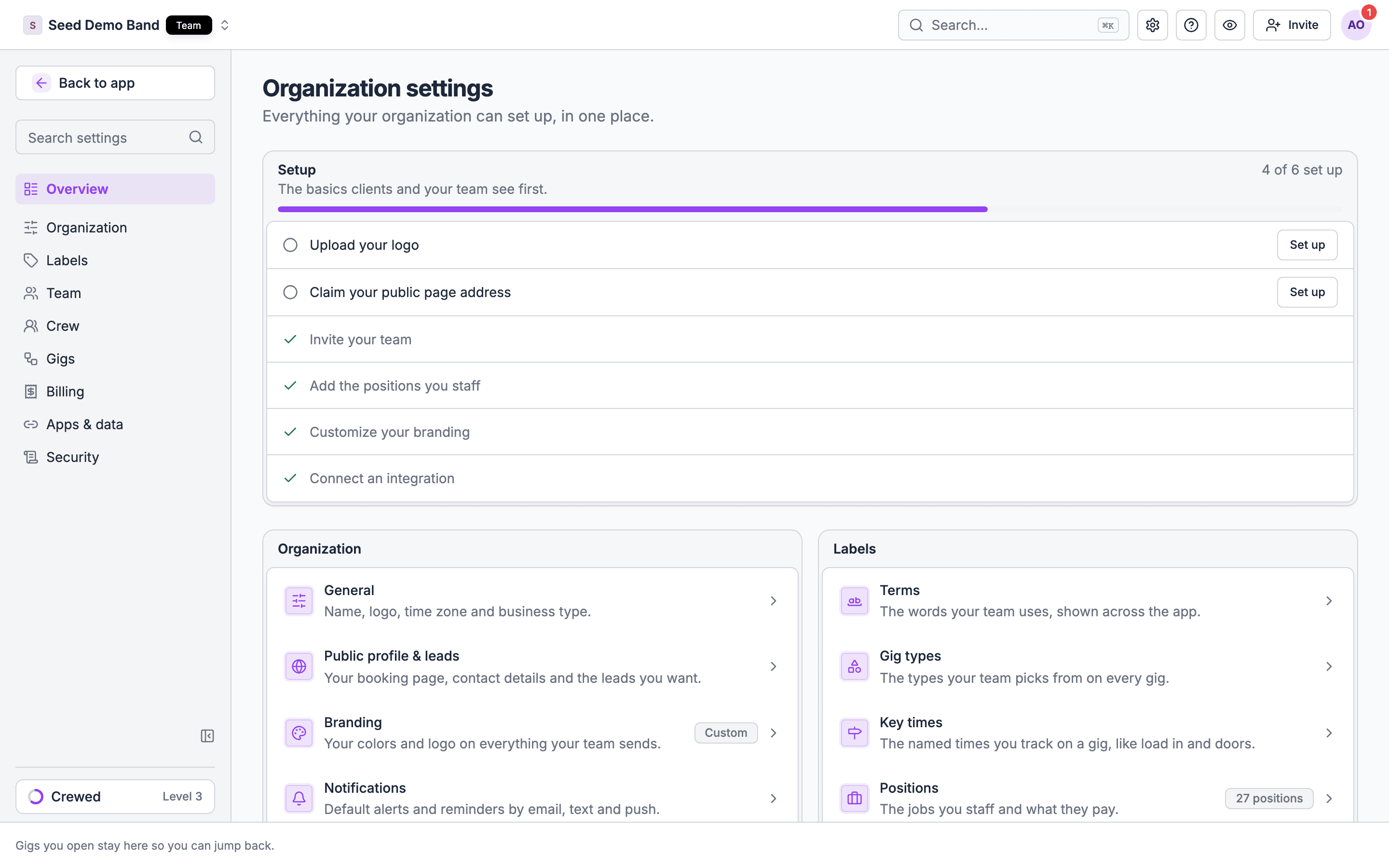
Labels with {Gig}, {Crew} or {Department} use your organization’s own word. A venue sees Event types where a production company sees Gig types. See Business type and operator profiles.
Questions this page answers
- What can I change about my organization, and where is each setting?
- What is each setting set to when I start?
- Who on my team can change each setting?
- Which settings can I change from the mobile app?
- What does my business type change, and can I rename words like gig or crew?
- Which settings need a plan, and which are early access?
Worked example: a corporate AV production company
Ridgeline Productions runs audio, lighting and video for corporate conferences and galas. The Owner sets up the organization in one sitting:1
Organization → General
Business type is Production, chosen at sign-up. The sidebar leads with show prep, new gigs default to Corporate Gig, and starter departments are Audio and Lighting. Timezone is already the Owner’s zone, America/New_York, so call times on offer emails read in Eastern time.
2
Organization → Branding
The Owner uploads a light and a dark logo and sets the primary color to the company’s navy. Call sheets, gig documents and the client portal now carry the Ridgeline look.
3
Labels → Terms
Ridgeline groups a client’s multi-city roadshow as one job, so it sets the singular to Roadshow and keeps the suggested plural Roadshows.
4
Labels → Gigs → Key times
The production featured key times are already in place: Crew call, Load in, Show and Load out. The Owner recolors Load in so it stands out on the run of show.
5
Labels → Departments → Positions
The Owner adds A1, A2, LD and V1 with short codes and default day rates, then writes the dress preset “Black business casual, closed-toe shoes” under Crew requirements. Every new gig inherits it.
6
Organization → Gig workflow
Enforce close-out gates goes on, so new gigs can’t be settled until the close-out checklist’s blocking steps are done.
7
Notifications
The Owner leaves every channel on. Crew can still turn channels off for themselves.
Organization
General
Public profile
Leads is part of the Team plan. Discovered leads in Find Leads are early access and rolling out; email info@soundchecklive.io to ask about it.
Branding
Branding is on every plan.
Remove your brand colors? sets both pairs back to the defaults.
Email (early access)
The Email page is rolling out by organization; email info@soundchecklive.io to ask for it. Sending from your own domain needs the Pro plan or higher.
See Email sending domains for the DNS steps, copies of sent emails and your forwarding address.
Gig workflow
The page is titled {Gig} workflow.
The four time clock options under clock-in stay disabled until clock-in is on. Upgrades shows only while an upgrade is still available.
Labels
Terms
Terms sets only this one word. Soundcheck doesn’t let you type your own word for gig, crew, department, client or any other term today. Those come from your business type.
Gigs: Gig types, Key times and Tags
Gig types, Key times and Tags share one label editor. Each label has a Name (up to 64 characters), a Color, an optional Description (up to 500) and Use on. You can edit, Merge into…, archive and restore a label. Merging updates every record that uses it. An archived label stays on the records that have it but can’t be picked for anything new. There is no hard delete.Departments: All departments, Positions, Crew records and Onboarding
Positions, crew records and onboarding apply to every department today. Soundcheck doesn’t keep separate positions, records or onboarding per department.Catalogs: Song types, Budget and Inventory
Team
Members and staff seats depend on your plan. See Seat limits and Plans.
Acts (the bands, DJs and performers you book) has no tab. Open it from a gig’s staffing panel or a song’s acts field. Owners and Admins edit acts there.
Notifications
Notification defaults set how members hear about each kind of message. Each switch saves when you flip it. Gig Coordinators can view the page. Members can still change these in their own notification settings, and their choice wins.
SMS carrier rates can apply for the person receiving the text. These seven kinds are the only org-wide defaults. Soundcheck doesn’t have org defaults for reminders, run of show publish notices or payments, quiet hours, digests, or different defaults per role today.
Billing
Apps & data
Security
Business type and operator profiles
Your business type (Settings → Organization → General → What you do) picks an operator profile. A profile only arranges and renames. It never gives or takes away access: roles, plans and early-access features decide that.
Not set uses the Production profile. Older business types, such as band, DJ, festival or talent agency, map to one of the three.
What a profile can’t do:
- It can’t hide a gig tab or move one into More. It reorders items only within a sidebar section.
- A view someone has already chosen always wins over the profile’s default.
- Gig tabs and the run of show default follow the gig’s organization, not the viewer’s active one.
- Your project word on Labels → Terms overrides the profile’s word for a group of gigs. Every other word follows the profile.
- The mobile app uses the same words, including your project word.
- Agents and the API keep one vocabulary: a venue’s event is still a gig to an agent.
Changing your business type
You can change it at any time on General. Your gigs, people and records stay. Soundcheck turns on the new type’s starter positions and retires starter positions, show prep, team and gig templates, and offerings that it added and you haven’t changed. Departments stay exactly as they are. Song type suggestions, wording and order switch to the new profile right away. See Feature matrix for every difference by business type.Related
Organization setup
Where each settings page lives
Roles and permissions
What each role can open and change
Settings FAQ
Answers about organization settings
Team FAQ
Answers about members, roles and seats
Managing members
The roster, seats and extra access
Plans
Features and seats by plan