

Mobile App Environment
Environment Variables
Create a.env file in the repository root:
Expo Configuration
The mobile app usesapp.config.js for configuration:
Stack: Expo SDK 57, React Native 0.86, React 19, Expo Router. In-app UI styling is NativeWind v4
(the brand primary is now an indigo token, not the
#9b87f5 purple above — see Mobile
Architecture).Physical device on a different VLAN
If a connected Android device can’t reach the Expo dev server over LAN, tunnel Metro (keep the subdomain to letters, numbers, and hyphens — Android rejects underscores in TLS hostnames):--go (same Wi-Fi, then scan the QR from Expo Go):
npm run start:go is the same command. A start without --go still uses the soundcheck scheme and can open TestFlight or the installed dev client.
Native Project Generation
Theios/ and android/ directories are gitignored and generated from app.config.js:
Web App Environment
Environment Variables
Create a.env.local file in the web/ directory:
Development Server
npm run dev runs a predev hook that regenerates the typed API client from the OpenAPI spec (web/src/lib/generated/api-client/, gitignored).
Shared infrastructure & api-events
api-events (Encore.ts on:4000) is the system of record — HTTP API, DDL, direct Pub/Sub publication, and notification fan-out. Local Postgres, fake-gcs-server (app file storage), and the Clerk emulator come from shared compose:
Database migrations & seed
Canonical schema + migrations:api-events/src/db/. Migrations apply on api-events boot; explicit apply:
db_migrate then db_seed with mode=demo-full.)
Run api-events locally
Requires the Encore CLI (installed in the devcontainer).npm run openapi:emit, npm run openapi:parity (TS self-check — not schema:parity).
Access Points
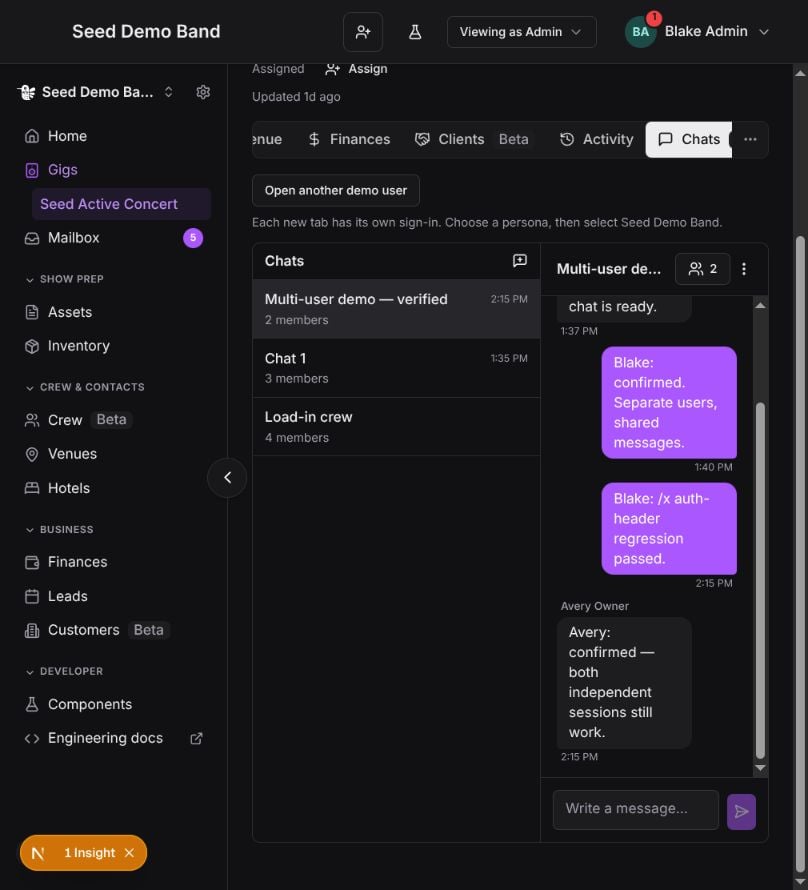
Multi-user event chat demo
With shared infrastructure, api-events, and thedemo-full personas ready,
start the Next.js console with cd web && npm run dev:emulator. This enables
event chats unless explicitly overridden and selects the server-backed chat
transport on :4013. Open a seeded gig’s Chats tab, then click
Open another demo user to sign in as another persona. Select Seed Demo Band
in each session if its personal workspace is active.
Every click opens a fresh demo-<random-id>.localhost origin on this web
server’s port. The launcher supplies that port even when the current page uses
a named portless URL, so demo tabs reach the same worktree. Separate
hostnames isolate Clerk sessions, workspace selection, browser storage, and
sign-out while sharing the API and chat history. Ordinary tabs on the same
hostname share auth; changing only the port or a query parameter does not
isolate cookies. The launcher and additional Next development origins are
enabled only for explicit local Clerk-emulator development.
The chat adapter polls messages, typing, and unread counts once per second;
chat-list discovery and metadata refresh every three seconds, including
background tabs. Compose retains provider history in twilio_emulator_data.
No carrier SMS is sent by this in-app demo, and the emulator does not implement
the proprietary Twilio SDK WebSocket protocol. Production continues to use
the real SDK. See local provider emulators
for provider setup and the emulator README for failure injection and webhook retries.
MCP (api-events /mcp)
Streamable HTTP MCP is hosted on api-events (http://localhost:4000/mcp). mcp-ts/ is the @soundcheck/mcp SDK, not a standalone listener.
CheckAI (eve agent)
checkai/ is the AI agent, built on Vercel’s eve framework. It requires Node 24.
Fresh worktree / clean checkout
Several build inputs are gitignored generated artifacts. A clean checkout must regenerate them before builds pass. In agit worktree, run npm run worktree:setup from the worktree root: it installs each package for real and generates the clients. Do not symlink them from the main checkout, because install and codegen hooks write through the links.
See Pitfalls for the worktree-artifacts gotcha in more detail.
Infrastructure Environment
Azure Authentication
Terraform Initialization
VPN Configuration
For accessing protected resources in dev environment:- Download Azure VPN Client
- Import
azurevpnconfig.xmlfrom 1Password - Connect using Azure AD authentication
Shared Configuration
Git Configuration
Ensure your Git is configured with your identity:SSH Keys
Generate an SSH key for GitHub access:Editor Setup
VS Code / Cursor
Recommended extensions:- TypeScript and JavaScript Language Features
- Oxc / oxlint
- Expo Tools
- Tailwind CSS IntelliSense
- Go (for api-events / web TypeScript work, Node tooling is sufficient)
.vscode/ settings for consistent configuration.
Verification
Mobile App
Web App
api-events
Troubleshooting
Common Issues
npm install fails with permission errors
npm install fails with permission errors
Clear the npm cache and try again:
Docker containers won't start
Docker containers won't start
Ensure Docker Desktop is running, then restart the containers while preserving the database and chat-history volumes:
Clerk authentication fails
Clerk authentication fails
Verify your environment variables are set correctly:
- Mobile:
EXPO_PUBLIC_CLERK_PUBLISHABLE_KEYin.env - Web: Both
NEXT_PUBLIC_CLERK_PUBLISHABLE_KEYandCLERK_SECRET_KEYin.env.local - api-events: Clerk secrets via
npm run dev:emulatoror env; local emulator on:4711afternpm run dev:infra
First local user gets 404 / has no org
First local user gets 404 / has no org
Clerk delivers user and org data via webhooks; locally, prefer the Clerk emulator + Sign-in lists demo personas for one-click auth.
db:seed:demo-full:Next Steps
Engineering Overview
Architecture, services, and dev workflows
Troubleshooting
Common issues and solutions