> ## Documentation Index
> Fetch the complete documentation index at: https://docs.soundchecklive.io/llms.txt
> Use this file to discover all available pages before exploring further.
# Setlist management overview
> Plan performances with drag-and-drop setlists, a reusable song library, and per-gig run-of-show — all in one Music Management workspace.
Build performance-ready setlists with drag-and-drop, keep a reusable song library, and attach the right set to each gig. Whether you're prepping a wedding, a club night, or a festival set, Soundcheck keeps the music organized and on time.
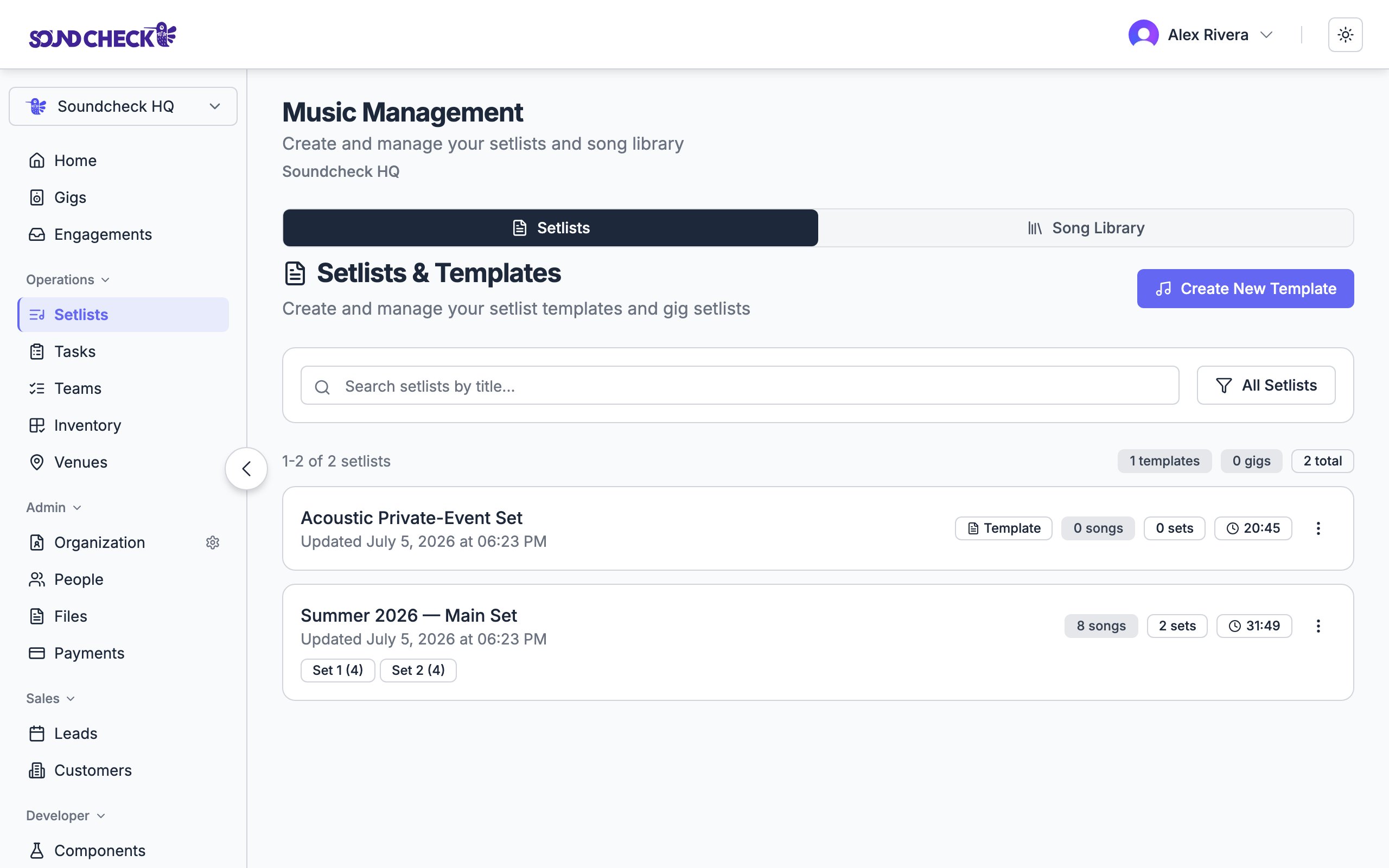 ## The Music Management workspace
Setlists live in the **Music Management** page, which has two tabs:
* **Setlists** — your reusable templates and gig-attached setlists.
* **Song Library** — your organization's catalog of performable songs.
You can search, filter (all / templates / gigs), duplicate, and delete from the setlists list. Each card badges whether it's a **template** or attached to a **gig**, and shows its song count, set count, and total running time.
## Setlists vs. templates
A setlist has two flavors:
| Type | What it is |
| --------------- | ------------------------------------------------------------------------------------------------------------------------ |
| **Template** | A reusable setlist not tied to any one show — a "wedding reception" or "club night" shape you stamp out again and again. |
| **Gig setlist** | A setlist attached to a specific event, visible to the team assigned to that gig. |
Start from a template and duplicate it for each new show rather than building from scratch every time.
## Structure
A setlist is organized into **sets**, and each set holds **songs**:
```
Setlist: "Friday Night at Blue Note"
├── Set 1: Opening (45 min)
│ ├── Take Five
│ ├── So What
│ └── Autumn Leaves
├── Set 2: Main (60 min)
│ ├── All Blues
│ └── Blue in Green
└── Set 3: Encore (15 min)
└── A Night in Tunisia
```
Soundcheck totals the running time automatically — each set sums its songs, and the setlist sums its sets — so you always know whether you fit the slot.
## The setlist builder
The builder is drag-and-drop: reorder songs within a set, reorder the sets themselves, and pull songs in from your song library. As you go, durations update live.
Add songs with title, artist, duration, key, tempo, and any attached charts. You can import a whole album at once from Spotify.
Make a template or a gig setlist, add sets (opening, main, encore), and drag songs from the library into each set.
Reorder for energy, add set notes for transitions, and check the total against your time slot.
Link the setlist to a show so the assigned team can pull it up on-site.
## Run of show on a gig
A gig's detail page has its own **Run of Show** section for building or attaching the setlist right where the show lives — pick songs from the org library without leaving the gig. The team assigned to the gig sees the setlist there, including on mobile.
## The song library
Songs are the reusable building blocks that populate every setlist. Manage them on the **Song Library** tab, where each song can carry:
* Title and artist
* Duration, musical key, and tempo
* Performance notes
* Attached charts, lyrics, and media links
Build and maintain your organization's song catalog, including Spotify album import.
## Who can manage setlists
Setlist management is available to **owners, admins, and gig coordinators**. Members who aren't in those roles see the setlist for a gig they're assigned to, but don't create or edit the library.
| Action | Owner | Admin | Gig Coordinator | Member |
| ----------------------- | :---: | :---: | :-------------: | :--------------------: |
| View a gig's setlist | ✓ | ✓ | ✓ | If assigned to the gig |
| Create / edit setlists | ✓ | ✓ | ✓ | — |
| Manage the song library | ✓ | ✓ | ✓ | — |
On the mobile app, the setlist and song-library screens are enabled per organization. If you don't see them on your phone, ask an admin to turn them on — or use the web app.
## Related guides
Managing your song catalog.
Creating performance setlists step by step.
Connecting setlists to events.
## The Music Management workspace
Setlists live in the **Music Management** page, which has two tabs:
* **Setlists** — your reusable templates and gig-attached setlists.
* **Song Library** — your organization's catalog of performable songs.
You can search, filter (all / templates / gigs), duplicate, and delete from the setlists list. Each card badges whether it's a **template** or attached to a **gig**, and shows its song count, set count, and total running time.
## Setlists vs. templates
A setlist has two flavors:
| Type | What it is |
| --------------- | ------------------------------------------------------------------------------------------------------------------------ |
| **Template** | A reusable setlist not tied to any one show — a "wedding reception" or "club night" shape you stamp out again and again. |
| **Gig setlist** | A setlist attached to a specific event, visible to the team assigned to that gig. |
Start from a template and duplicate it for each new show rather than building from scratch every time.
## Structure
A setlist is organized into **sets**, and each set holds **songs**:
```
Setlist: "Friday Night at Blue Note"
├── Set 1: Opening (45 min)
│ ├── Take Five
│ ├── So What
│ └── Autumn Leaves
├── Set 2: Main (60 min)
│ ├── All Blues
│ └── Blue in Green
└── Set 3: Encore (15 min)
└── A Night in Tunisia
```
Soundcheck totals the running time automatically — each set sums its songs, and the setlist sums its sets — so you always know whether you fit the slot.
## The setlist builder
The builder is drag-and-drop: reorder songs within a set, reorder the sets themselves, and pull songs in from your song library. As you go, durations update live.
Add songs with title, artist, duration, key, tempo, and any attached charts. You can import a whole album at once from Spotify.
Make a template or a gig setlist, add sets (opening, main, encore), and drag songs from the library into each set.
Reorder for energy, add set notes for transitions, and check the total against your time slot.
Link the setlist to a show so the assigned team can pull it up on-site.
## Run of show on a gig
A gig's detail page has its own **Run of Show** section for building or attaching the setlist right where the show lives — pick songs from the org library without leaving the gig. The team assigned to the gig sees the setlist there, including on mobile.
## The song library
Songs are the reusable building blocks that populate every setlist. Manage them on the **Song Library** tab, where each song can carry:
* Title and artist
* Duration, musical key, and tempo
* Performance notes
* Attached charts, lyrics, and media links
Build and maintain your organization's song catalog, including Spotify album import.
## Who can manage setlists
Setlist management is available to **owners, admins, and gig coordinators**. Members who aren't in those roles see the setlist for a gig they're assigned to, but don't create or edit the library.
| Action | Owner | Admin | Gig Coordinator | Member |
| ----------------------- | :---: | :---: | :-------------: | :--------------------: |
| View a gig's setlist | ✓ | ✓ | ✓ | If assigned to the gig |
| Create / edit setlists | ✓ | ✓ | ✓ | — |
| Manage the song library | ✓ | ✓ | ✓ | — |
On the mobile app, the setlist and song-library screens are enabled per organization. If you don't see them on your phone, ask an admin to turn them on — or use the web app.
## Related guides
Managing your song catalog.
Creating performance setlists step by step.
Connecting setlists to events.