> ## Documentation Index
> Fetch the complete documentation index at: https://docs.soundchecklive.io/llms.txt
> Use this file to discover all available pages before exploring further.
# Operator data imports
> Bulk-load gigs, venues, customers, and invitations from a spreadsheet
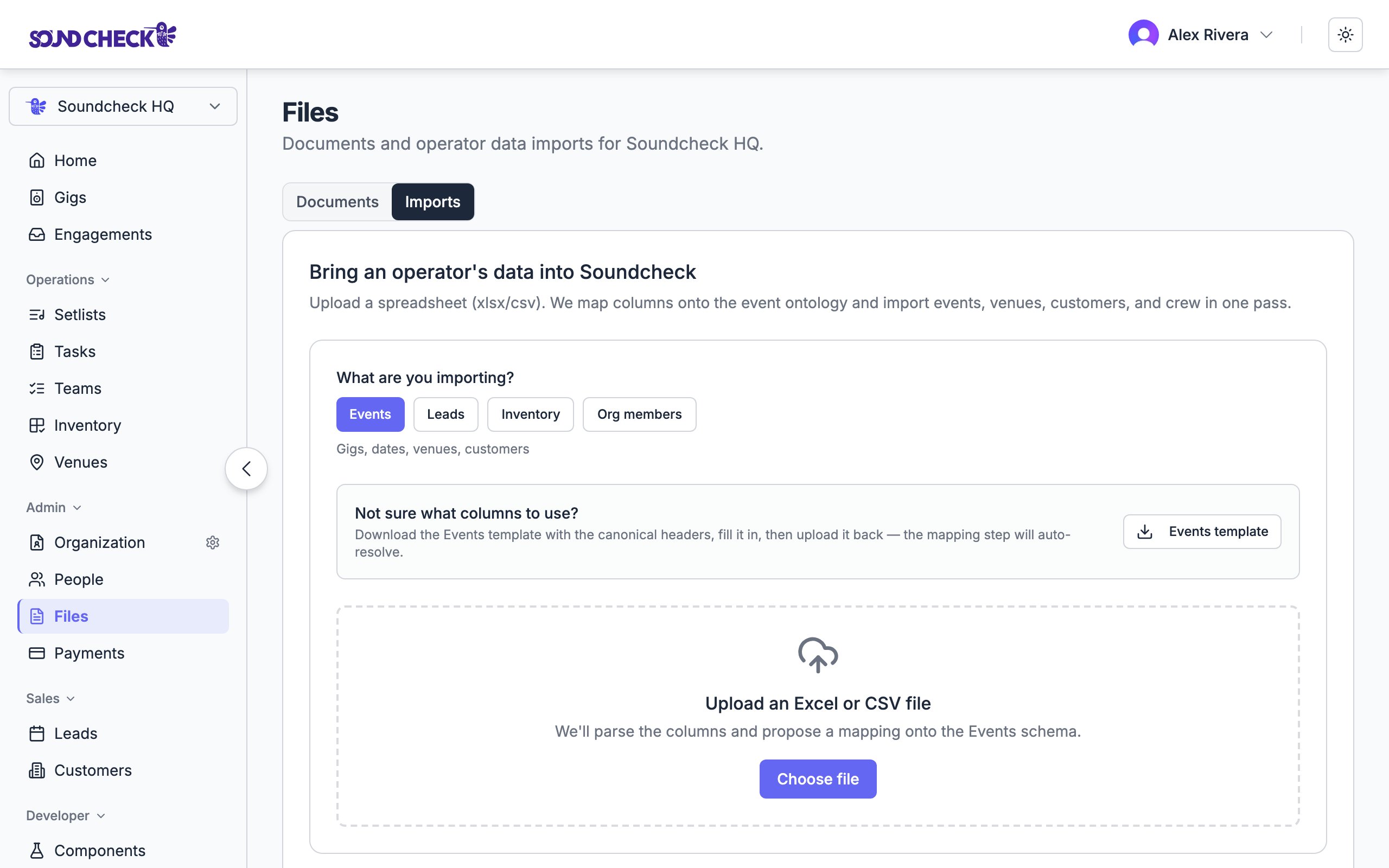
The operator data importer lets you bring legacy bookings into Soundcheck in bulk — gigs, venues, customers, and crew invitations — without re-typing each row. It lives at `/imports` and is available to CRM managers and owners.
 Re-importing the same file is safe. The importer is **idempotent**: rows matched by external ID or natural key are updated in place rather than duplicated.
Importing a **structured** spreadsheet is one of three ways data lands in Soundcheck. For **unstructured** gig paperwork — a contract, call sheet, rider, or email — use [AI file ingestion](/features/ai/file-ingestion) instead, which extracts the records for you. For a recurring source with a webhook, use [n8n CRM sync](/crm/integrations/n8n-crm-sync). All three produce the same [Universal Event Format](/features/imports/universal-event-format).
***
## When to use it
* Migrating from a spreadsheet, paper records, or another CRM.
* Loading a season of advance bookings in one pass.
* Pulling in a partner's gig feed before the n8n CRM sync is wired up.
If you only have a handful of events, create them directly under **Gigs → Create gig**.
***
## What you can import
| Source | Format | Limit |
| ------------ | --------------- | ------ |
| File upload | `.xlsx`, `.csv` | 25 MiB |
| Paste | CSV or TSV | 8 MiB |
| Rows per job | — | 50,000 |
Each row produces — at most — one event (and its venue, customer, and one crew invitation). When you have several crew on the same gig, use **row grouping** so multiple rows collapse into one event with multiple members.
***
## The four-step wizard
Upload a file or paste your data. Soundcheck detects the format, normalizes the headers, and pulls a 20-row sample for the next step. While a commit is in flight the job is locked — re-parses are blocked until the commit finishes.
Soundcheck proposes column → field mappings, either with the AI mapper (opt-in, PII scrubbed before any model call) or by heuristic match. Review the mapping, adjust as needed, and optionally save it as a template for future imports. If a single gig spans multiple rows, set **Row grouping = `group_by_external_id`**.
Dry-run the import. You'll see exact counts of what would be created vs. updated for events, venues, customers, and invitations — plus row-level errors (missing required fields, invalid dates, members without a contact channel). The counts here match exactly what Commit will write.
Write the records. Events, venues, and customers go through in a single transaction; invitations follow in a deduped second phase. You get a per-row outcome (`IMPORTED`, `UPDATED`, `DUPLICATE`, `FAILED`) so you can audit what happened.
***
## What gets created
The importer can write to four entity types:
* **Events** — matched by `external_id` first, then by `(title, event_date)`.
* **Venues** — matched by name within the organization.
* **Customers** — matched by name within the organization.
* **Invitations** — one per crew member row that has a contact channel.
External IDs are stable across runs. If your source system has a gig ID, customer ID, or venue ID, map it — re-importing then produces zero new rows, only updates.
***
## Addressable channel requirement
An invitation can only be sent if Soundcheck can reach the person. So a member row needs at least one of:
* Email address
* Phone number
Rows without either are silently skipped during commit. The **Preview** step mirrors this rule, so the count you see is exactly the count Commit will write.
***
## Permissions
The importer requires the **CRM manager** capability on the organization. Owners always have this; admins can be granted it through roles & permissions.
***
## Sample file
A 14-row sample lives at [`docs/sample-imports/operator-business-import.csv`](https://github.com/soundchecklive/soundcheck-mobile-app/blob/dev/docs/sample-imports/operator-business-import.csv). It exercises the full pipeline:
* **5 events** — Acme Holiday Party, Smith-Johnson Wedding, Riverside Festival, Westside Brunch Set, Mercer Birthday.
* **5 venues** and **5 customers**.
* **14 invitations** across 5 distinct performers with mixed positions.
* Re-running the file produces zero new rows.
After importing the sample, edit one Gig Name and re-import. The Preview should show **1 updated, 4 unchanged** for events.
***
## Related
Schema reference for partner feeds and advanced mappings
Extract records from contracts, call sheets, and emails
Recurring sync for sources with a webhook
Re-importing the same file is safe. The importer is **idempotent**: rows matched by external ID or natural key are updated in place rather than duplicated.
Importing a **structured** spreadsheet is one of three ways data lands in Soundcheck. For **unstructured** gig paperwork — a contract, call sheet, rider, or email — use [AI file ingestion](/features/ai/file-ingestion) instead, which extracts the records for you. For a recurring source with a webhook, use [n8n CRM sync](/crm/integrations/n8n-crm-sync). All three produce the same [Universal Event Format](/features/imports/universal-event-format).
***
## When to use it
* Migrating from a spreadsheet, paper records, or another CRM.
* Loading a season of advance bookings in one pass.
* Pulling in a partner's gig feed before the n8n CRM sync is wired up.
If you only have a handful of events, create them directly under **Gigs → Create gig**.
***
## What you can import
| Source | Format | Limit |
| ------------ | --------------- | ------ |
| File upload | `.xlsx`, `.csv` | 25 MiB |
| Paste | CSV or TSV | 8 MiB |
| Rows per job | — | 50,000 |
Each row produces — at most — one event (and its venue, customer, and one crew invitation). When you have several crew on the same gig, use **row grouping** so multiple rows collapse into one event with multiple members.
***
## The four-step wizard
Upload a file or paste your data. Soundcheck detects the format, normalizes the headers, and pulls a 20-row sample for the next step. While a commit is in flight the job is locked — re-parses are blocked until the commit finishes.
Soundcheck proposes column → field mappings, either with the AI mapper (opt-in, PII scrubbed before any model call) or by heuristic match. Review the mapping, adjust as needed, and optionally save it as a template for future imports. If a single gig spans multiple rows, set **Row grouping = `group_by_external_id`**.
Dry-run the import. You'll see exact counts of what would be created vs. updated for events, venues, customers, and invitations — plus row-level errors (missing required fields, invalid dates, members without a contact channel). The counts here match exactly what Commit will write.
Write the records. Events, venues, and customers go through in a single transaction; invitations follow in a deduped second phase. You get a per-row outcome (`IMPORTED`, `UPDATED`, `DUPLICATE`, `FAILED`) so you can audit what happened.
***
## What gets created
The importer can write to four entity types:
* **Events** — matched by `external_id` first, then by `(title, event_date)`.
* **Venues** — matched by name within the organization.
* **Customers** — matched by name within the organization.
* **Invitations** — one per crew member row that has a contact channel.
External IDs are stable across runs. If your source system has a gig ID, customer ID, or venue ID, map it — re-importing then produces zero new rows, only updates.
***
## Addressable channel requirement
An invitation can only be sent if Soundcheck can reach the person. So a member row needs at least one of:
* Email address
* Phone number
Rows without either are silently skipped during commit. The **Preview** step mirrors this rule, so the count you see is exactly the count Commit will write.
***
## Permissions
The importer requires the **CRM manager** capability on the organization. Owners always have this; admins can be granted it through roles & permissions.
***
## Sample file
A 14-row sample lives at [`docs/sample-imports/operator-business-import.csv`](https://github.com/soundchecklive/soundcheck-mobile-app/blob/dev/docs/sample-imports/operator-business-import.csv). It exercises the full pipeline:
* **5 events** — Acme Holiday Party, Smith-Johnson Wedding, Riverside Festival, Westside Brunch Set, Mercer Birthday.
* **5 venues** and **5 customers**.
* **14 invitations** across 5 distinct performers with mixed positions.
* Re-running the file produces zero new rows.
After importing the sample, edit one Gig Name and re-import. The Preview should show **1 updated, 4 unchanged** for events.
***
## Related
Schema reference for partner feeds and advanced mappings
Extract records from contracts, call sheets, and emails
Recurring sync for sources with a webhook