> ## Documentation Index
> Fetch the complete documentation index at: https://docs.soundchecklive.io/llms.txt
> Use this file to discover all available pages before exploring further.
# Coming from Planning Center
> Export Planning Center people and songs as CSV, then import crew, songs, setlists, and services as gigs
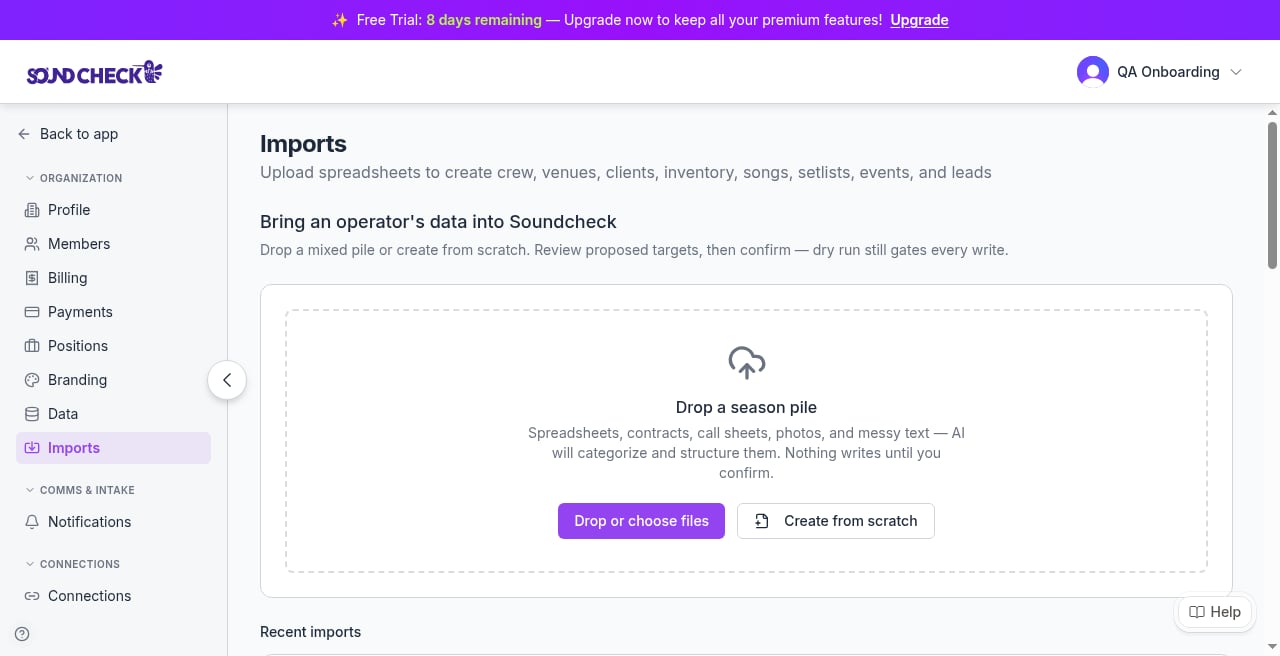
**Planning Center** (PCO) is for churches and houses of worship. You move data by exporting CSVs and dropping them on **Organization → Imports** (sidebar under Organization). There is **no** Planning Center connector: no live sync, no plan ingest, no webcal calendar import. Coming-from is CSV / guided export only.
Empty-state Imports is **drop-first**. Drop files on the empty state; don't lead with pick-target-first. There are **no** in-product "Coming from Planning Center" cards.
**Who can import (web UI):** organization **owner or admin** on the active org, with the `data-import` flag enabled. Prefer in-app target templates when you need a known-good column set.
Shared mapping traps: [Coming from another system](/features/imports/coming-from#mapping-traps-every-source).
Video walkthrough coming. Until it ships, follow the export steps, Soundcheck Frames, and PCO screenshot Tips below.
 ## Who it's for
Worship pastors, music directors, and church ops who already run **Services** and **People** in Planning Center and want the same worship team, songs, and services as gigs in Soundcheck.
## What moves / what doesn't
| In Planning Center | Import target (UI label) | Notes |
| -------------------------------- | --------------------------------------------------- | ------------------------------------------------------------------------------------------------ |
| Services **People** CSV | **Crew** | Primary path (scheduler+). Export the **worship team / roster only** |
| Song **reports** (CSV) | **Songs** | **Date-windowed CCLI / usage reports only**, not a song library or full catalog dump |
| People database export | **Crew** (trap) | Import & Export of the People database can pull the **whole church**. Filter to the worship team |
| Plans / order of service | n/a | **No plan / order-of-service CSV** (print / PDF only) |
| Services calendar (webcal / ICS) | n/a | **Rejected**. Importer accepts `.xlsx` / `.csv` / `.tsv` / `.txt` only |
| Services as shows | **Events** (+ **Setlists** you rebuild after songs) | Rebuild from schedules you keep. Not a drop-in plan file |
Do **not** expect CCLI numbers, charts, or plan order to land as fields. The live spreadsheet **Songs** mapper has **no** CCLI column and **no** `external_id`. Keep those in UEF / coming-from soft notes only.
## Official export steps
Prefer Planning Center's public help host `help.planningcenter.com` (not `support.planningcenter.com`).
### Crew: Services People (worship team)
1. In Planning Center **Services**, open **People**.
2. Export a CSV (scheduler+). This is the roster path.
3. Limit the export to the **worship team / roster**. Do **not** dump the full congregation.
Official help: [Export a CSV file](https://help.planningcenter.com/en/142857-export-a-csv-file.html). Broader export overview: [Export data](https://help.planningcenter.com/en/138570-export-data.html).
Screenshot placeholder: (1) Services → People → Export CSV with the worship-team filter visible. Caption as Planning Center product UI.
### People database (trap: whole church)
**People → Actions → Import & Export CSV** (or download from a list) is a **different** export from Services People. If you Import & Export the People database, you can ingest the **whole church**. Filter to the worship team before you upload, or you'll invite people who aren't on the rotation.
Official help: [Export data](https://help.planningcenter.com/en/138570-export-data.html).
Screenshot placeholder: (2) People → Actions → Import & Export as a **trap contrast** next to the Services People path. Caption clearly so operators don't confuse the two.
### Prepare CSV field names (PCO import template shape)
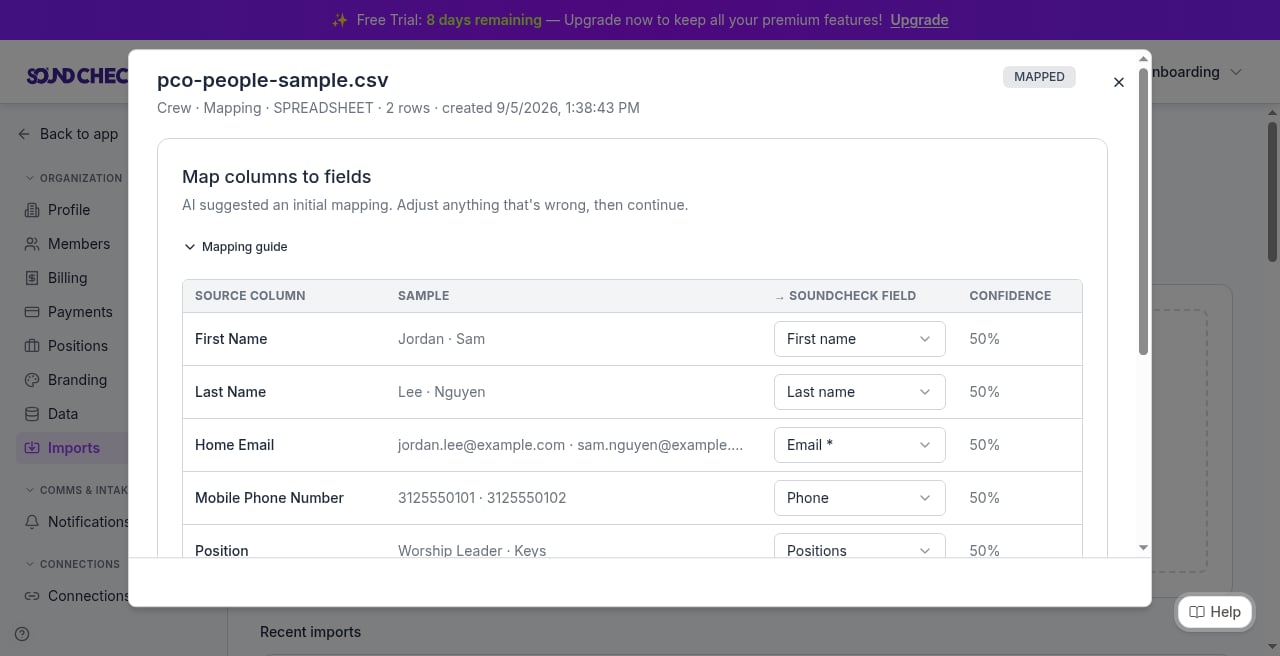
Planning Center documents default CSV field names for **profile data** imports in [Prepare a CSV file for import](https://help.planningcenter.com/en/138557-prepare-a-csv-file-for-import.html). That page requires **First Name** and **Last Name**. Email columns are **Home Email**, **Work Email**, and **Other Email**. Phone columns include **Mobile Phone Number**. Sample sheet: [Import Fields Template](https://docs.google.com/spreadsheets/d/1L-tsoy8ShfkZsQJ4gMorSBSh4uAgMyrfpImaKY8ne_k/edit).
Planning Center's own CSV import is **profile data only**. It isn't a plan, order-of-service, or song-catalog ingest path. Use their field names as a mapping reference when you reshape an export for the **Crew** target.
### Songs: date-windowed CCLI / usage reports
1. Open **Songs**, create a **report**, export CSV.
2. **Widen the date window** to the slice you need. Planning Center song reports are **CCLI / usage reports for a date range**, not a catalog dump.
3. Flatten arrangements into one row per song you want in the repertoire.
4. Rename **Author → Artist** (or map Author to Artist by hand). Heuristics do **not** bind `Author`.
Official help: [Create song reports](https://help.planningcenter.com/en/139390-create-song-reports.html).
Screenshot placeholder: (3) Songs → report builder → CSV with the date window visible. Remind operators that a narrow window means an incomplete repertoire.
### Plans / calendar: will not import as files
* There is **no** plan or order-of-service CSV from any source.
* Planning Center Services calendar is **webcal**. Operators often try ICS/webcal; the importer **rejects** it.
After Crew and Songs are in, rebuild **Setlists** and **Events** (services as gigs) from schedules you already keep, or enter them in the product.
## Recommended zip / sheet layout
If you're packing a season folder before you drop files:
```
season-pco/
01-crew-services-people.csv # worship team only
02-songs-usage-report.csv # widened date window; Author→Artist preferred
03-venues.csv # optional BYO if not in PCO export
04-setlists.csv # rebuild - not from PCO plan
05-events-services.csv # rebuild services as gigs
README.txt # date window used; org name; export date
```
Drop the CSVs on **Organization → Imports**. The empty state accepts files first; review detected targets, then map / preview / commit.
## Field map (source → import targets)
| Planning Center column | Import target / field | Notes |
| ----------------------- | ------------------------ | ---------------------------------------------------------------------------------------------------------------- |
| First Name | Crew first name | Required |
| Last Name | Crew last name | Required |
| **Home Email** | Crew **email** | Map explicitly. Heuristics do **not** bind this |
| **Work Email** | Crew **email** (alt) | Same: map explicitly if Home Email is empty |
| **Other Email** | Crew **email** (alt) | Same: map explicitly |
| **Mobile Phone Number** | Crew **phone** | Map explicitly. Heuristics do **not** bind this header |
| Author | Songs **Artist** | Rename or map. Heuristics do **not** bind `Author` |
| Song title / name | Songs title | From usage report rows |
| CCLI / song id | n/a in live Songs mapper | **Not** offered on the spreadsheet Songs target today. Soft note only (UEF / coming-from); don't invent a column |
| Plan / order of service | n/a | No plan CSV. Rebuild Setlists / Events |
Email is hard-required on **Crew**. Dedup is email. Phone-only rows fail.
## Who it's for
Worship pastors, music directors, and church ops who already run **Services** and **People** in Planning Center and want the same worship team, songs, and services as gigs in Soundcheck.
## What moves / what doesn't
| In Planning Center | Import target (UI label) | Notes |
| -------------------------------- | --------------------------------------------------- | ------------------------------------------------------------------------------------------------ |
| Services **People** CSV | **Crew** | Primary path (scheduler+). Export the **worship team / roster only** |
| Song **reports** (CSV) | **Songs** | **Date-windowed CCLI / usage reports only**, not a song library or full catalog dump |
| People database export | **Crew** (trap) | Import & Export of the People database can pull the **whole church**. Filter to the worship team |
| Plans / order of service | n/a | **No plan / order-of-service CSV** (print / PDF only) |
| Services calendar (webcal / ICS) | n/a | **Rejected**. Importer accepts `.xlsx` / `.csv` / `.tsv` / `.txt` only |
| Services as shows | **Events** (+ **Setlists** you rebuild after songs) | Rebuild from schedules you keep. Not a drop-in plan file |
Do **not** expect CCLI numbers, charts, or plan order to land as fields. The live spreadsheet **Songs** mapper has **no** CCLI column and **no** `external_id`. Keep those in UEF / coming-from soft notes only.
## Official export steps
Prefer Planning Center's public help host `help.planningcenter.com` (not `support.planningcenter.com`).
### Crew: Services People (worship team)
1. In Planning Center **Services**, open **People**.
2. Export a CSV (scheduler+). This is the roster path.
3. Limit the export to the **worship team / roster**. Do **not** dump the full congregation.
Official help: [Export a CSV file](https://help.planningcenter.com/en/142857-export-a-csv-file.html). Broader export overview: [Export data](https://help.planningcenter.com/en/138570-export-data.html).
Screenshot placeholder: (1) Services → People → Export CSV with the worship-team filter visible. Caption as Planning Center product UI.
### People database (trap: whole church)
**People → Actions → Import & Export CSV** (or download from a list) is a **different** export from Services People. If you Import & Export the People database, you can ingest the **whole church**. Filter to the worship team before you upload, or you'll invite people who aren't on the rotation.
Official help: [Export data](https://help.planningcenter.com/en/138570-export-data.html).
Screenshot placeholder: (2) People → Actions → Import & Export as a **trap contrast** next to the Services People path. Caption clearly so operators don't confuse the two.
### Prepare CSV field names (PCO import template shape)
Planning Center documents default CSV field names for **profile data** imports in [Prepare a CSV file for import](https://help.planningcenter.com/en/138557-prepare-a-csv-file-for-import.html). That page requires **First Name** and **Last Name**. Email columns are **Home Email**, **Work Email**, and **Other Email**. Phone columns include **Mobile Phone Number**. Sample sheet: [Import Fields Template](https://docs.google.com/spreadsheets/d/1L-tsoy8ShfkZsQJ4gMorSBSh4uAgMyrfpImaKY8ne_k/edit).
Planning Center's own CSV import is **profile data only**. It isn't a plan, order-of-service, or song-catalog ingest path. Use their field names as a mapping reference when you reshape an export for the **Crew** target.
### Songs: date-windowed CCLI / usage reports
1. Open **Songs**, create a **report**, export CSV.
2. **Widen the date window** to the slice you need. Planning Center song reports are **CCLI / usage reports for a date range**, not a catalog dump.
3. Flatten arrangements into one row per song you want in the repertoire.
4. Rename **Author → Artist** (or map Author to Artist by hand). Heuristics do **not** bind `Author`.
Official help: [Create song reports](https://help.planningcenter.com/en/139390-create-song-reports.html).
Screenshot placeholder: (3) Songs → report builder → CSV with the date window visible. Remind operators that a narrow window means an incomplete repertoire.
### Plans / calendar: will not import as files
* There is **no** plan or order-of-service CSV from any source.
* Planning Center Services calendar is **webcal**. Operators often try ICS/webcal; the importer **rejects** it.
After Crew and Songs are in, rebuild **Setlists** and **Events** (services as gigs) from schedules you already keep, or enter them in the product.
## Recommended zip / sheet layout
If you're packing a season folder before you drop files:
```
season-pco/
01-crew-services-people.csv # worship team only
02-songs-usage-report.csv # widened date window; Author→Artist preferred
03-venues.csv # optional BYO if not in PCO export
04-setlists.csv # rebuild - not from PCO plan
05-events-services.csv # rebuild services as gigs
README.txt # date window used; org name; export date
```
Drop the CSVs on **Organization → Imports**. The empty state accepts files first; review detected targets, then map / preview / commit.
## Field map (source → import targets)
| Planning Center column | Import target / field | Notes |
| ----------------------- | ------------------------ | ---------------------------------------------------------------------------------------------------------------- |
| First Name | Crew first name | Required |
| Last Name | Crew last name | Required |
| **Home Email** | Crew **email** | Map explicitly. Heuristics do **not** bind this |
| **Work Email** | Crew **email** (alt) | Same: map explicitly if Home Email is empty |
| **Other Email** | Crew **email** (alt) | Same: map explicitly |
| **Mobile Phone Number** | Crew **phone** | Map explicitly. Heuristics do **not** bind this header |
| Author | Songs **Artist** | Rename or map. Heuristics do **not** bind `Author` |
| Song title / name | Songs title | From usage report rows |
| CCLI / song id | n/a in live Songs mapper | **Not** offered on the spreadsheet Songs target today. Soft note only (UEF / coming-from); don't invent a column |
| Plan / order of service | n/a | No plan CSV. Rebuild Setlists / Events |
Email is hard-required on **Crew**. Dedup is email. Phone-only rows fail.
 ## Mapping traps
* Target for roster rows is **Crew**.
* Heuristics do not bind Planning Center `Home Email` / `Work Email` / `Other Email` or `Mobile Phone Number`. Map those columns yourself.
* Rename or map **Author → Artist**. Same title + empty artist collapses.
* Song reports remain **date-windowed usage**, not a catalog. There is **no** plan CSV.
* Do not invent a CCLI or song `external_id` column in the live Songs mapper. Those aren't offered there today.
* ICS / webcal is rejected.
Full shared traps: [Coming from another system](/features/imports/coming-from#mapping-traps-every-source).
## Import order
Suggested for houses of worship:
1. **Crew** (Services People: worship team)
2. **Venues** / **Clients** when you have directory sheets (optional BYO)
3. **Songs** (date-windowed report; Author → Artist)
4. **Setlists** (you rebuild; not a PCO plan CSV)
5. **Events** (services as gigs)
Canonical product order: **Crew → Venues → Clients → Songs → Setlists → Events** (Inventory and Leads when you need them).
## Import path
1. Open **Organization → Imports**. Drop files on the empty state (drop-first). Review detected targets (**Crew**, Songs, Setlists, or Events), map columns (especially **Email** / **Artist**), preview, commit.
2. Save a mapping **template** if you'll re-export the same shape.
3. After commit: open **Gigs**, ask people to accept invitations, spot-check Show Prep, re-import once (expect **0 new** rows).
## Mapping traps
* Target for roster rows is **Crew**.
* Heuristics do not bind Planning Center `Home Email` / `Work Email` / `Other Email` or `Mobile Phone Number`. Map those columns yourself.
* Rename or map **Author → Artist**. Same title + empty artist collapses.
* Song reports remain **date-windowed usage**, not a catalog. There is **no** plan CSV.
* Do not invent a CCLI or song `external_id` column in the live Songs mapper. Those aren't offered there today.
* ICS / webcal is rejected.
Full shared traps: [Coming from another system](/features/imports/coming-from#mapping-traps-every-source).
## Import order
Suggested for houses of worship:
1. **Crew** (Services People: worship team)
2. **Venues** / **Clients** when you have directory sheets (optional BYO)
3. **Songs** (date-windowed report; Author → Artist)
4. **Setlists** (you rebuild; not a PCO plan CSV)
5. **Events** (services as gigs)
Canonical product order: **Crew → Venues → Clients → Songs → Setlists → Events** (Inventory and Leads when you need them).
## Import path
1. Open **Organization → Imports**. Drop files on the empty state (drop-first). Review detected targets (**Crew**, Songs, Setlists, or Events), map columns (especially **Email** / **Artist**), preview, commit.
2. Save a mapping **template** if you'll re-export the same shape.
3. After commit: open **Gigs**, ask people to accept invitations, spot-check Show Prep, re-import once (expect **0 new** rows).
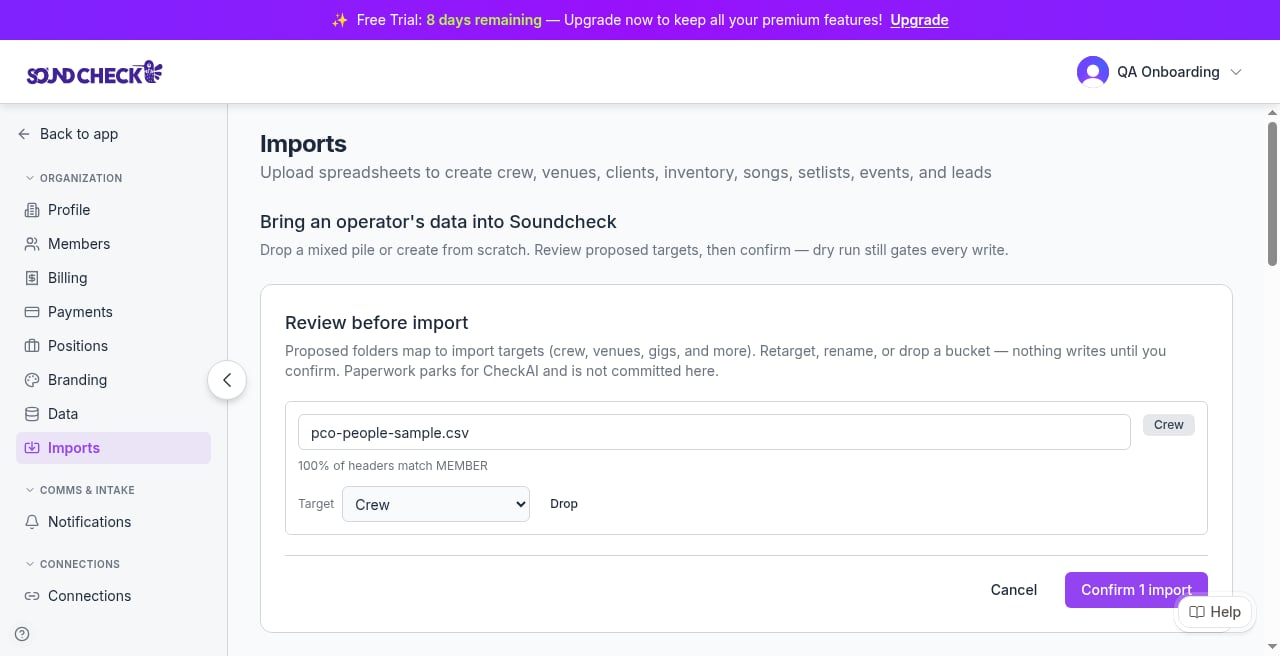
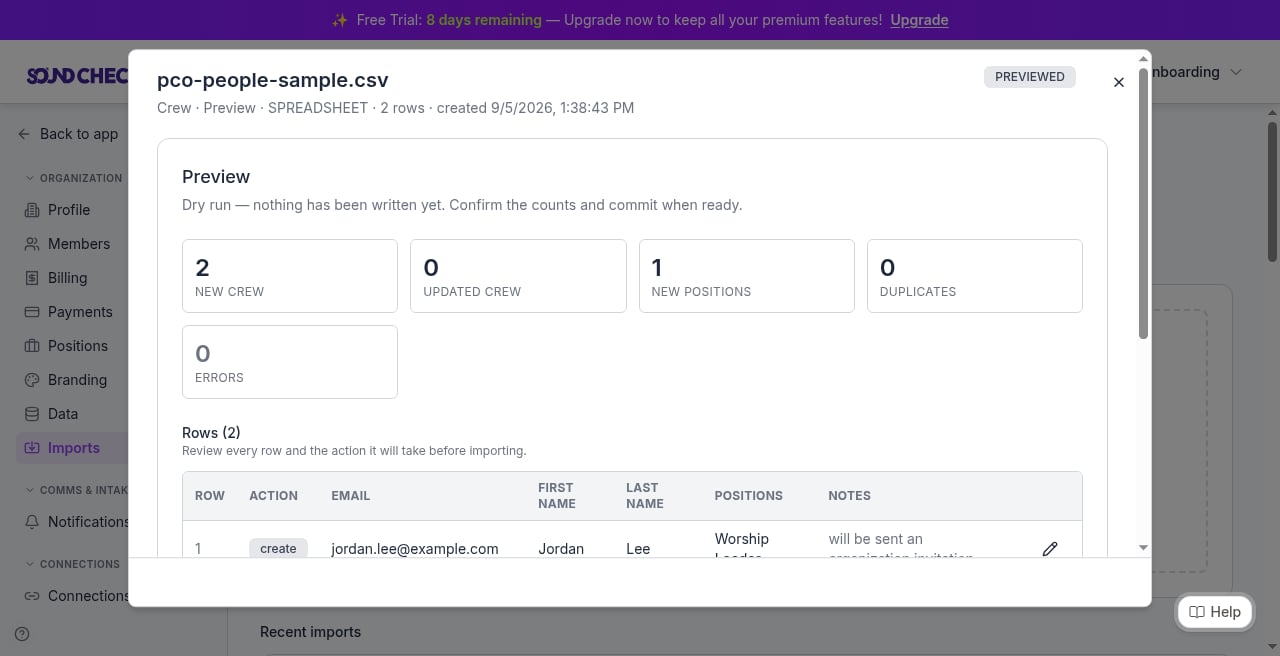 Live chrome is **Organization → Imports**. `/assets?tab=imports` is a route alias to the same Imports page (not an Assets tab in the sidebar). `/imports` redirects only. On some builds, older Settings bookmarks can bounce an owner to `/gigs`; treat that as a product gap, not a docs typo.
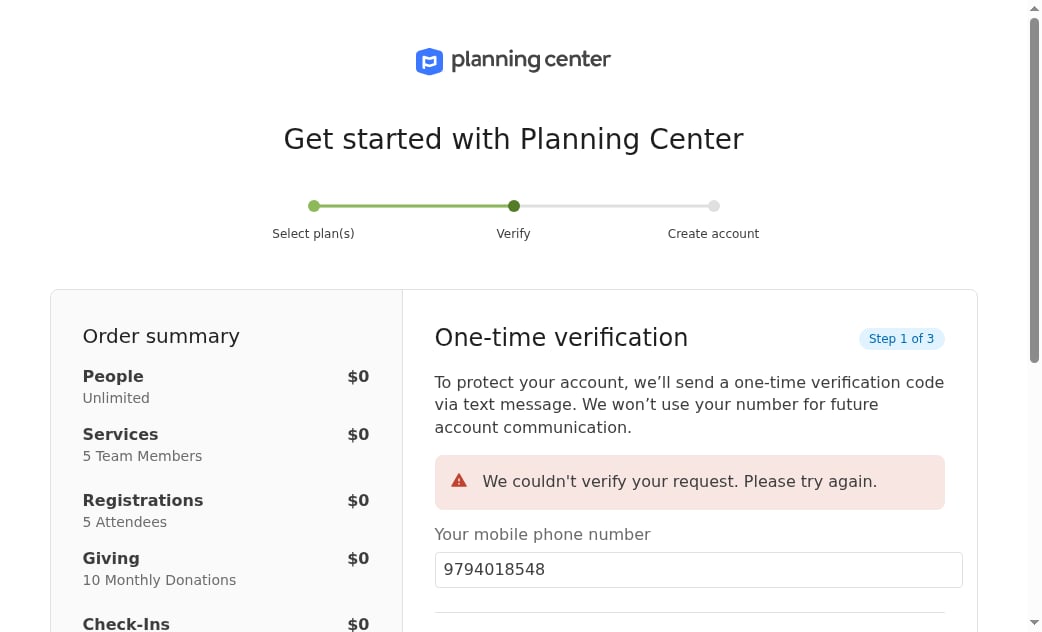
No Google Sheets connector. Follow the official export links above for Services / People / Songs. Signup can stop at **SMS / one-time verification** before you ever reach an org:
Live chrome is **Organization → Imports**. `/assets?tab=imports` is a route alias to the same Imports page (not an Assets tab in the sidebar). `/imports` redirects only. On some builds, older Settings bookmarks can bounce an owner to `/gigs`; treat that as a product gap, not a docs typo.
No Google Sheets connector. Follow the official export links above for Services / People / Songs. Signup can stop at **SMS / one-time verification** before you ever reach an org:
 Partial commit (some rows written when others fail) is shipping via PR **1446** on DEV. Hedge production: until your environment shows it, one bad row can still block the whole file.
Full wizard: [Operator data imports](/features/imports/overview). Season recipe: [Importing your season](/faq/workflows/importing-your-season).
## Practice samples
House-of-worship practice files: `docs/sample-imports/customers/house-of-worship/` (volunteer team, worship songs, service schedule).
Those CSVs use **sample-import headers**, not native Planning Center exports. You still must **map**. That folder has **no setlists file**. Setlists and Events are rebuilds (the service schedule is a sample-shaped events practice file, not a PCO plan dump).
## FAQ
No. Coming-from stays on CSV / guided export into the wizard. No live sync, no OAuth, no plan ingest.
Heuristics only bind `email`, `e-mail`, and `email address`. Map **Home Email**, **Work Email**, or **Other Email** to email yourself.
No. The importer rejects ICS / webcal. Rebuild services as **Events** from a CSV or by hand.
Not into the live spreadsheet Songs mapper. There is no CCLI or song `external_id` column there today. Soft note only.
Use **Services → People** for the worship team. People Import & Export can dump the whole church. Filter before you upload.
## First-week checklist after commit
1. Confirm **Crew** count matches the worship team (not the whole church).
2. Spot-check a few people for email and phone.
3. Confirm **Songs** count matches your widened date window (widen and re-export if the repertoire looks short).
4. Rebuild at least one **Setlist** and one **Event** (service as a gig).
5. Ask people to accept invitations; spot-check Show Prep.
6. Re-import the same Crew / Songs files once (expect **0 new** rows).
7. Save mapping templates for the next season export.
## Related
Hub for Planning Center, Back On Stage, Master Tour, and more
Organization → Imports wizard, targets, and permissions
Partial commit (some rows written when others fail) is shipping via PR **1446** on DEV. Hedge production: until your environment shows it, one bad row can still block the whole file.
Full wizard: [Operator data imports](/features/imports/overview). Season recipe: [Importing your season](/faq/workflows/importing-your-season).
## Practice samples
House-of-worship practice files: `docs/sample-imports/customers/house-of-worship/` (volunteer team, worship songs, service schedule).
Those CSVs use **sample-import headers**, not native Planning Center exports. You still must **map**. That folder has **no setlists file**. Setlists and Events are rebuilds (the service schedule is a sample-shaped events practice file, not a PCO plan dump).
## FAQ
No. Coming-from stays on CSV / guided export into the wizard. No live sync, no OAuth, no plan ingest.
Heuristics only bind `email`, `e-mail`, and `email address`. Map **Home Email**, **Work Email**, or **Other Email** to email yourself.
No. The importer rejects ICS / webcal. Rebuild services as **Events** from a CSV or by hand.
Not into the live spreadsheet Songs mapper. There is no CCLI or song `external_id` column there today. Soft note only.
Use **Services → People** for the worship team. People Import & Export can dump the whole church. Filter before you upload.
## First-week checklist after commit
1. Confirm **Crew** count matches the worship team (not the whole church).
2. Spot-check a few people for email and phone.
3. Confirm **Songs** count matches your widened date window (widen and re-export if the repertoire looks short).
4. Rebuild at least one **Setlist** and one **Event** (service as a gig).
5. Ask people to accept invitations; spot-check Show Prep.
6. Re-import the same Crew / Songs files once (expect **0 new** rows).
7. Save mapping templates for the next season export.
## Related
Hub for Planning Center, Back On Stage, Master Tour, and more
Organization → Imports wizard, targets, and permissions