> ## Documentation Index
> Fetch the complete documentation index at: https://docs.soundchecklive.io/llms.txt
> Use this file to discover all available pages before exploring further.
# Coming from Back On Stage
> Reuse Back On Stage Members and Bookings sheet templates, then import crew, songs, and events
**Back On Stage** (BOS) is for bands and booking leaders. BOS is primarily an **importer** into BOS. There is **no** native export and **no** public API. Operators usually still have the Google Sheet they (or BOS) used to load the product. Export or download that sheet to CSV/XLSX, then import through **Assets → Imports** (`/assets?tab=imports`), or **Settings → Organization → Imports** if your org still shows that entry. There is **no** Back On Stage connector. Coming-from is CSV / guided export only.
Empty-state Imports is **drop-first**. Drop files on the empty state; don't lead with pick-target-first. There are **no** in-product "Coming from Back On Stage" cards.
You can't ingest BOS setlists as files. Booked roles / services / contracts do **not** come across from the Bookings sheet.
**Who can import (web UI):** organization **owner or admin** on the active org, with the `data-import` flag enabled.
Shared mapping traps: [Coming from another system](/features/imports/coming-from#mapping-traps-every-source).
Video walkthrough coming. Until it ships, follow the academy / template steps and screenshot Tips below.
## Who it's for
Band leaders and booking ops who already loaded Members, Bookings, and Songs into Back On Stage (or still have those Google templates) and want the same roster, songs, and bookings as gigs in Soundcheck.
## What moves / what doesn't
| Source | Import target (UI label) | Notes |
| --------------------------- | ------------------------------------------------- | --------------------------------------------------------------------------------------------------------- |
| **Members** sheet | **Crew** | Required: First Name, Last Name, Email. Phone optional (numbers only) |
| **Bookings** (Leader) sheet | **Events** (+ **Venues** / **Clients** as needed) | Required starred fields below; booked roles / services / contracts do **not** come across |
| Songs CSV | **Songs**, then **Setlists** you rebuild | Song Title required; length as **HH:MM:SS or total seconds**; BOS has **no** CCLI field. Don't invent one |
| Expense CSV | n/a | The only real BOS CSV export is **expenses / payouts**, not the gig calendar |
| BOS setlists | n/a | Setlist Builder has **no CSV export**. Rebuild Setlists after Songs |
## Academy / help path (not live BOS product UI)
The frames below are **Back On Stage academy/help** pages only. Caption them that way. An embedded in-app crop inside an academy article is still academy-embedded, not a live product session. Do **not** publish a Google account-picker shot as product UI.
### Templates: Make a Copy → Download CSV
1. Open the Member or Booking Import Template (Google may require an account; not a public link). Spreadsheet IDs below are **unchanged**; Google URLs are **not public**.
2. **File → Make a Copy**, fill required `*` fields, then **File → Download → Comma-Separated Values**.
3. If Google is gated (account picker / invite required), **BYO a sheet** with the same verified headers and download CSV from that.
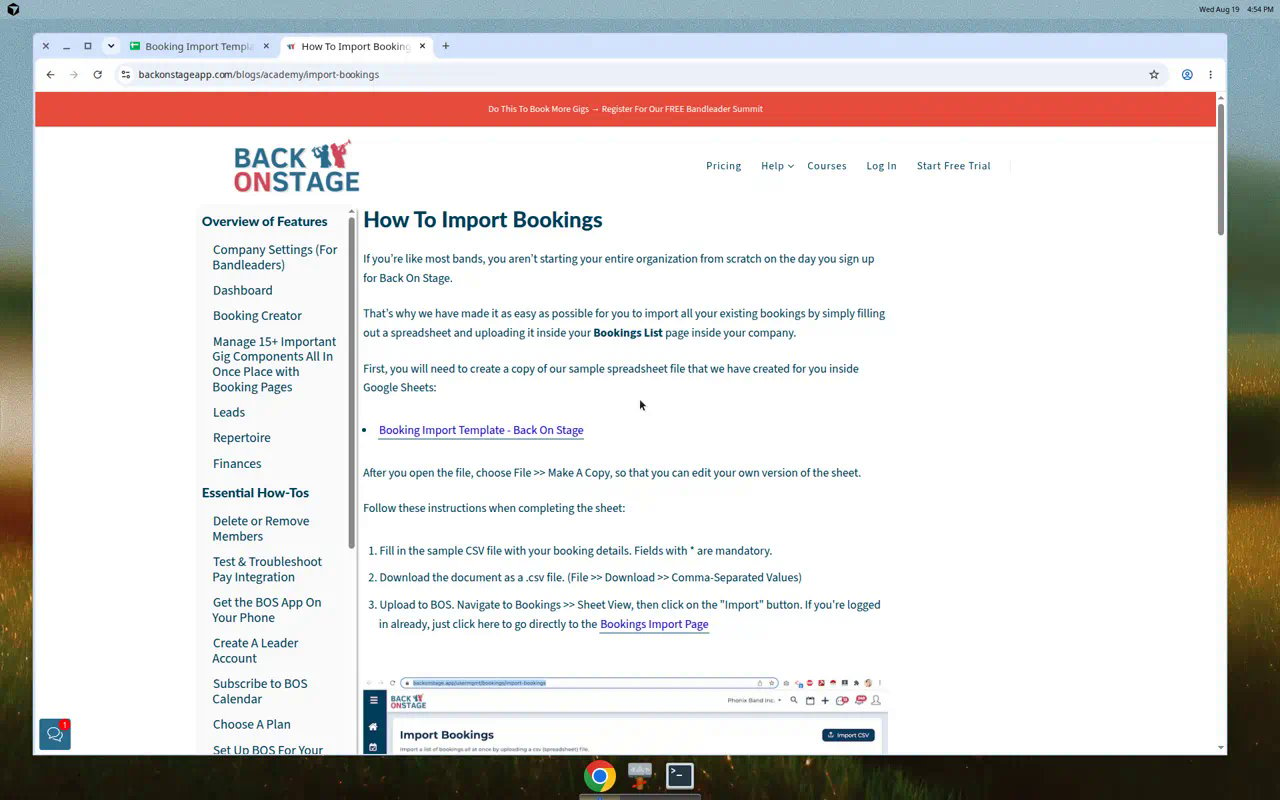
### Bookings: academy import article
In BOS (if still active): **Bookings → Sheet View → Import** (academy crop shows Import Bookings).
Academy still does **not** list booking template columns in prose. It marks required fields with asterisks only. Use the verified htmlview headers below for the column list.
 ### Members: academy bulk upload
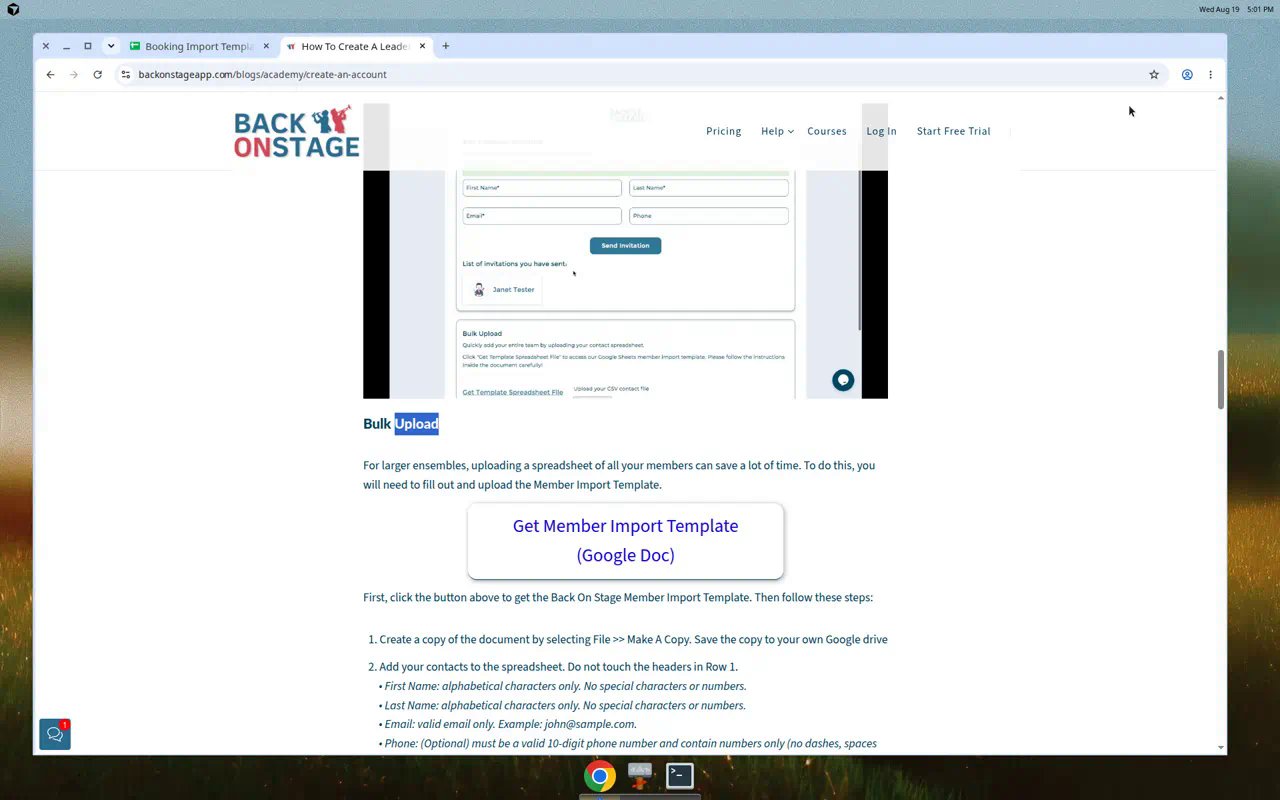
Academy **Bulk Upload** points at **Get Member Import Template (Google Doc)**. **File → Make a Copy**. Do not touch headers in row 1. Google template URLs are **not public** (account picker). BYO the same headers if access is blocked.
### Members: academy bulk upload
Academy **Bulk Upload** points at **Get Member Import Template (Google Doc)**. **File → Make a Copy**. Do not touch headers in row 1. Google template URLs are **not public** (account picker). BYO the same headers if access is blocked.
 ### Songs: academy repertoire CSV
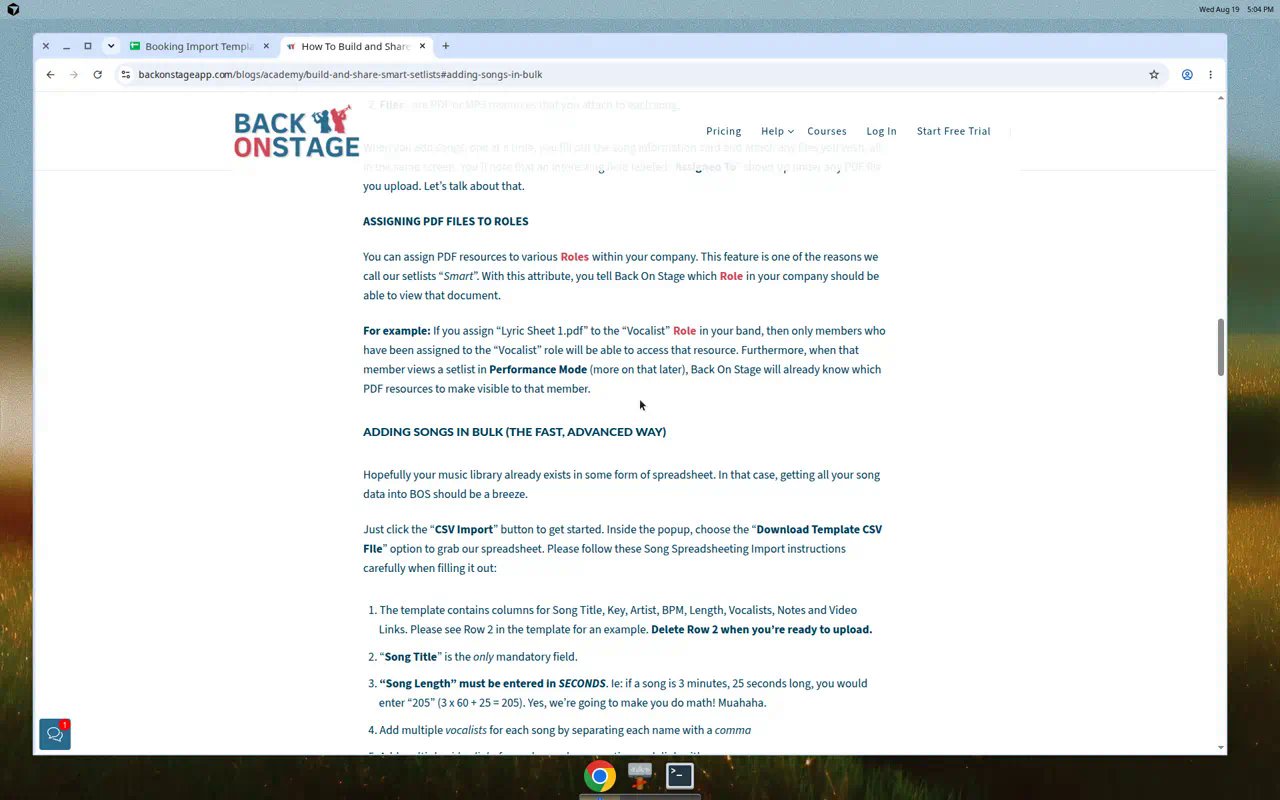
Academy path: Repertoire Manager → CSV Import / Download Template. Song **Length** may be **HH:MM:SS or total seconds** (academy text often shows the seconds example). Setlist Builder has **no CSV export**. Rebuild setlists after songs land. BOS docs don't offer a CCLI field. Don't invent one on the way in.
### Songs: academy repertoire CSV
Academy path: Repertoire Manager → CSV Import / Download Template. Song **Length** may be **HH:MM:SS or total seconds** (academy text often shows the seconds example). Setlist Builder has **no CSV export**. Rebuild setlists after songs land. BOS docs don't offer a CCLI field. Don't invent one on the way in.
 Academy text links:
* [Import bookings](https://backonstageapp.com/blogs/academy/import-bookings)
* [Create an account / bulk upload](https://backonstageapp.com/blogs/academy/create-an-account)
* [Build and share smart setlists](https://backonstageapp.com/blogs/academy/build-and-share-smart-setlists)
## Verified template headers (htmlview)
These headers come from view-only Google Sheets htmlview. Prefer them over earlier notes that said a combined "Location Name & Address" or a duplicate Doors header. Live `docs.google.com` template URLs often hit a **Google account picker**. Treat spreadsheet IDs as reference, not as public customer links. Prefer the sheet you already used to load BOS. If invite/account access is blocked, BYO a sheet with the same headers.
### Members: tab "Member Import Template"
Spreadsheet ID (may require a Google account): `1MC2bvC54ZYZIKAZAdSw9MHSIXINZeAyHe-xrOtUaf3o`
| Column | Required? | Notes |
| ---------- | --------- | ------------------------------------------------------------------- |
| First Name | Yes (`*`) | |
| Last Name | Yes (`*`) | |
| Email | Yes (`*`) | Hard-required for **Crew** import too |
| Phone | No | Header: "Phone (numbers only - no dashes, brackets or punctuation)" |
Map into **Crew**. Skip nothing required; phone-only rows still fail on our side because email is hard-required.
### Bookings Leader: tab "Bookings Import Template (Leader Accounts)"
Spreadsheet ID (may require a Google account): `1IuFY4kRaNDAS9VjOYAU_Leeryj2NPu3rN3S0d7GXWaw`
There is also a **Musician Pro Accounts** bookings tab. This guide covers the **Leader Accounts** template only.
**Required (`*`):**
* Event Date (`yyyy-mm-dd`)
* Event Title
* Client First Name
* Client Email
* Booking Status
**Then (in template order):**
* Client Last Name, Client Phone, Client Company
* Client Address, Client City, Client State/Province, Client Country, Client Zip/Postal
* **Location Name**: a **separate** column (not a combined "Location Name & Address")
* Performance Room, Greenroom, Load-in, SoundCheck, **Doors** (one column, not a duplicate), End Time
* Attire, Meal details, Backline & Production, Parking details
* Notes for musicians, Admin notes (not shared with musicians)
* Accommodation, Check-in time, Check-out time, Accommodation Notes
* Show Description
Also present: Private Event (Enter Yes or No).
## Field map (source → import targets)
| Back On Stage column | Import target / field | Notes | |
| ------------------------------------------------------------------------------------------------------------------------------------ | -------------------------------------------- | --------------------------------------------------------------------------------------------------------- | - |
| First Name / Last Name / Email | **Crew** | Email hard-required | |
| Phone (numbers only) | Crew phone | Reshape punctuation if needed | |
| Event Date / Event Title / Booking Status | **Events** | Required on Leader template | |
| Client First/Last/Email/Phone/Company/address | **Clients** (or metadata) | Prefer a Clients file first when you want directory matches | |
| **Location Name** | Venues `name` / event location | Separate column, not combined with address | |
| **Load-in**, **SoundCheck**, **Doors** | event `schedule_items` (name + `start_time`) | UEF shape. Spreadsheet wizard may still park these in notes/metadata until a `schedule_items` map is live | |
| End Time | event `end_time` (or a schedule item) | | |
| Accommodation\*, Attire, Meal, Parking, Backline & Production, Performance Room, Greenroom, Private Event, Show Description overflow | **metadata** (or notes) | Hospitality extras aren't first-class catalog fields | |
| Notes for musicians | Events `notes` | When the mapper offers them | |
| Admin notes | Events `admin_notes` | When the mapper offers them | |
| Song Title / Artist / Length | **Songs** | Length: HH:MM:SS or total seconds. No CCLI | |
| Booked roles / services / contracts | n/a | Defer. Do not invent | |
| Setlists | rebuild | No BOS CSV export | |
If the live spreadsheet mapper doesn't offer `schedule_items` yet, park Load-in / SoundCheck / Doors in notes or metadata rather than inventing columns. Don't promise rundown as a drop-in via the CSV wizard alone.
Screenshot placeholder: Soundcheck Assets → Imports map with **Location Name → venue** and **Load-in / SoundCheck / Doors → schedule\_items** (or notes/metadata if schedule\_items isn't offered yet). Drop-first empty state.
There is **no Google Sheets connector**. Export or download the sheet to CSV/XLSX (`.xlsx` / `.csv` / `.tsv` / `.txt` only; ICS/webcal is rejected), then drop or paste in **Assets → Imports**.
## Recommended zip / sheet layout
```
season-bos/
01-crew-members.csv
02-songs.csv
03-venues.csv # optional extract from Location Name
04-clients.csv # optional extract from Client*
05-events-bookings.csv # Leader Bookings template shape
06-setlists.csv # rebuild after songs
README.txt
```
Drop the CSVs on **Assets → Imports**. Load order: **Crew → Venues → Clients → Songs → Setlists → Events**.
## Mapping traps
* BOS Phone on the Members template is **numbers only** (no dashes, brackets, or punctuation). Reshape if needed before map.
* Song length: **HH:MM:SS or total seconds**.
* Do not invent CCLI. BOS has no CCLI field in the docs, and the live Songs mapper has no CCLI column either.
* Do not promise booked-roles, charts, or plan order coming across.
* Practice / sample CSVs under `docs/sample-imports/` use **sample-import headers**. You must still map BOS columns.
Full shared traps: [Coming from another system](/features/imports/coming-from#mapping-traps-every-source).
## Import order
1. **Crew** (Members)
2. **Venues** / **Clients** when you want directory matches from Location Name / Client\*
3. **Songs** (then **Setlists** you rebuild; BOS Setlist Builder has no CSV export)
4. **Events** (Bookings Leader)
Canonical product order: **Crew → Venues → Clients → Songs → Setlists → Events** (Inventory and Leads when you need them).
## Import path
1. Open **Assets → Imports** (`/assets?tab=imports`), or **Settings → Organization → Imports** if your org still shows that entry. Drop or paste files on the empty state (drop-first). Review detected targets, map columns, preview, commit.
2. Crew need **email** (hard-required). Save a mapping template for the BOS sheet shape.
3. After commit: open **Gigs**, ask people to accept invitations, spot-check venues / clients / Show Prep, re-import once (expect **0 new** rows).
Prefer **Assets → Imports** (`/assets?tab=imports`). Use **Settings → Organization → Imports** only if your org still shows that entry. `/imports` is a redirect only.
Partial commit (some rows written when others fail) is shipping via PR **1446** on DEV. Hedge production: until your environment shows it, one bad row can still block the whole file.
Full wizard: [Operator data imports](/features/imports/overview). Season recipe: [Importing your season](/faq/workflows/importing-your-season).
## FAQ
No. BOS has no public API. Coming-from stays on CSV / guided export into the wizard. No fake OAuth.
Template URLs aren't public. Use **File → Make a Copy** when you have access, or BYO a sheet with the verified htmlview headers and download CSV.
Prefer event `schedule_items` (UEF shape). If the live spreadsheet wizard doesn't offer that map yet, park them in notes or metadata. Don't invent columns.
No. Defer booked roles / services / contracts. Rebuild staffing in Soundcheck after Events land.
Setlist Builder has no CSV export. Import Songs, then rebuild Setlists.
## First-week checklist after commit
1. Confirm **Crew** emails look right (phone-only rows should have failed).
2. Spot-check **Venues** / **Clients** from Location Name and Client\* fields.
3. Confirm **Songs** lengths parse (HH:MM:SS or seconds).
4. Rebuild at least one **Setlist**.
5. Open a sample **Event** and check Load-in / SoundCheck / Doors (schedule\_items or notes/metadata).
6. Ask people to accept invitations; spot-check Show Prep.
7. Re-import the same files once (expect **0 new** rows).
8. Save mapping templates for the BOS sheet shape.
## Related
Hub for Planning Center, Back On Stage, Master Tour, and more
Assets → Imports wizard, targets, and permissions
Academy text links:
* [Import bookings](https://backonstageapp.com/blogs/academy/import-bookings)
* [Create an account / bulk upload](https://backonstageapp.com/blogs/academy/create-an-account)
* [Build and share smart setlists](https://backonstageapp.com/blogs/academy/build-and-share-smart-setlists)
## Verified template headers (htmlview)
These headers come from view-only Google Sheets htmlview. Prefer them over earlier notes that said a combined "Location Name & Address" or a duplicate Doors header. Live `docs.google.com` template URLs often hit a **Google account picker**. Treat spreadsheet IDs as reference, not as public customer links. Prefer the sheet you already used to load BOS. If invite/account access is blocked, BYO a sheet with the same headers.
### Members: tab "Member Import Template"
Spreadsheet ID (may require a Google account): `1MC2bvC54ZYZIKAZAdSw9MHSIXINZeAyHe-xrOtUaf3o`
| Column | Required? | Notes |
| ---------- | --------- | ------------------------------------------------------------------- |
| First Name | Yes (`*`) | |
| Last Name | Yes (`*`) | |
| Email | Yes (`*`) | Hard-required for **Crew** import too |
| Phone | No | Header: "Phone (numbers only - no dashes, brackets or punctuation)" |
Map into **Crew**. Skip nothing required; phone-only rows still fail on our side because email is hard-required.
### Bookings Leader: tab "Bookings Import Template (Leader Accounts)"
Spreadsheet ID (may require a Google account): `1IuFY4kRaNDAS9VjOYAU_Leeryj2NPu3rN3S0d7GXWaw`
There is also a **Musician Pro Accounts** bookings tab. This guide covers the **Leader Accounts** template only.
**Required (`*`):**
* Event Date (`yyyy-mm-dd`)
* Event Title
* Client First Name
* Client Email
* Booking Status
**Then (in template order):**
* Client Last Name, Client Phone, Client Company
* Client Address, Client City, Client State/Province, Client Country, Client Zip/Postal
* **Location Name**: a **separate** column (not a combined "Location Name & Address")
* Performance Room, Greenroom, Load-in, SoundCheck, **Doors** (one column, not a duplicate), End Time
* Attire, Meal details, Backline & Production, Parking details
* Notes for musicians, Admin notes (not shared with musicians)
* Accommodation, Check-in time, Check-out time, Accommodation Notes
* Show Description
Also present: Private Event (Enter Yes or No).
## Field map (source → import targets)
| Back On Stage column | Import target / field | Notes | |
| ------------------------------------------------------------------------------------------------------------------------------------ | -------------------------------------------- | --------------------------------------------------------------------------------------------------------- | - |
| First Name / Last Name / Email | **Crew** | Email hard-required | |
| Phone (numbers only) | Crew phone | Reshape punctuation if needed | |
| Event Date / Event Title / Booking Status | **Events** | Required on Leader template | |
| Client First/Last/Email/Phone/Company/address | **Clients** (or metadata) | Prefer a Clients file first when you want directory matches | |
| **Location Name** | Venues `name` / event location | Separate column, not combined with address | |
| **Load-in**, **SoundCheck**, **Doors** | event `schedule_items` (name + `start_time`) | UEF shape. Spreadsheet wizard may still park these in notes/metadata until a `schedule_items` map is live | |
| End Time | event `end_time` (or a schedule item) | | |
| Accommodation\*, Attire, Meal, Parking, Backline & Production, Performance Room, Greenroom, Private Event, Show Description overflow | **metadata** (or notes) | Hospitality extras aren't first-class catalog fields | |
| Notes for musicians | Events `notes` | When the mapper offers them | |
| Admin notes | Events `admin_notes` | When the mapper offers them | |
| Song Title / Artist / Length | **Songs** | Length: HH:MM:SS or total seconds. No CCLI | |
| Booked roles / services / contracts | n/a | Defer. Do not invent | |
| Setlists | rebuild | No BOS CSV export | |
If the live spreadsheet mapper doesn't offer `schedule_items` yet, park Load-in / SoundCheck / Doors in notes or metadata rather than inventing columns. Don't promise rundown as a drop-in via the CSV wizard alone.
Screenshot placeholder: Soundcheck Assets → Imports map with **Location Name → venue** and **Load-in / SoundCheck / Doors → schedule\_items** (or notes/metadata if schedule\_items isn't offered yet). Drop-first empty state.
There is **no Google Sheets connector**. Export or download the sheet to CSV/XLSX (`.xlsx` / `.csv` / `.tsv` / `.txt` only; ICS/webcal is rejected), then drop or paste in **Assets → Imports**.
## Recommended zip / sheet layout
```
season-bos/
01-crew-members.csv
02-songs.csv
03-venues.csv # optional extract from Location Name
04-clients.csv # optional extract from Client*
05-events-bookings.csv # Leader Bookings template shape
06-setlists.csv # rebuild after songs
README.txt
```
Drop the CSVs on **Assets → Imports**. Load order: **Crew → Venues → Clients → Songs → Setlists → Events**.
## Mapping traps
* BOS Phone on the Members template is **numbers only** (no dashes, brackets, or punctuation). Reshape if needed before map.
* Song length: **HH:MM:SS or total seconds**.
* Do not invent CCLI. BOS has no CCLI field in the docs, and the live Songs mapper has no CCLI column either.
* Do not promise booked-roles, charts, or plan order coming across.
* Practice / sample CSVs under `docs/sample-imports/` use **sample-import headers**. You must still map BOS columns.
Full shared traps: [Coming from another system](/features/imports/coming-from#mapping-traps-every-source).
## Import order
1. **Crew** (Members)
2. **Venues** / **Clients** when you want directory matches from Location Name / Client\*
3. **Songs** (then **Setlists** you rebuild; BOS Setlist Builder has no CSV export)
4. **Events** (Bookings Leader)
Canonical product order: **Crew → Venues → Clients → Songs → Setlists → Events** (Inventory and Leads when you need them).
## Import path
1. Open **Assets → Imports** (`/assets?tab=imports`), or **Settings → Organization → Imports** if your org still shows that entry. Drop or paste files on the empty state (drop-first). Review detected targets, map columns, preview, commit.
2. Crew need **email** (hard-required). Save a mapping template for the BOS sheet shape.
3. After commit: open **Gigs**, ask people to accept invitations, spot-check venues / clients / Show Prep, re-import once (expect **0 new** rows).
Prefer **Assets → Imports** (`/assets?tab=imports`). Use **Settings → Organization → Imports** only if your org still shows that entry. `/imports` is a redirect only.
Partial commit (some rows written when others fail) is shipping via PR **1446** on DEV. Hedge production: until your environment shows it, one bad row can still block the whole file.
Full wizard: [Operator data imports](/features/imports/overview). Season recipe: [Importing your season](/faq/workflows/importing-your-season).
## FAQ
No. BOS has no public API. Coming-from stays on CSV / guided export into the wizard. No fake OAuth.
Template URLs aren't public. Use **File → Make a Copy** when you have access, or BYO a sheet with the verified htmlview headers and download CSV.
Prefer event `schedule_items` (UEF shape). If the live spreadsheet wizard doesn't offer that map yet, park them in notes or metadata. Don't invent columns.
No. Defer booked roles / services / contracts. Rebuild staffing in Soundcheck after Events land.
Setlist Builder has no CSV export. Import Songs, then rebuild Setlists.
## First-week checklist after commit
1. Confirm **Crew** emails look right (phone-only rows should have failed).
2. Spot-check **Venues** / **Clients** from Location Name and Client\* fields.
3. Confirm **Songs** lengths parse (HH:MM:SS or seconds).
4. Rebuild at least one **Setlist**.
5. Open a sample **Event** and check Load-in / SoundCheck / Doors (schedule\_items or notes/metadata).
6. Ask people to accept invitations; spot-check Show Prep.
7. Re-import the same files once (expect **0 new** rows).
8. Save mapping templates for the BOS sheet shape.
## Related
Hub for Planning Center, Back On Stage, Master Tour, and more
Assets → Imports wizard, targets, and permissions