> ## Documentation Index
> Fetch the complete documentation index at: https://docs.soundchecklive.io/llms.txt
> Use this file to discover all available pages before exploring further.
# Gig management overview
> The Gigs board, the tabbed gig detail, and the full lifecycle — how you advance, staff, and settle every show your team runs.
Gigs are the heart of Soundcheck. Whether you call them events, shows, or performances, a **gig** is the central record for one engagement — when and where it is, who's playing, who's working, what's on the schedule, and what's owed. This page is the map: the board you manage gigs from, the tabbed detail inside each one, and the lifecycle they move through.
 ## The Gigs board
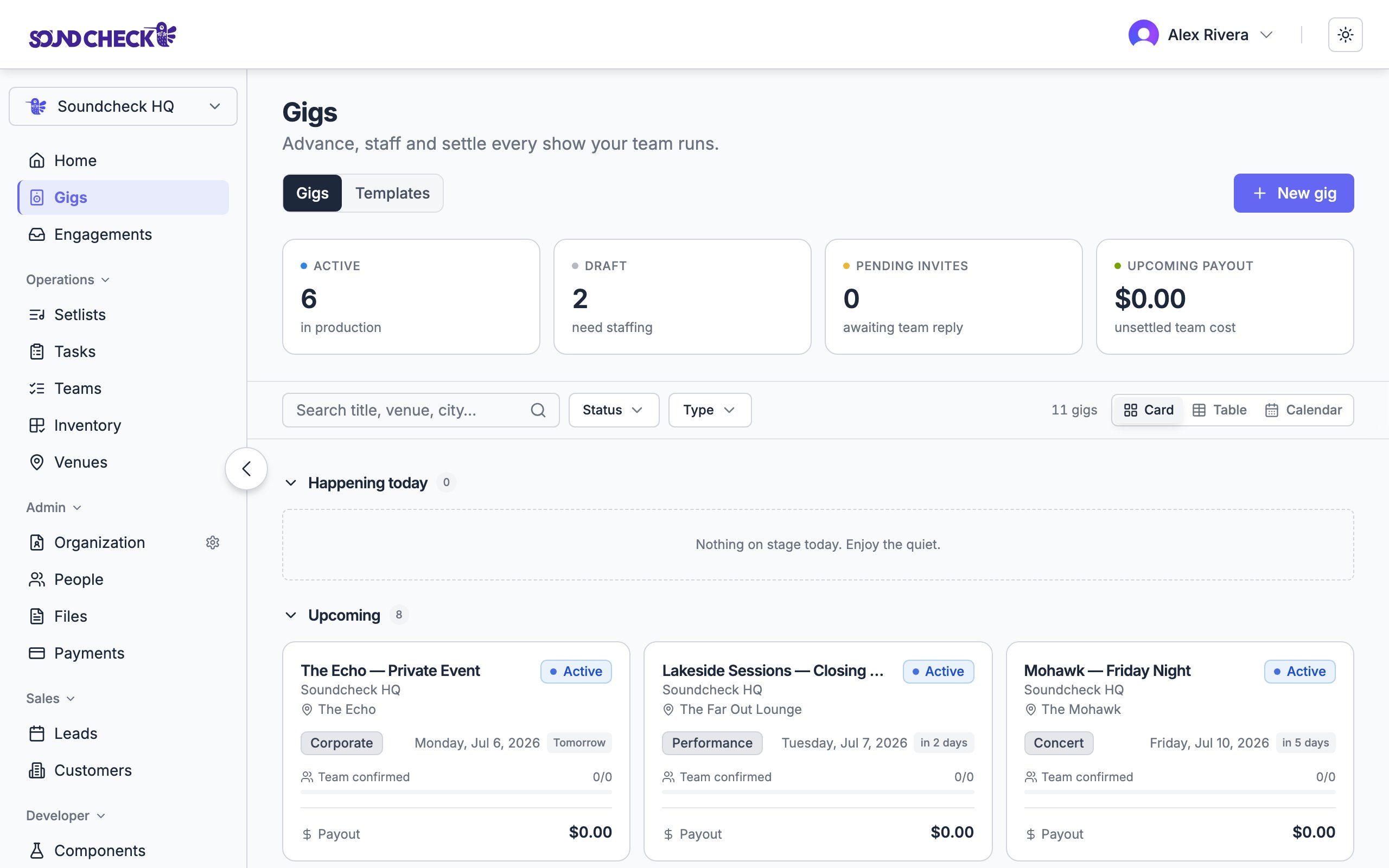
The **Gigs** board is where every show lives. Across the top, four **stat tiles** give you the state of your operation at a glance:
| Tile | Shows |
| ------------------- | --------------------------------------------------------------------------------- |
| **Active** | Gigs in production. |
| **Draft** | Gigs that still need staffing. |
| **Pending invites** | Crew replies you're still waiting on. |
| **Upcoming payout** | Unsettled team cost ahead. (Crew see **Upcoming pay** — their own unsettled pay.) |
Below the tiles, a **sticky filter bar** keeps search and filters in reach as you scroll:
* **Search** — match on title, venue, or city (*"Search title, venue, city…"*)
* **Status** filter — Draft, Active, Completed, Settled, Cancelled
* **Type** filter — by event type
* A running **result count**
### Three ways to view
A **view switcher** on the filter bar toggles how gigs are laid out:
Gigs as cards, split into **Happening today**, **Upcoming**, and **Past** sections — each independently paginated so a long history never buries what's next. [Tours](/features/gigs/tours) appear as folders at the top of this view.
A dense, sortable table — **Gig, Type, Date, Venue, Confirmed, Payout, Status** — for scanning many gigs at once.
Your gigs on a calendar for a schedule-first view of the month.
### What a gig card shows
Each card carries the essentials: **title**, organization, and **venue**; a **status pill** and **type**; the **date** (a range for [multi-day gigs](/features/gigs/creating-gigs#multi-day-gigs)); and a relative-day chip (**Today**, *Tomorrow*, *in 3 days*, *2d ago*). What's below depends on your role — managers see a **Team confirmed** progress bar (filled positions vs. total) and the gig's **payout** total; crew see their position and **their pay**.
## The gig detail
Open any gig to work it. The detail page is organized into **tabs**:
| Tab | What it holds |
| ------------- | ---------------------------------------------------------------------------------------------------------------------------------------------------------- |
| **Details** | The core record — plus the pinned [Run of Show](/features/gigs/run-of-show), the day-of timeline, attachments, notes, the setlist, location, and the team. |
| **Tasks** | The gig's checklist of what has to happen before the show. |
| **Venue** | The venue record and per-show logistics — load-in, parking, access. |
| **Inventory** | Gear and resources for the gig. |
| **Files** | Documents on the gig (where AI file ingestion is enabled). |
| **Finances** | Payables and [payouts](/features/gigs/payments). (Crew see **My Expenses** — their own.) |
| **Clients** | Customers and sponsors tied to the gig. |
| **Activity** | The gig's audit log of who changed what. |
| **Closeout** | The post-event [checklist and reviews](/features/gigs/closeout). |
Tabs appear based on your role and your organization's enabled features — a coordinator staffing a gig sees a different set than an owner closing one out. The older single **Resources** tab has been split into the dedicated **Venue**, **Clients**, and **Inventory** tabs.
The **Details** tab is the heart of it: the [Run of Show](/features/gigs/run-of-show) sits pinned at the top, and the other sections — timeline, attachments, notes, setlist, location, and team — can be rearranged to suit how you work.
## The lifecycle
Every gig moves through a small set of states. Most follow **Draft → Active → Completed → Settled**; two off-path states, **Cancelled** and **Archived**, cover the gigs that don't go the distance; and **Template** holds reusable structures.
```mermaid theme={null}
stateDiagram-v2
[*] --> DRAFT: Create as draft / use template
[*] --> ACTIVE: Create active gig
DRAFT --> ACTIVE: Set to Active
ACTIVE --> COMPLETED: Automatic after the date
COMPLETED --> SETTLED: Mark settled (gated)
DRAFT --> CANCELLED: Cancel gig
ACTIVE --> CANCELLED: Cancel gig
```
* **Draft** — still being prepared; sends nothing on its own. [Publish it](/features/gigs/draft-publish) to go live.
* **Active** — live for staffing, notifications, and operations.
* **Completed** — automatic once the event date passes; moves the gig into [closeout](/features/gigs/closeout).
* **Settled** — every payout has cleared and the gig is closed on the books.
* **Cancelled** — the gig was called off (from Draft or Active); never gated by close-out.
* **Archived** — a legacy filing state for delivered gigs.
The full state list, the transition matrix, and what gates settling.
## What you do with a gig
Name and date to start; venue and the rest come later.
Staff org positions with invitations or crew offers.
Lay out the show flow, timeline, and files.
Pay crew by direct deposit or card from Finances.
Fold related gigs into a folder with rolled-up finances.
Work the checklist, settle, and capture reviews.
## Web vs. mobile
Both surfaces show the same gig data. The build-and-configure work lives best on the web; the in-the-moment work lives on mobile.
| Action | Web | Mobile |
| --------------------------------- | --------- | -------------------------- |
| Create a gig | Full form | Light — title, date, venue |
| Build a team / staffing | Full | Read + respond |
| Edit Run of Show, timeline, files | Full | Read; light edits |
| Read tonight's setlist | Yes | Yes (cached for offline) |
| Chat with the team | Yes | Yes — native push |
| Send payouts | Yes | — |
See [Mobile app overview](/features/mobile/overview) for the full parity table, and [Chat](/features/chat/overview) for the per-gig threads on every gig.
## Who can manage gigs
| Action | Owner | Admin | Gig Coordinator | Member |
| ---------------------- | :---: | :---: | :-------------: | :----------: |
| View gigs | ✓ | ✓ | ✓ | Invited only |
| Create / edit gigs | ✓ | ✓ | ✓ | — |
| Staff the team | ✓ | ✓ | ✓ | — |
| Send payouts & settle | ✓ | ✓ | — | — |
| Respond to invitations | ✓ | ✓ | ✓ | ✓ |
Gig coordinators run the operational side — creating, staffing, and scheduling — without payout or P\&L access, which stays with owners and admins.
## Related guides
Reuse repeatable gig structures.
Prepare gigs before they go live.
## Related reading
How Soundcheck is redefining live music operations.
Why coordinating gigs through Soundcheck builds verified reputation.
## The Gigs board
The **Gigs** board is where every show lives. Across the top, four **stat tiles** give you the state of your operation at a glance:
| Tile | Shows |
| ------------------- | --------------------------------------------------------------------------------- |
| **Active** | Gigs in production. |
| **Draft** | Gigs that still need staffing. |
| **Pending invites** | Crew replies you're still waiting on. |
| **Upcoming payout** | Unsettled team cost ahead. (Crew see **Upcoming pay** — their own unsettled pay.) |
Below the tiles, a **sticky filter bar** keeps search and filters in reach as you scroll:
* **Search** — match on title, venue, or city (*"Search title, venue, city…"*)
* **Status** filter — Draft, Active, Completed, Settled, Cancelled
* **Type** filter — by event type
* A running **result count**
### Three ways to view
A **view switcher** on the filter bar toggles how gigs are laid out:
Gigs as cards, split into **Happening today**, **Upcoming**, and **Past** sections — each independently paginated so a long history never buries what's next. [Tours](/features/gigs/tours) appear as folders at the top of this view.
A dense, sortable table — **Gig, Type, Date, Venue, Confirmed, Payout, Status** — for scanning many gigs at once.
Your gigs on a calendar for a schedule-first view of the month.
### What a gig card shows
Each card carries the essentials: **title**, organization, and **venue**; a **status pill** and **type**; the **date** (a range for [multi-day gigs](/features/gigs/creating-gigs#multi-day-gigs)); and a relative-day chip (**Today**, *Tomorrow*, *in 3 days*, *2d ago*). What's below depends on your role — managers see a **Team confirmed** progress bar (filled positions vs. total) and the gig's **payout** total; crew see their position and **their pay**.
## The gig detail
Open any gig to work it. The detail page is organized into **tabs**:
| Tab | What it holds |
| ------------- | ---------------------------------------------------------------------------------------------------------------------------------------------------------- |
| **Details** | The core record — plus the pinned [Run of Show](/features/gigs/run-of-show), the day-of timeline, attachments, notes, the setlist, location, and the team. |
| **Tasks** | The gig's checklist of what has to happen before the show. |
| **Venue** | The venue record and per-show logistics — load-in, parking, access. |
| **Inventory** | Gear and resources for the gig. |
| **Files** | Documents on the gig (where AI file ingestion is enabled). |
| **Finances** | Payables and [payouts](/features/gigs/payments). (Crew see **My Expenses** — their own.) |
| **Clients** | Customers and sponsors tied to the gig. |
| **Activity** | The gig's audit log of who changed what. |
| **Closeout** | The post-event [checklist and reviews](/features/gigs/closeout). |
Tabs appear based on your role and your organization's enabled features — a coordinator staffing a gig sees a different set than an owner closing one out. The older single **Resources** tab has been split into the dedicated **Venue**, **Clients**, and **Inventory** tabs.
The **Details** tab is the heart of it: the [Run of Show](/features/gigs/run-of-show) sits pinned at the top, and the other sections — timeline, attachments, notes, setlist, location, and team — can be rearranged to suit how you work.
## The lifecycle
Every gig moves through a small set of states. Most follow **Draft → Active → Completed → Settled**; two off-path states, **Cancelled** and **Archived**, cover the gigs that don't go the distance; and **Template** holds reusable structures.
```mermaid theme={null}
stateDiagram-v2
[*] --> DRAFT: Create as draft / use template
[*] --> ACTIVE: Create active gig
DRAFT --> ACTIVE: Set to Active
ACTIVE --> COMPLETED: Automatic after the date
COMPLETED --> SETTLED: Mark settled (gated)
DRAFT --> CANCELLED: Cancel gig
ACTIVE --> CANCELLED: Cancel gig
```
* **Draft** — still being prepared; sends nothing on its own. [Publish it](/features/gigs/draft-publish) to go live.
* **Active** — live for staffing, notifications, and operations.
* **Completed** — automatic once the event date passes; moves the gig into [closeout](/features/gigs/closeout).
* **Settled** — every payout has cleared and the gig is closed on the books.
* **Cancelled** — the gig was called off (from Draft or Active); never gated by close-out.
* **Archived** — a legacy filing state for delivered gigs.
The full state list, the transition matrix, and what gates settling.
## What you do with a gig
Name and date to start; venue and the rest come later.
Staff org positions with invitations or crew offers.
Lay out the show flow, timeline, and files.
Pay crew by direct deposit or card from Finances.
Fold related gigs into a folder with rolled-up finances.
Work the checklist, settle, and capture reviews.
## Web vs. mobile
Both surfaces show the same gig data. The build-and-configure work lives best on the web; the in-the-moment work lives on mobile.
| Action | Web | Mobile |
| --------------------------------- | --------- | -------------------------- |
| Create a gig | Full form | Light — title, date, venue |
| Build a team / staffing | Full | Read + respond |
| Edit Run of Show, timeline, files | Full | Read; light edits |
| Read tonight's setlist | Yes | Yes (cached for offline) |
| Chat with the team | Yes | Yes — native push |
| Send payouts | Yes | — |
See [Mobile app overview](/features/mobile/overview) for the full parity table, and [Chat](/features/chat/overview) for the per-gig threads on every gig.
## Who can manage gigs
| Action | Owner | Admin | Gig Coordinator | Member |
| ---------------------- | :---: | :---: | :-------------: | :----------: |
| View gigs | ✓ | ✓ | ✓ | Invited only |
| Create / edit gigs | ✓ | ✓ | ✓ | — |
| Staff the team | ✓ | ✓ | ✓ | — |
| Send payouts & settle | ✓ | ✓ | — | — |
| Respond to invitations | ✓ | ✓ | ✓ | ✓ |
Gig coordinators run the operational side — creating, staffing, and scheduling — without payout or P\&L access, which stays with owners and admins.
## Related guides
Reuse repeatable gig structures.
Prepare gigs before they go live.
## Related reading
How Soundcheck is redefining live music operations.
Why coordinating gigs through Soundcheck builds verified reputation.